Google Sheet sync to Google Calendar using personal account
Status: Open · Asked by Eileen Chieng on · 0 views
Hi i'm getting error message in creating an event in Google calendar.
Step 1 - the tool extension has been added onto Google sheet.
Step 2 - the test data is not sending thru
please help. thanks
This is my workflow
https://connect.pabbly.com/workflow/mapping/IjU3NjYwNTZhMDYzNjA0MzQ1MjZjNTUzMTUxMzIi_pc
Hello @TER,
Thank you for sharing the details.
Upon checking, the issue appears to be with the date that’s being mapped in the action step, it isn't in the required format. We attempted to format it correctly using the Date/Time Formatter, but the date received from the trigger lacks complete information, particularly the year, which is resulting in an incorrect date being generated.
Could you please ensure that the date from the trigger is either in the format 2020-04-28T09:30:00Z (YYYY-MM-DDTHH:mm:ss[Z]) or includes the full date and time details? This will allow us to assist you more effectively.
Looking forward to your response.
hi i've update the format as suggested.
ALso including the T and Z as per your sample text but its still an error
question,
i have headers, date - start, date - end and remarks
And the column of of the dates are already pre-filled. & when one of the cells under remarks. are added.
Only at this point i want a calander event to be created.
What setup would you suggest?
The date you were trying to map had a space after the year. We've removed that space from both the Start and End dates, and it seems to have resolved the issue.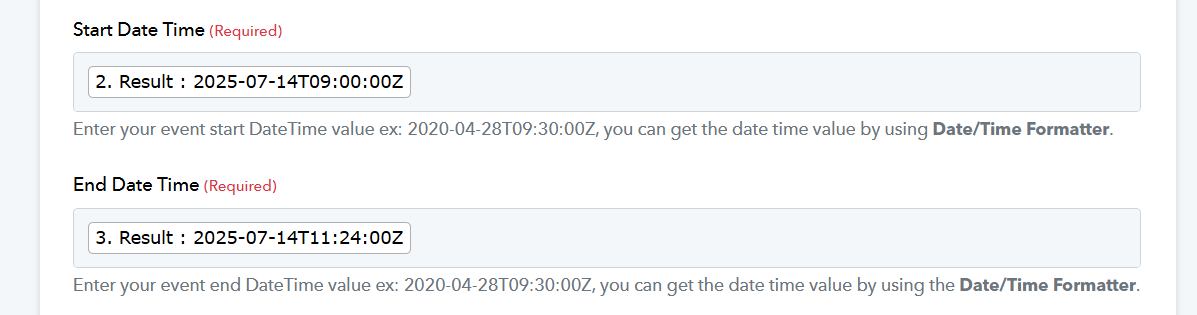
HI i just clone a workflow as I reformated the date so that i do "waste" 2 steps (ie 2 task) just to format the date.
However, i haev issue trying to recpature the responses to show the updated headers.
https://connect.pabbly.com/workflow/mapping/IjU3NjYwNTZhMDYzNjA0MzQ1MjZjNTUzMTUxMzIi_pc
HI i just clone a workflow as I reformated the date so that i do "waste" 2 steps (ie 2 task) just to format the date.
However, i haev issue trying to recpature the responses to show the updated headers.https://connect.pabbly.com/workflow/mapping/IjU3NjYwNTZhMDYzNjA0MzQ1MjZjNTUzMTUxMzIi_pc
The cloned workflow has a different webhook URL, so you'll need to set up the Google Sheets trigger step again.
youtube.com/watch?v=FipPt_qnW4I
FYI: The Text Formatter steps we added are free tasks, so they won’t count against your paid task quota.
Hi the webhook is accurate as the test data goes thru. Seems like there is a limit in the headers that are captured?
Here's a screen video. thanks
https://www.loom.com/share/6f6f537f4ce8425ca6787c948723bd97?sid=34a27f01-bf51-45ee-9f65-08db389d47ab
Hello @TER,
Currently, your workflow is receiving data only up to column D because the trigger column is set as D. If you would like to capture data up to column H, please update the trigger column to H and resubmit the initial setup. This will ensure that data—including dates—is captured correctly.
However, please note that the workflow will only trigger when data is added under the trigger column, i.e., column H.
Regarding the free tasks:
Steps marked with the "Free Task" label do not consume tasks from the 100 free tasks allocated to your account. Only the steps without this label will count against your task limit.
Let us know if you need any further assistance!