Google Sheets "Append Value" — invalid JSON on quotes/backslashes/newlines
Status: Closed · Asked by Vincenzo Tortora on · 0 views
Hello Vincenzo,
Thanks for contacting us.
Could you please share the Workflow URL so that we can look into it and provide information accordingly?
Please be aware that to assist you effectively, we may need to access your Pabbly Connect account. If you're comfortable with this, please grant us permission by stating in your next email: "You have my permission to log into my Pabbly Connect account, and edit workflow {If required}. Here is the registered email address associated with it."
Thanks & Regards,
Adeel Akhtar
🌐 Pabbly.com
https://connect.pabbly.com/v2/app/workflow/mapping/IjU3NjcwNTY5MDYzNzA0MzU1MjY4NTUzMzUxMzQi_pc
Task History ID:
IjU3NjYwNTZjMDYzNDA0MzU1MjZmNTUzNDUxMzM1MTYyNTQzNzBmMzAi_pc
You have my permission to log into my Pabbly Connect account, and edit workflow. Here is the registered email address associated with it.
Hello Vincenzo,
Thanks for contacting us.
Could you please share the Workflow URL so that we can look into it and provide information accordingly?
Please be aware that to assist you effectively, we may need to access your Pabbly Connect account. If you're comfortable with this, please grant us permission by stating in your next email: "You have my permission to log into my Pabbly Connect account, and edit workflow {If required}. Here is the registered email address associated with it."
Thanks & Regards,
Adeel Akhtar
🌐 Pabbly.com
Hello Vincenzo,
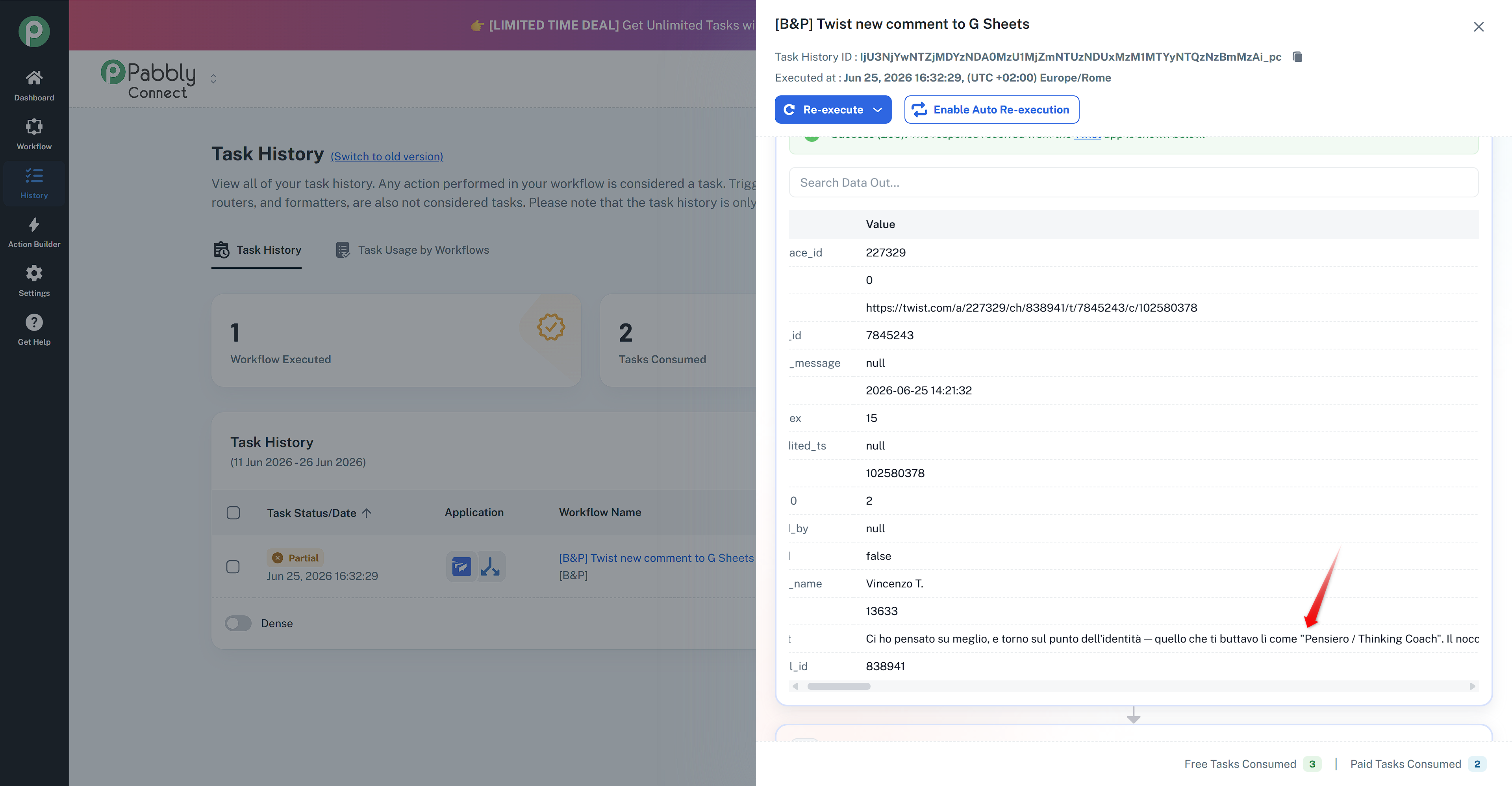
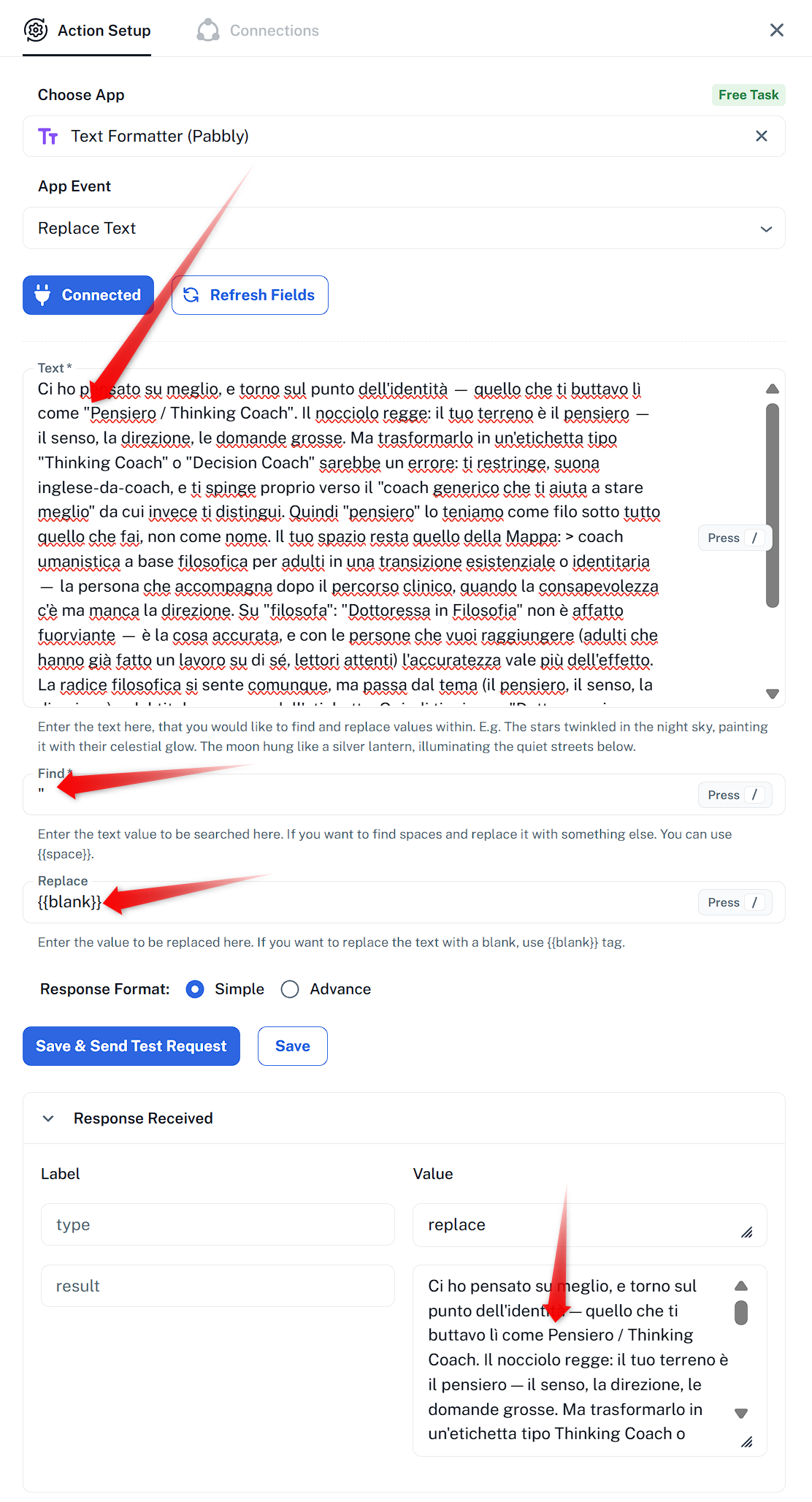
As we checked the particular task, it failed because the content have Double quotes in the data, as the Double quotes is already being used to separate the data in the Google Sheet: Append Value action under Value field, this additional Double quotes disturbed the JSON structure of the API request. To avoid such failurees, you can use Text Formatter: Replace text action to remove such characters from the content so that it does not fail.
Thanks & Regards,
Adeel Akhtar
🌐 Pabbly.com
I noticed that if I type directly in Twist (the double quotes are converted to the curved version), everything flows smoothly.
If, however, I copy and paste (e.g., from a text file) and the quotes appear straight, the problem occurs.
Are the quotes the only cause of the problem? Or are other characters also causing the problem? E.g., backslash?
Hello Vincenzo,
As we checked the particular task, it failed because the content have Double quotes in the data, as the Double quotes is already being used to separate the data in the Google Sheet: Append Value action under Value field, this additional Double quotes disturbed the JSON structure of the API request. To avoid such failurees, you can use Text Formatter: Replace text action to remove such characters from the content so that it does not fail.
Thanks & Regards,
Adeel Akhtar
🌐 Pabbly.com
Hello Vincenzo,
At the moment, Double quotes will create issues as they are being used as a separator for the values. So you need to add Text Formatter to replace them accordingly.
Thanks & Regards,
Adeel Akhtar
🌐 Pabbly.com