Google Sheets — Trigger on sheet different from first.
Status: Open · Asked by Vincenzo Tortora on · 0 views
Is it possible to set the trigger in Google Sheets on a sheet different from the first one?
Hi @Vincenzo Tortora,
Thank you for reaching out.
Yes, it is possible to set triggers for sheets other than the first one. You can configure the trigger for a specific sheet within the same spreadsheet by selecting the desired sheet during setup.
Additionally, if needed, you can set up multiple triggers for different sheets within the same spreadsheet.
Please let us know if you need any assistance with the setup.
When I click on Initial Setup, I can't select the specific sheet. If I've already added the Weebhook URL, I can't "delete" it (e.g., unlink the webhook from the specific sheet). Is there a guide/video on this?
Hi @Vincenzo Tortora ,
Thank you for your follow-up question.
Let me clarify how this works in a simple way:
When you go to a specific sheet (for example, Sheet1) and set up the webhook via:
Extensions → Pabbly Connect Webhook → Initial Setup,
the webhook gets configured only for that particular sheet (tab).
So, if you later add data in Sheet2, the workflow will not trigger, because the webhook was not set up there.
What you need to do
If you want the workflow to capture data from another sheet (e.g., Sheet2), you will need to:
- Open Sheet2 in the same spreadsheet
- Go to Extensions → Pabbly Connect Webhook → Initial Setup
- Configure the webhook again using the same webhook URL
Key Point
Each sheet (tab) requires separate webhook setup.
The configuration is sheet-specific, not applied automatically to all sheets in the spreadsheet.
Please try this and let us know if it works for you.
Ok, thanks.
The problem is that I have Sheet2 that changes based on Sheet1.
Sheet1 is an "input" sheet, while I would use Sheet2 as the output for Pabbly. So the trigger needs to fire ONLY on Sheet2, otherwise I think the data will overlap.
How do I "delete" the webhook from a specific sheet?
Hello @Vincenzo Tortora ,
You can remove the webhook from a specific Google Sheet by going to:
Extensions → Pabbly Connect Webhook → Manage Webhooks → Delete
This will unlink the webhook from that particular sheet without affecting other sheets.
Also, could you please confirm how you are sending data from Sheet1 to Sheet2?
Since Sheet2 is dependent on Sheet1, the method used (formulas, scripts, or automation) might affect how data is sent to Pabbly Connect. This will help us ensure that your workflow triggers correctly and no data is missed or duplicated.
Once we know this, we can guide you on the best setup to make sure the webhook works reliably on Sheet2.
"Extensions → Pabbly Connect Webhook → Manage Webhooks → Delete"
There isn't a "Manage Webhooks" option.
"Extensions → Pabbly Connect Webhook → Manage Webhooks → Delete"There isn't a "Manage Webhooks" option.
Apologies, please ignore the previous response.
To remove the webhook URL, simply clear it from the Initial Setup of Sheet 1, remove the Trigger Column, and click on "Submit".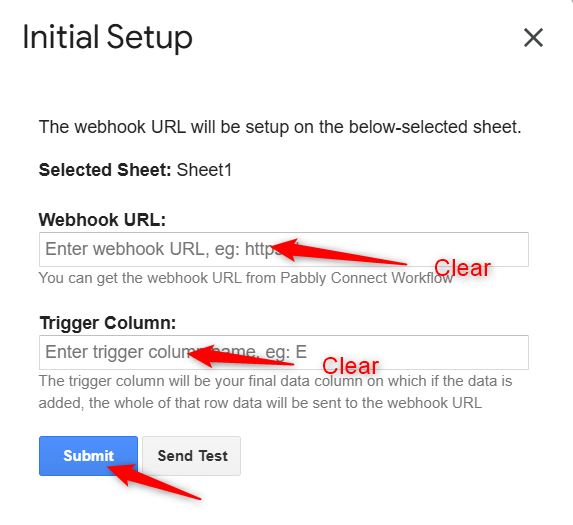
======================================================================
Ok, thanks.
The problem is that I have Sheet2 that changes based on Sheet1.Sheet1 is an "input" sheet, while I would use Sheet2 as the output for Pabbly. So the trigger needs to fire ONLY on Sheet2, otherwise I think the data will overlap.
Are you using Formulas to update data in Sheet 2 from Sheet 1?
Thanks & Regards,
Arshil Ahmad
Customer Support Associate
? Pabbly.com
?Rate your support
If I clear and click on Submit, the "pop up" says "Please fill the fields". If I leave them blank, close the pop-up, then re-click "Initial setup", I see again the previous values.
Hi @Vincenzo Tortora,
Instead of leaving the field blank, please add a space in the field and then submit.
Oooh, ok, now it works! :)
Hi @Vincenzo Tortora,
Thanks for the update, we'd love to hear your thoughts! If you have a moment, please rate us on Google. Your feedback helps us improve.