Google Sheets Webhook not firing
Status: Open · Asked by Pallav Chaudhary on · 0 views
I am manually entering data in a google sheet in which Pabbly Webhook Plugin is installed and test fires correctly. But when I enter data, webhook is not firing at all. It was working fine last month and has just stopped now.
Hello @Pallav
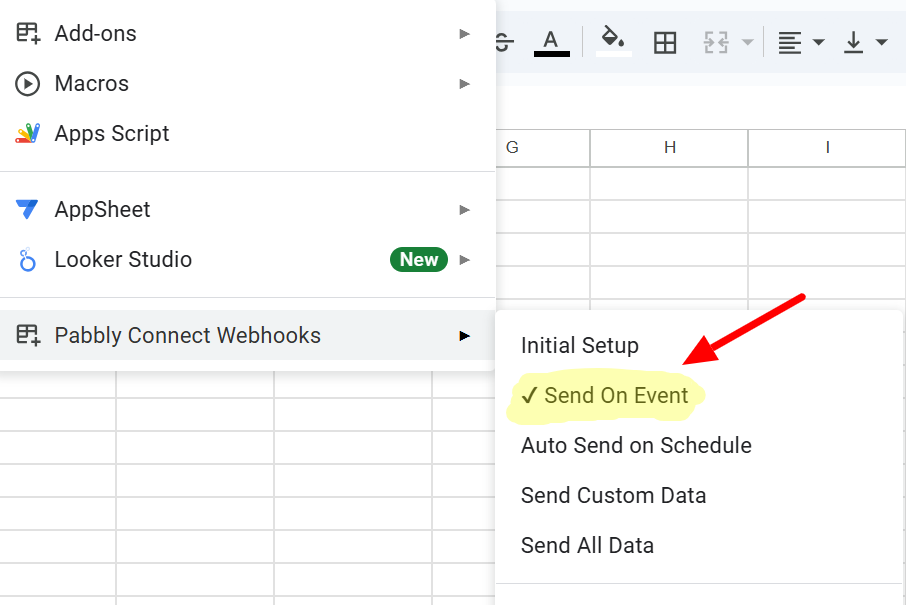
To make automation work, please make sure you have enabled 'Send On Event' if you're manually entering data into your Google Sheets, refer to the attached screenshot.
Additionally, you can check this tutorial to verify that everything is configured properly: -
youtube.com/watch?v=FipPt_qnW4I
If you continue to experience issues, please provide us with the Workflow URL and grant access to your Google Sheets. You can share access using the following email address:
Email Address: [email protected].
Hello @PallavTo make automation work, please make sure you have enabled 'Send On Event' if you're manually entering data into your Google Sheets, refer to the attached screenshot.
Additionally, you can check this tutorial to verify that everything is configured properly: -
youtube.com/watch?v=FipPt_qnW4I
If you continue to experience issues, please provide us with the Workflow URL and grant access to your Google Sheets. You can share access using the following email address:
Email Address: [EMAIL][email protected][/EMAIL].
Have sent mail. It used to work fine and now has stopped across multiple sheets.
Hello @Pallav
Can you please provide us with access to your Google Sheets, so we can look into the issue? Also, please provide us with the workflow URL in which you have encountered this issue.
Please provide us with access at [EMAIL][email protected][/EMAIL].
My google sheets webhook has stopped working and now there are no opinions to reset it...
My google sheets webhook has stopped working and now there are no opinions to reset it...
Please create a new thread and share the Workflow URL along with the Google Sheets spreadsheet connected to that workflow, so we can look into this issue.