Google sheets webhooks
Status: Closed · Asked by Hareendra Alahakoon on · 0 views
Hi, Can I use 2 Pabbly webhooks with one Google sheet? For an example I have a worksheet that currently create tasks in Asana when a new row is added. I also want to export the data in to a contact list in constant contact at the same time.
Thanks,
Hello @Hareendra,
Thank you for your query.
Currently, it's not possible to add two separate Pabbly webhooks to a single Google Sheet. Google Sheets supports only one webhook trigger per worksheet when using the Pabbly Connect add-on.
Recommended Solution:
Instead of creating two separate workflows, you can simply add another action to your existing workflow — the one that already creates tasks in Asana.
Here’s how:
- Open your current workflow.
- After the Asana action step, add a new step to send the same data to Constant Contact and add it to your contact list.
This way, both actions (Asana and Constant Contact) will run in sequence whenever a new row is added to the sheet.
Let us know if you'd like help setting this up!
Got it. Thanks. I will try that out.
UPDATE: Both first name and last names are in a single cell in the google sheet but constant contact requires first name and last name on 2 different fields. How can I fix this?
You can use the 'Text Formatter: Split Text' action to split the first and last name.
You can use the 'Text Formatter: Split Text' action to split the first and last name.
Thank you! I have another question. So the action exporting a contact into Constant contact fails sometimes due to email address already being on the list. I want to know if the entire task fails because of this or just the constant contact action? For example my task has Google sheets to Asana action, Google sheets to Constant contact.
Hello @Hareendra,
Thank you for your question.
We’d like to inform you that your workflow is partially failing, meaning only specific actions are failing—not the entire task. Upon checking the task history, we noticed that the Constant Contact action is failing because the email address being passed already exists in the list.
To avoid this issue and ensure the contacts are added only when they don’t already exist, you can follow this approach:
- Add a “Search Contact” action for Constant Contact before the “Create Contact” step.
- Use a filter after the search step to check whether a contact ID is returned.
- If the contact does not exist (i.e., no ID returned), only then proceed with the “Create Contact” action.
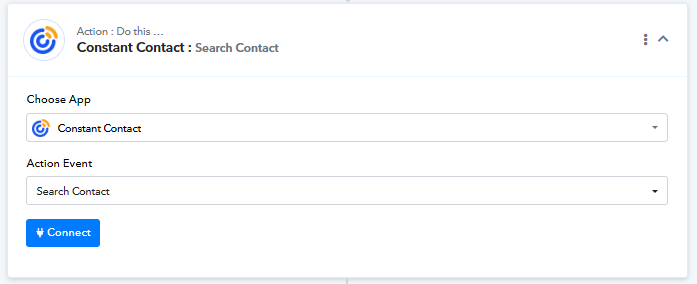
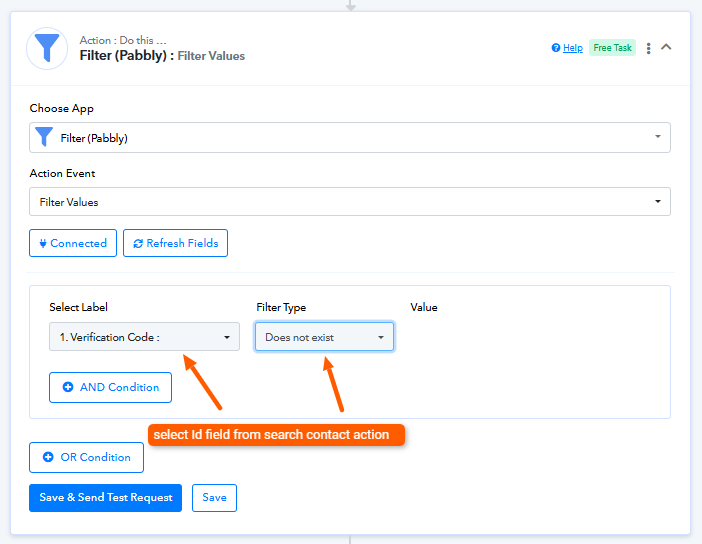
This logic will prevent duplicate creation attempts and help the workflow run smoothly.
Hello @Hareendra,Thank you for your question.
We’d like to inform you that your workflow is partially failing, meaning only specific actions are failing—not the entire task. Upon checking the task history, we noticed that the Constant Contact action is failing because the email address being passed already exists in the list.
To avoid this issue and ensure the contacts are added only when they don’t already exist, you can follow this approach:
- Add a “Search Contact” action for Constant Contact before the “Create Contact” step.
- Use a filter after the search step to check whether a contact ID is returned.
- If the contact does not exist (i.e., no ID returned), only then proceed with the “Create Contact” action.
This logic will prevent duplicate creation attempts and help the workflow run smoothly.
Great! Thank you for the detailed instructions! One more question, The first action creates duplicate Asana tasks whenever a row in the google sheet is changed. Is there a way to just update the already existing Asana task with the new data instead creating a new Asana task?
Great! Thank you for the detailed instructions! One more question, The first action creates duplicate Asana tasks whenever a row in the google sheet is changed. Is there a way to just update the already existing Asana task with the new data instead creating a new Asana task?
Could you please share the Workflow URL you have setup?
Could you please share the Workflow URL you have setup?
https://connect.pabbly.com/workflow/share/CEBVZ1QDBWZXHQJoDlFTdFhMBgIBWAJjVUxWRFxTAnpTHVEEVBVYMg1BAyFVEgloA0pXPQJdA2cBFVFVVwEHdFVMCQtUV1YsWxZVLgNWCToIVlV9VDU#
Great! Thank you for the detailed instructions! One more question, The first action creates duplicate Asana tasks whenever a row in the google sheet is changed. Is there a way to just update the already existing Asana task with the new data instead creating a new Asana task?
This particular use case is currently not possible, as we don't have a 'Search Task' action step in Asana. If you want this action step to be added to Pabbly Connect, you can submit your request on our dedicated platform:
http://connect.pabbly.com/workflow/mapping/IjU3NjYwNTZhMDYzNTA0MzE1MjY4NTUzMTUxMzUi_pc
Our integrations team will look into your request and, if possible, add the desired action event to Asana.
Ok, is there a way to trigger the workflow ONLY when a NEW row is added to the google sheet?
Ok, is there a way to trigger the workflow ONLY when a NEW row is added to the google sheet?
Currently, the workflow is triggered both when a new row is added or when an existing row is updated (especially if the trigger column is modified). At the moment, there is no trigger available that runs only when a new row is added.
ok thank you!
Where can I submit a feature request?
You can submit the feature request here:
https://roadmap.pabbly.com/b/pabbly-chatflow-new-feature-request-bugs
Thank you!
Thank you everyone for your 5 star support. Also I would like to thank the whole team for creating such a wonderful integration tool. Its very powerful and has great potential. Also it is very generous of you to give 100 tasks for free. I may upgrade o a paid account soon. Thanks!
Thank you for your kind words! We’d love to hear your feedback, and it would mean a lot if you could leave us a quick review on Google.