GoogleSheets... and a formula
Status: Open · Asked by woodennickel on · 0 views
I have a form that is capturing data. All of the data is added to the last row in a Google Sheet.
What I want to do is use concatenate on that data in googles sheets to join some constants, and some of the variables from the LAST ROW of the googlesheets into one unique URL. Looking online AI suggest Text Formatter and to use the Merge function instead of doing it in GoogleSheets, which seems easier, but I don't see a Merge function in Text Formatter.
Is there a merge data / concatenator outside of google sheets in a Pabbly function?
Is google sheets concatenate the best.. but then I have the issue that the formula in Column Q is wiped out when the data is added to columns A-P.
Hello @woodennickel ,
Could you please share a short screencast of your exact use case and the expected output? This will help us understand your setup better and guide you with the best possible approach.
And yes, you’re correct — whenever a new row is added to Google Sheets via the Pabbly Connect action, any existing formulas in that row will be overwritten. Once we review your workflow and requirements, we can suggest the most suitable way to achieve your concatenation logic without losing the formula.
Here is the video: https://www.berrycast.com/conversations/ce51aff8-3b36-51c5-a4bd-a182f4928eb1
I think if I could
- pull the data into Pabbly from Google sheets using Last Row,
- And then pull apart the date in Pabbly into its components of D, M, Y using Text Formatter,
- And then concatenate the base URL I have, plus all the other variables and constants using a MERGE (Text formatter?),
- I could use Gmail action to send out the email
Text Formatter does not seem to have a merge or concatenate function, and thats where I am first getting stuck
Please combine this data in the way you want to create a Jotform URL, and then share that URL with us. We’ll show you how you can automatically combine the data to form a URL and send it via Gmail.
We just need to see how your desired URL looks with the data included.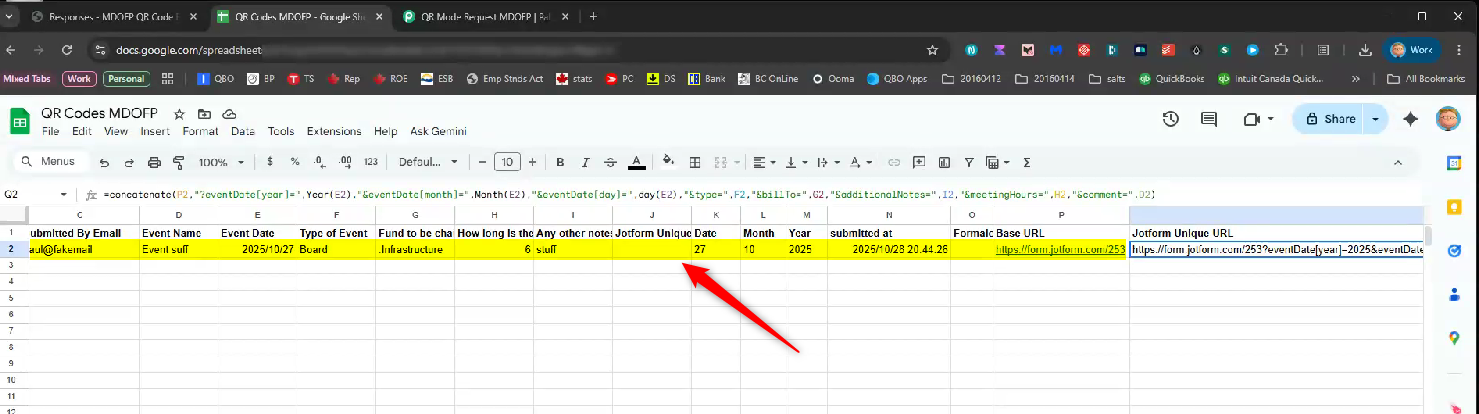
This is my sheet formula:
=concatenate(P2,"?eventDate[year]=",Year(E2),"&eventDate[month]=",Month(E2),"&eventDate[day]=",day(E2),"&type=",F2,"&billTo=",G2,"&additionalNotes=",I2,"&meetingHours=",H2,"&comment=",D2)
This is the result:
https://form.jotform.com/253?eventDate[year]=2025&eventDate[month]=10&eventDate[day]=27&type=Board&billTo=.Infrastructure&additionalNotes=stuff&meetingHours=6&comment=Event suff
What I did is just use pabbly text formatter to pull and split the date into its components of dd, mm, and yyyy
Then in gmail for the URL I just referenced all the fields directly in the pabbly gmail. The only problem is that doing this, any spaces stop the URL, as opposed to if they were an actual URL they would have the %20

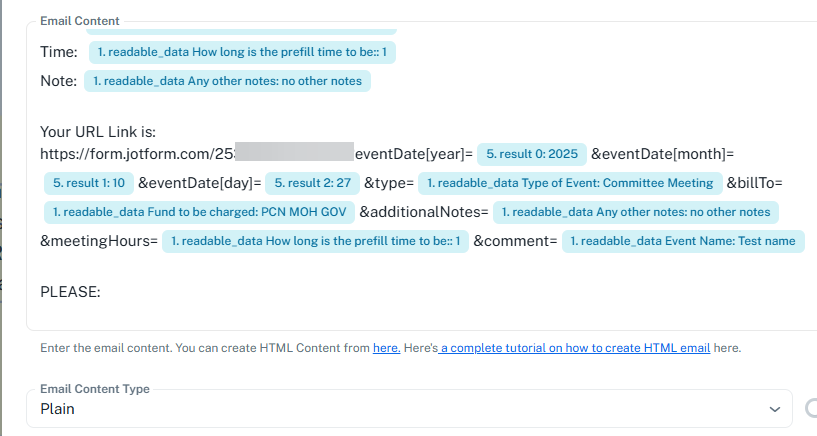
You can compose the URL in the Text Formatter step to automatically replace the spaces with %20, and then pass the complete URL to the Gmail action step.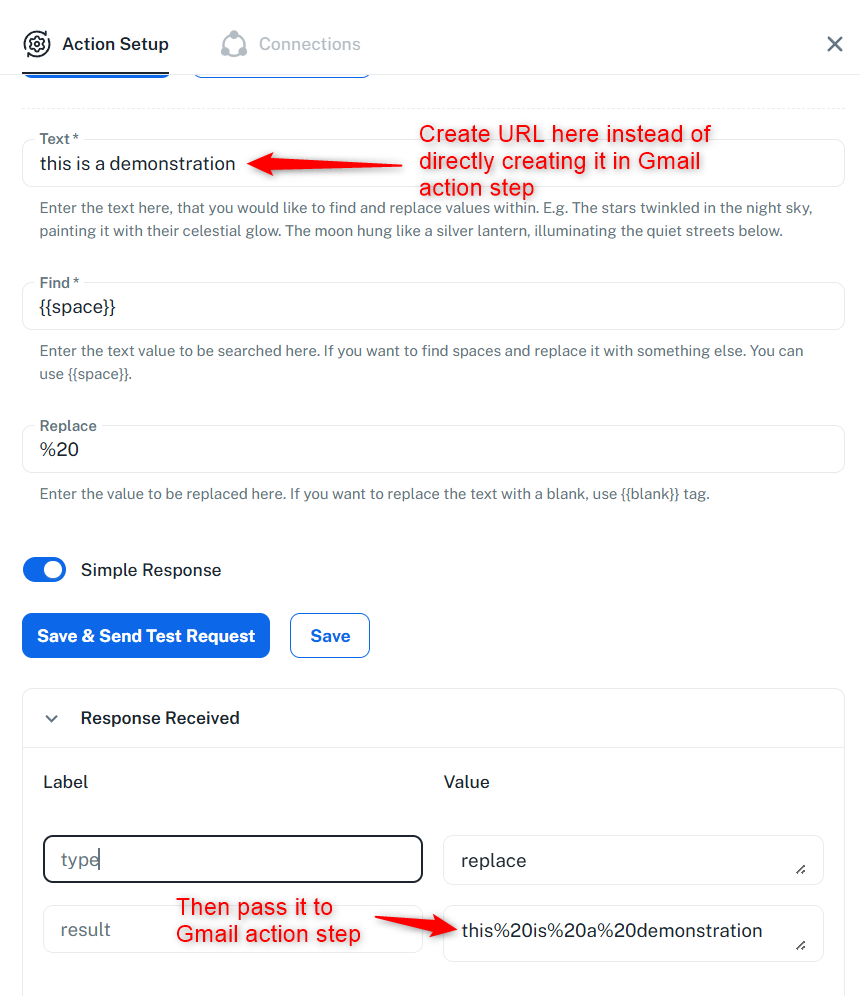
Thanks & Regards,
Arshil Ahmad
Customer Support Associate
? Pabbly.com
?Rate your support
You can compose the URL in the Text Formatter step to automatically replace the spaces with %20, and then pass the complete URL to the Gmail action step.Thanks & Regards,
Arshil Ahmad
Customer Support Associate
? Pabbly.com
?Rate your support
Yes, I understand that.
But my URL is currently built just inside of Pabbly Gmail, because I can't use the URL from GoogleSheets. (the formula for each each row would need to be added first, then I could use this and text formatter/replace.
Or even easier still, if in Text Formatter... with a concatenate or merge function, build the URL; and then use the replace %20
Please check step 6 of your workflow and see if it gives you the desired result. You can map the result from this Text Formatter step directly to the Gmail action step.
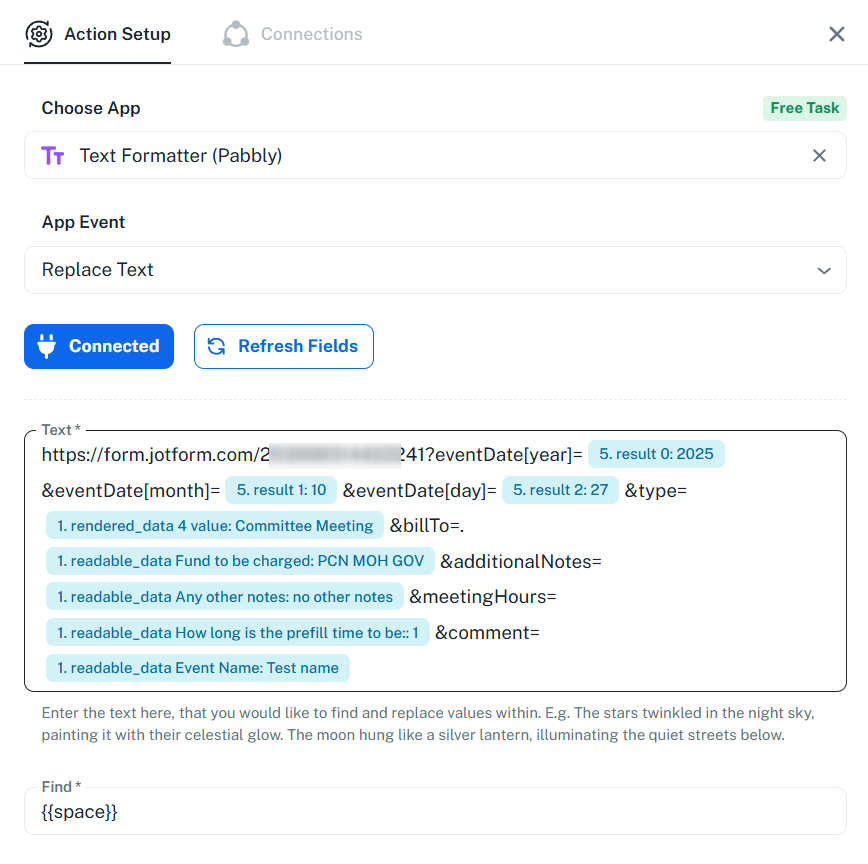
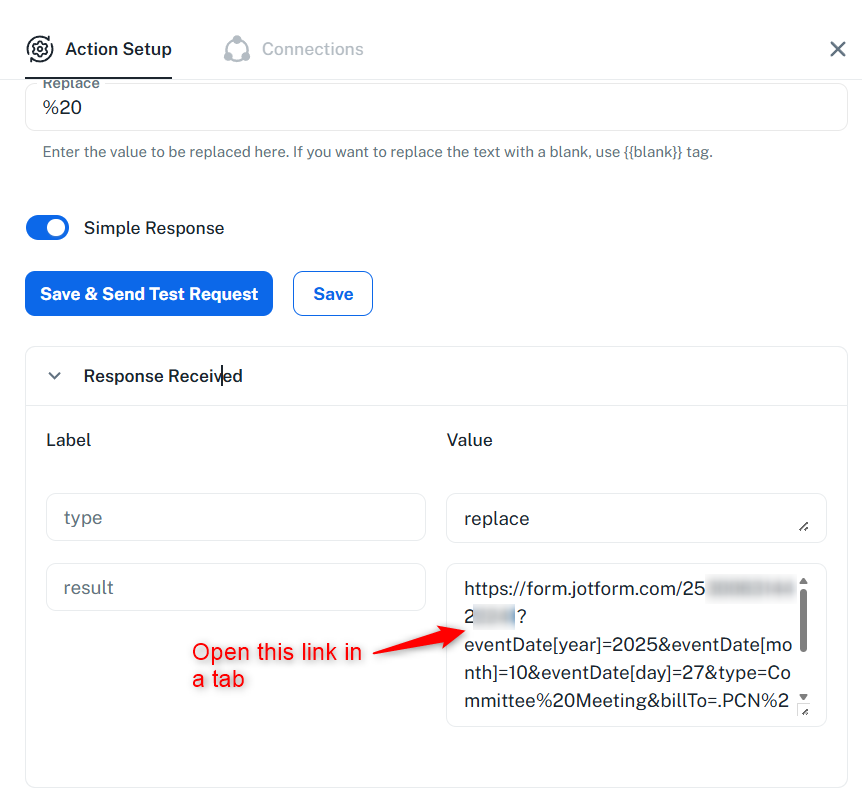
Got it. I was looking for merge data function in the Text Formatter.
What I realized just now is that in the Text Formatter / Split function; in the text field, I can create my URL - merging the constants and variables - AND then do the Replace %20... all in the one step.
Which i then pulled into Gmail.
Thank you so much!
We’re glad we were able to help. We’d really appreciate it if you could take a moment to rate our support.
Thanks & Regards,
Arshil Ahmad
Customer Support Associate
? Pabbly.com
?Rate your support