Help to update openai assitant vector store using Google Drive trigger
Status: Open · Asked by carlosmt on · 0 views
Hello appreciated team experts! i need some help of you please
I am new to pabbly, trying to test if is possible to update my openai assitant vector store using a pabbly conection to my google drive folder,
(i am using a my openai assitant created for a bot, fully working with a vector store working, but i need to automate the vector by using files on Google drive.)
What may i put on the input: File URL
and on the input: Purpose
i share an image to help understand the situation
thanks!!! 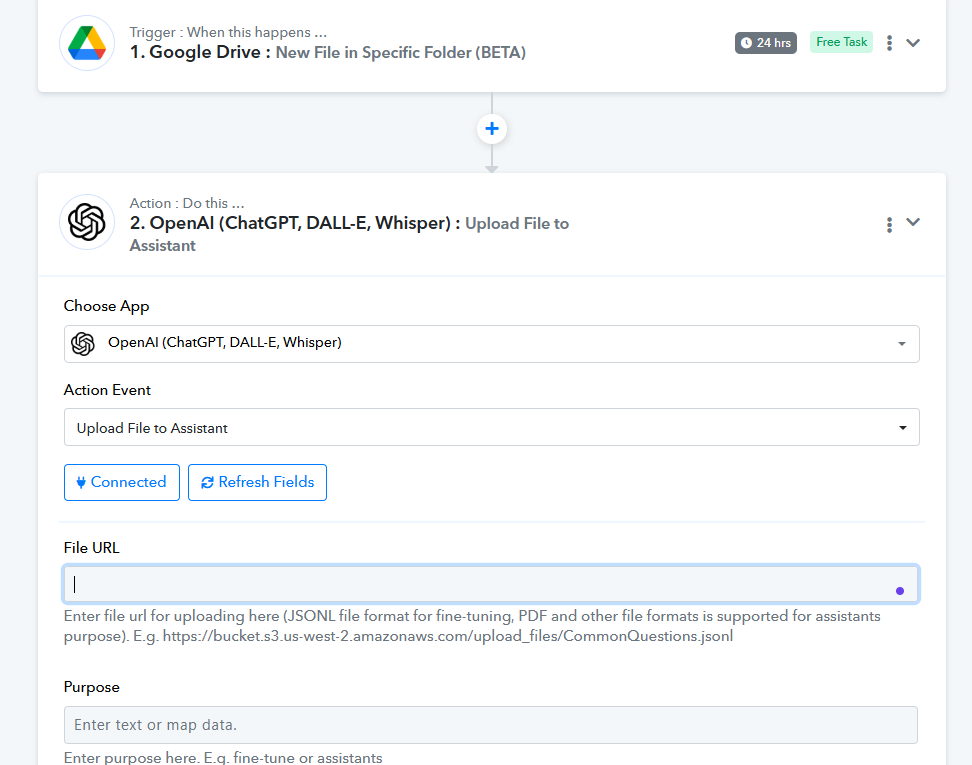
Hi @carlosmt,
Please allow us some time to look into this concern. We will get back to you with an update soon.
Hello @carlosmt
Google Drive files cannot be directly input into ChatGPT. You will have to host your file on a third party application so the file is publicly accessible. You can use host the image and map the URl in the next step. For e.g. Imgur or Dropbox and then pass the URL in ChatGPT.
youtube.com/watch?v=-NXmZ2jRdE0
youtube.com/watch?v=k4PnFaZ0BSg
Let us know if it works for you.