How can I loop the workflow steps
Status: Open · Asked by Smartcent on · 0 views
I need to loop the workflow steps. Is there any way to do that?
Hello @Smartcent,
You can use an Iterator to loop through your data. To ensure it works correctly, please make sure the data from the previous step is captured in Advanced Format.
To do this:
- Turn off the "Simple Response" toggle.
- Click on "Save & Send Test Request" to capture the complete data structure.
For a detailed walkthrough, please refer to the attached tutorial.
I want to loop the steps, not the data. How can I go back to step 4 from step 6 based on a condition?
It is not possible to loop through the steps in the manner you’ve described.
I need to manage the cursor position to run an API pagination. But I cannot do that without iteration. The pagination is of 100 and I have record of 1000
Hello @Smartcent,
Could you please share the workflow URL where you're trying to achieve this, along with a screen recording that better explains your use case? This will help us understand the requirement more clearly and check whether it can be achieved through a workaround.
Looking forward to your response.
Hello @Smartcent,Could you please share the workflow URL where you're trying to achieve this, along with a screen recording that better explains your use case? This will help us understand the requirement more clearly and check whether it can be achieved through a workaround.
Looking forward to your response.
https://connect.pabbly.com/workflow/mapping/IjU3NjYwNTZhMDYzNjA0M2Q1MjY4NTUzMzUxM2Ei_pc
https://connect.pabbly.com/workflow/mapping/IjU3NjYwNTZhMDYzNjA0M2Q1MjY4NTUzMzUxM2Ei_pc
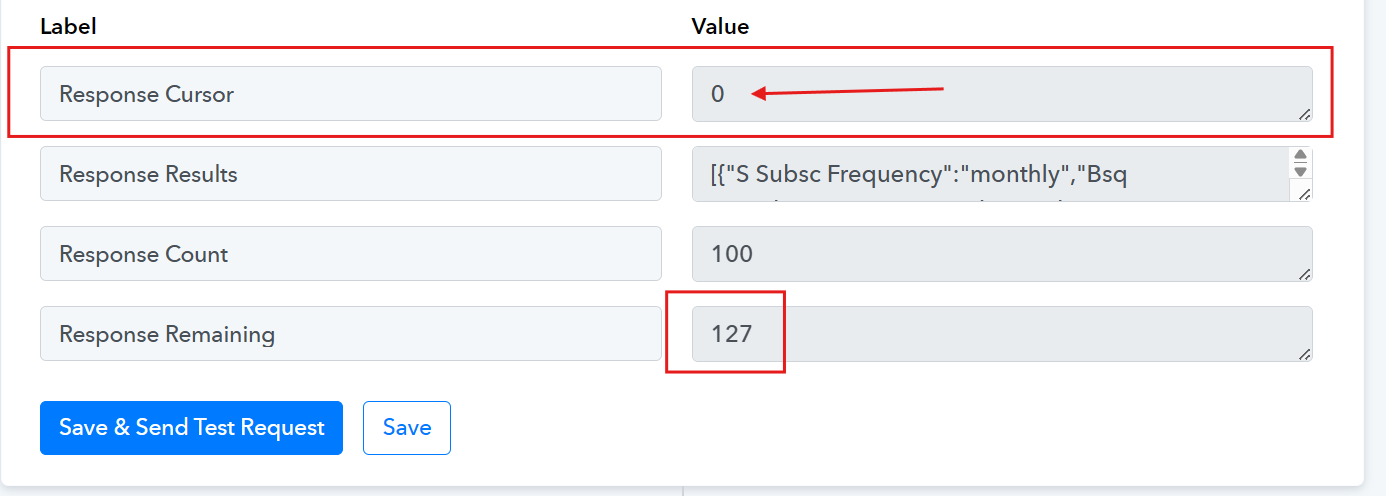
How to retrieve the "Remaining" response of 127. I will have to move the cursor to 100 to get the remaining response. How can I do that?
Hello @Smartcent,
Thanks for sharing the details. Based on your use case, the only possible workaround we can suggest is as follows:
- After the API step (with the cursor), add a Google Sheets – Update Cell step to store the current cursor value (starting with 0 and ending at 100).
- The Iterator will then process the fetched records (e.g., 100).
- In the next scheduled run, use a Google Sheets – Lookup to fetch the last cursor value, use a Number Formatter to increment it, and map that updated value back into the API request to fetch the next set of records (e.g., 101–200), and so on.
This approach helps maintain cursor continuity across runs. While this is a workaround, it's currently the most feasible method for your setup with custom API requests.
If you happen to discover a more efficient solution, feel free to share it in the same thread—it could be helpful for other users as well.