How can make sure the entire workflow is complete before proceeding to the next loop?
Status: Open · Asked by Ton Won on · 0 views
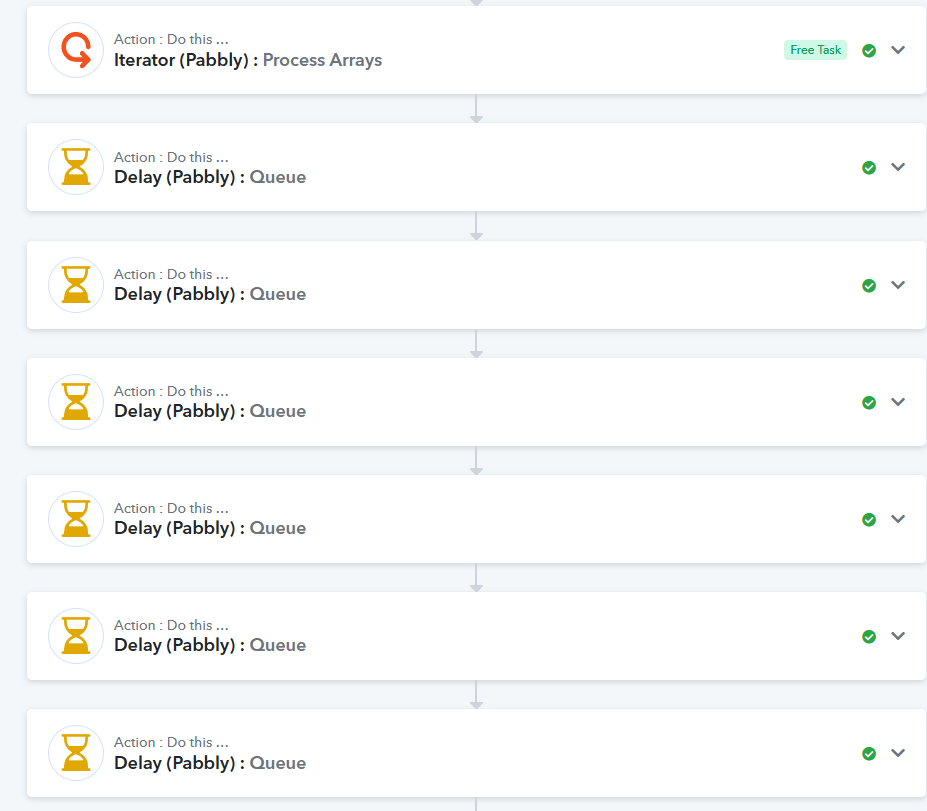
I used "Iterator(Pabbly)" action to loop the Google sheets Rows. However, I found that it started executing the next loop before completing the first workflow. Even I added "Pabbly delay" to the last step action, but it didn't process the delay.
Please advise!
Hey @gpro,
Thanks for reaching out.
The issue may be happening because the Delay is currently placed at the end of the workflow, and in that case, it won’t control how the Iterator processes items.
Our team has previously made fixes around this behavior. In the task history you shared, we noticed multiple irregularities, so we’ve escalated it for further review.
For now, we recommend:
Add the Delay(After queue) step immediately after the Iterator
Flow: Iterator → Delay → Remaining actions
This will ensure:
- Each item waits before the next one starts
- Execution happens one by one
Please make this change, monitor the workflow, and let us know how it goes
Hey @gpro,Thanks for reaching out.
The issue may be happening because the Delay is currently placed at the end of the workflow, and in that case, it won’t control how the Iterator processes items.
Our team has previously made fixes around this behavior. In the task history you shared, we noticed multiple irregularities, so we’ve escalated it for further review.
For now, we recommend:
Add the Delay(After queue) step immediately after the Iterator
Flow: Iterator → Delay → Remaining actions
This will ensure:
- Each item waits before the next one starts
- Execution happens one by one
Please make this change, monitor the workflow, and let us know how it goes
Thanks for your response!
But it will loop the Delay Queue......
Task History ID -
IjU3NjYwNTZkMDYzMjA0MzI1MjY1NTUzNDUxMzc1MTY1NTQzODBmMzAi_pc
It seems you set the Delay Unit to 4 hours instead of 4 minutes, which is why the action steps after the delay have not been executed. As a result, we are unable to determine the exact issue. We suggest cloning this workflow and executing it with a 4-minute delay instead of a 4-hour delay. This will help us diagnose the issue.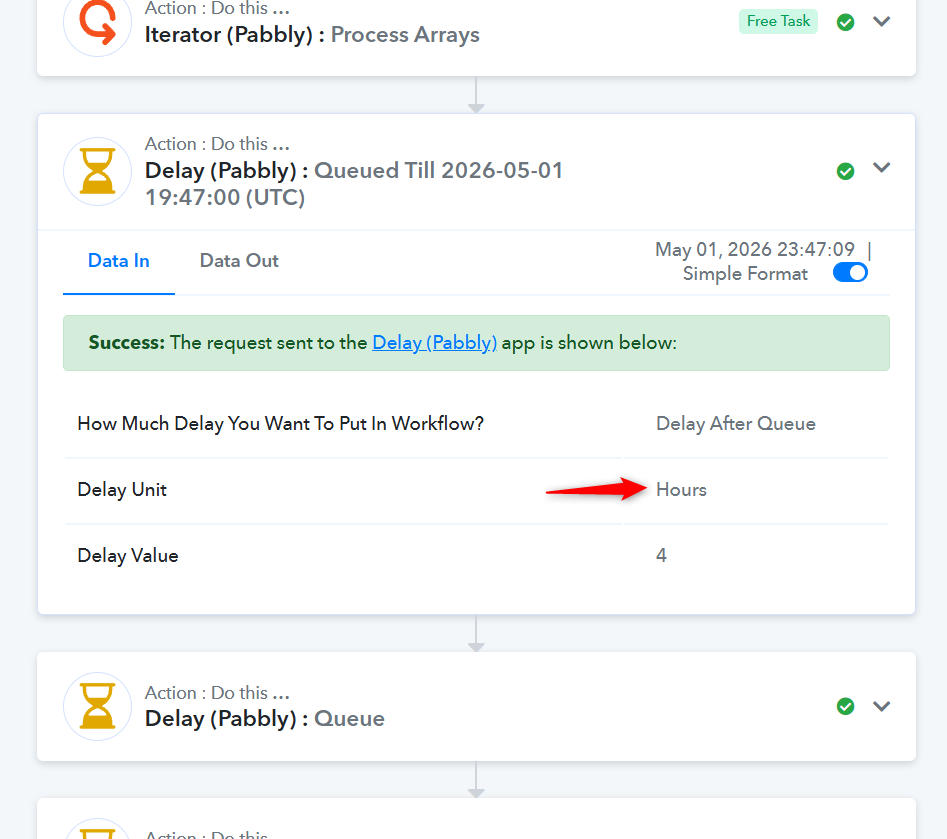
Thanks & Regards,
Arshil Ahmad
Customer Support Associate
? Pabbly.com
It seems you set the Delay Unit to 4 hours instead of 4 minutes, which is why the action steps after the delay have not been executed. As a result, we are unable to determine the exact issue. We suggest cloning this workflow and executing it with a 4-minute delay instead of a 4-hour delay. This will help us diagnose the issue.Thanks & Regards,
Arshil Ahmad
Customer Support Associate
? Pabbly.com
Yes, i want the time interval is 4 hours to process the next loop workflow.
any suggestion?
Hey @gpro,
Thanks for the clarification.
If your goal is to maintain a 4-hour gap between each iteration, then your current setup is working as expected.
Since you’ve added a 4-hour Delay, each item is being queued and processed sequentially after its scheduled delay. Because of this, multiple iterations are now lined up in the queue, which means it can take several hours or even a few days for the entire task history to complete.
So behavior-wise, everything looks correct.
You can keep monitoring the execution to see the queued tasks getting processed over time.
Additional Suggestions:
- We recommend checking the execution in the new Task History UI for better visibility of queued and delayed steps.
- Also, we noticed that your Whapi.Cloud action is returning a 429 error (Too Many Requests). This usually happens when API limits are exceeded.
Please check your Whapi account and verify:
- API rate limits
- Any quota restrictions
Hey @gpro,
The reported issue has now been resolved.