How do I setup Microsoft 365 Multiple email sending from the email addresses pulled from my crm?
Status: Closed · Asked by perfectportals on · 0 views
It looks like Gmail already does this flawlessly. I would like Microsoft 365 to do the same thing. I don't want to type in specific email addresses for the email to be sent to after a scheduled delay...I just want it to pull the information for email addresses that is included in the email being forwarded from my crm with the commas in-between each email address.
I currently have it set up for just sending to one email address and want to change it over to multiple. Can it use the same Result 0 : emailaddress from the text formatter?
Hi @perfectportals,
Please try using 'MS Office 365: Send Mail to Multiple Users' action step for your use case.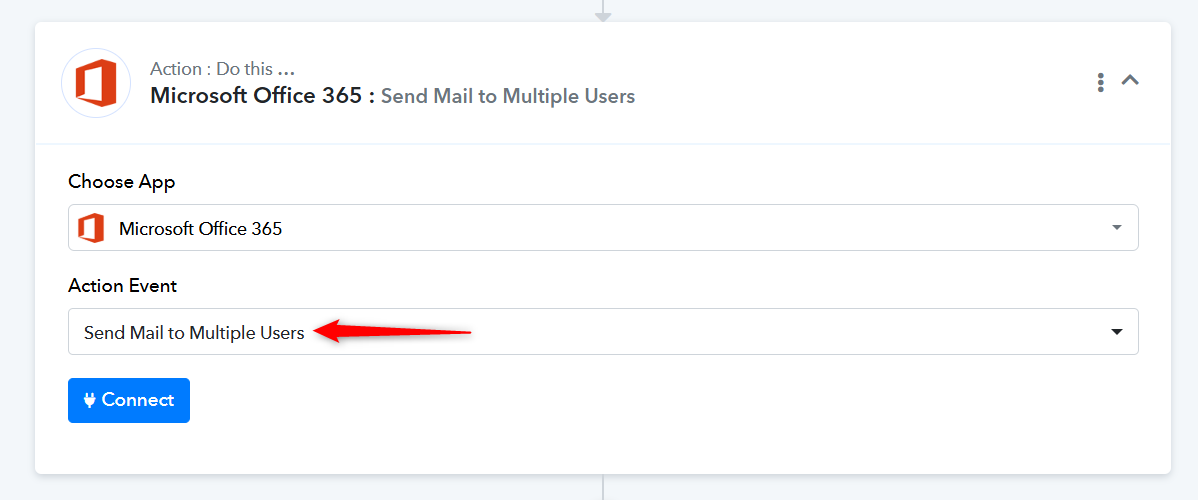
This only answered part of my question...can i use the Result 0 : emailaddress from the text formatter? That's the part I really need to know.
Thanks.
Could you please share the Workflow URL where you have this concern?
Thanks & Regards,
Arshil Ahmad
Customer Support Associate
? Pabbly.com
?Rate your support
Will this part of the setup remain the same for changing over to multiple email addresses (this shows what I currently have that is only 1 email). This is pulled from the text formatter info.
No, you’ll need to pass the email address to the ‘To Recipient’ field in the manner described in the help text. You can modify the data received using the Text Formatter to match this format. Or, we can do it on your behalf if you share your workflow.
I can't do it this way as it will be different email addresses every time. These are delays to client emails being sent from a CRM. Sometimes there are multiple email addresses to send to but it will be based on the email addresses provided for the clients in the CRM.
Not sure how I can show you this from my CRM to make it make sense.
Like I said it's already working flawlessly with the Gmail option.
I need it to pull the email addresses that come in here:

Hello @perfectportals,
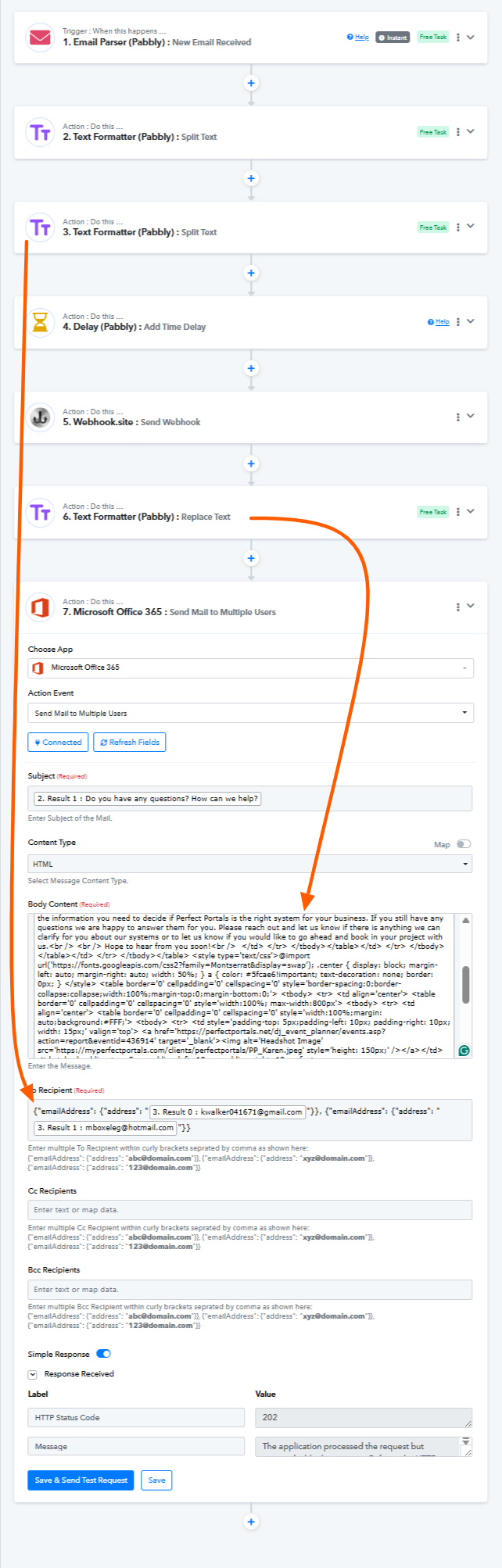
We have added two steps to your workflow: a text formatter to split the email and another text formatter to replace the double quotes with Single quotes, and then mapped the data to the Microsoft Office 365: Send Mail to Multiple Users action, and it seems to be working fine now.
Thank you so much!! ☺️
Hello @perfectportals,
Thanks for the update!!
As your issue has been resolved, we’d appreciate it if you could share quick feedback on the support received:
https://forms.gle/GAjS4wdPYKuhnEYV9
Thank you for your time.
PS: We are closing this thread as the issue is resolved. Please feel free to reach out to us if you face any issues in the future.