How do I use the Bigin node in the upsert?
Status: Open · Asked by Lorenzo Giacomini on · 0 views
Hello,
We appreciate you reaching out to Pabbly Support!
Could you please provide more details about your specific use case?
Additionally, it would be helpful if you could share the URL of the workflow you've created so that we can thoroughly review it and provide further guidance.
Please be aware that to assist you effectively, we may need to access your Pabbly Connect account. If you're comfortable with this, please grant us permission by stating in your next email: "You have my permission to log into my Pabbly Connect account, and edit workflow {If required}. Here is the registered email address associated with it."
Looking forward to assisting you further.
Thanks & Regards,
Hrishabh
Customer Support Associate
🌐 Pabbly.com
👉 Rate your support
I have to append value on Generale/custom_tag field on Bigin, please don't start the full automation but try just with a contact.
You have my permission to log into my Pabbly Connect account, and edit workflow https://connect.pabbly.com/v2/app/workflow/mapping/IjU3NjcwNTZjMDYzMzA0M2M1MjY1NTUzNzUxMzEi_pc. Here is the registered email address associated with it [email hidden].
Hello Lorenzo,
Thank you for providing access to your Pabbly Connect account.
To thoroughly investigate this behavior and verify it directly within your Zoho Bigin account, we would like to conduct a live test. During the session, we will create a test contact and perform updates to the custom_tag field to determine whether the values are being appended or overwritten.
Could you please schedule a meeting with us using the link below at your convenience?
https://www.draftmeet.com/book/lnk_a1da09834ded74d3cd2ca87d01e1cba7
This will help us review the setup together and provide you with an accurate resolution as quickly as possible.
We look forward to speaking with you.
Thanks & Regards,
Hrishabh
Customer Support Associate
🌐 Pabbly.com
👉 Rate your support
but i can give you the link of anydesk and do it today?
Hi Lorenzo,
Thank you for the update. Unfortunately, we cannot connect via AnyDesk as we do not use remote desktop software due to our company's security and support policies.
To help you resolve this directly, please schedule a meeting with us at your convenience using our official booking link:
This will allow us to join a secure screen-share session together, look at your workflow setup, and get this sorted out for you.
Looking forward to connecting with you!
Thanks & Regards,
Hrishabh
Customer Support Associate
🌐 Pabbly.com
👉 Rate your support
Is there any Italian support available? Otherwise, I’d find it difficult to communicate during the call.
Hello Lorenzo,
Thank you for getting back to us.
Please note that our official support is provided in English. However, we want to make sure you get the help you need, so we can absolutely use Google Translate during our live session to bridge the language gap and make communication easier for you.
If we still run into difficulties during the call, I will speak with our management to see if we can make an exception to connect via AnyDesk to resolve the issue.
Please go ahead and schedule a convenient time for our meeting using the link below, and we will work through this together: Schedule a Meeting
Looking forward to connecting with you!
Thanks & Regards,
Hrishabh
Customer Support Associate
🌐 Pabbly.com
👉 Rate your support
All right, anyway, the UPSERT has always worked the way I use it; it’s only now that it’s causing problems
Hi Lorenzo,
Thank you for your patience! We have checked your Pabbly Connect workflow "aggiungi generale" and found exactly why the multi-select field is overwriting instead of appending. Your logic is completely correct, but there is a small technical requirement from Zoho Bigin's API causing this.
In Zoho Bigin, every custom field has two names:
1. A Display Name (Label): What you see on your screen (e.g., "Generale").
2. An API Name (Technical Key): What Zoho's database uses in the background.
The Zoho Bigin documentation strictly requires you to use the background "API Name" inside the "Append Keys" configuration field, rather than the friendly display name.
Because you typed the word "Generale" into the Append Keys field, Zoho's API does not recognize it. When Zoho doesn't recognize the key, it completely ignores your instruction to append ("Append Values = true") and defaults to an overwrite.
How to Fix It:
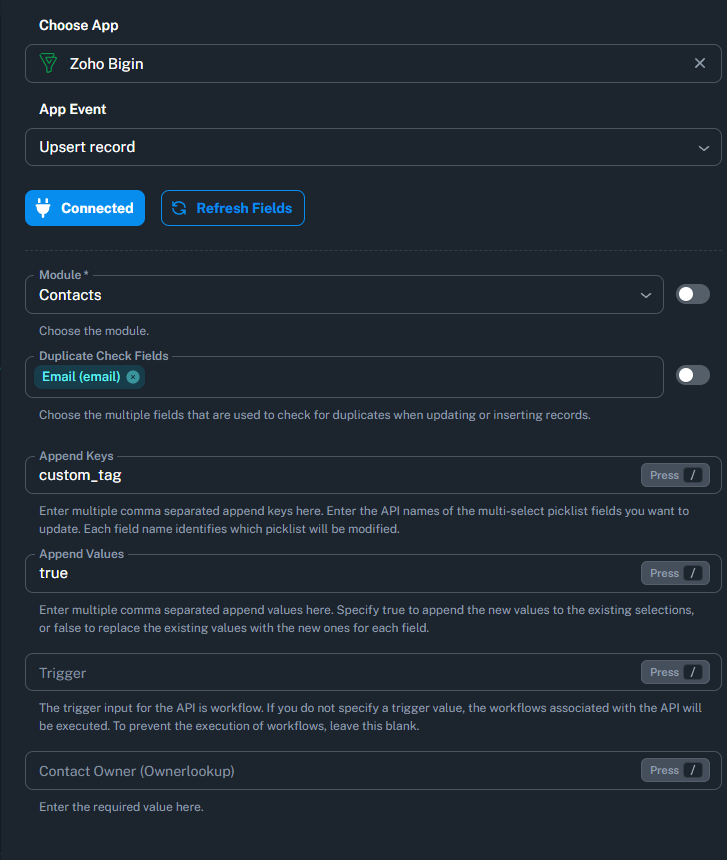
We ran a metadata check on your Zoho Bigin fields directly inside your workflow, and your exact technical API name for that field is: custom_tag
Please update your workflow step with these exact settings:
1. Open your "Zoho Bigin: Upsert record" action step.
2. Find the "Append Keys" input box.
3. Completely delete the word "Generale" from that box.
4. Paste the technical API name there instead: custom_tag
5. Keep "Append Values" set to: true
6. Save the step.
Once you make this change, Zoho Bigin will properly read your instruction and will append your new tags (like "Altri_eventi_live") alongside your existing values instead of replacing them!
Please let us know if you need any further help with this setup.
Thanks & Regards,
Hrishabh
Customer Support Associate
🌐 Pabbly.com
👉 Rate your support
Hello,
Take a look at this workflow, the second node.
In the “Append Keys” field, I specified the api_name and set “Append Values” to “true.”
If we try to add a value to “Provenienza” (Multiselectpicklist), the current value is overwritten.
I ran into a similar issue when I was coding these APIs into a script. Make sure that $append_values is INSIDE each record of the data array, not at the top level.
Here the workflow:
You have my permission to log into my Pabbly Connect account, and edit workflow {If required}. Here is the registered email address associated with it.
Thanks
Hello Lorenzo,
Thank you for the update.
Since you mentioned that the UPSERT action has always worked with the same configuration and has only recently started behaving differently, we'd like to gather some additional information before escalating this further.
Could you please share a screen recording of the entire process, showing:
The record in Zoho Bigin before the UPSERT action is executed.
The workflow execution in Pabbly Connect.
The record in Zoho Bigin after the UPSERT action is executed.
The values being passed to the Append Keys and Append Values fields in the action step.
This will help us verify whether the API is receiving the append instruction correctly and determine if there has been any change in behavior on Zoho's end. If required, we will escalate the issue to our technical team for further investigation.
We look forward to your recording.
Hello,
Take a look at this workflow, the second node.
In the “Append Keys” field, I specified the api_name and set “Append Values” to “true.”
If we try to add a value to “Provenienza” (Multiselectpicklist), the current value is overwritten.I ran into a similar issue when I was coding these APIs into a script. Make sure that $append_values is INSIDE each record of the data array, not at the top level.
Here the workflow:
You have my permission to log into my Pabbly Connect account, and edit workflow {If required}. Here is the registered email address associated with it.
Thanks
Thanks and Regards,
Preeti Paryani
Customer Success Associate,
Pabbly.com
Sure, here's the Vimeo's link to our video:
Thanks
Lorenzo
Hello Lorenzo,
Thank you for sharing the video demonstration and details!
We have escalated this issue along with your video recording directly to our core development team to investigate why the multi-select field values are being overwritten despite the correct Append Keys configuration.
We will keep you updated right here as soon as we have an update from our technical team. We appreciate your patience in the meantime!
Thanks & Regards,
Hrishabh
Customer Support Associate
🌐 Pabbly.com
👉 Rate your support
Good morning,
Is there any news on the Upsert? Many of our automations relied on it, so it’s a major problem for us if it isn’t working.
Hi Lorenzo,
Good morning!
Our core development team is still actively investigating this issue with the Zoho Bigin "Upsert Record" action and multi-select field value handling.
Because this behavior impacts multiple workflows, the team is working to identify the core cause and implement a fix as quickly as possible.
We are monitoring the issue closely and will update you right here as soon as we have progress or a resolution to report. Thank you for your continued patience!
Thanks & Regards,
Hrishabh
Customer Support Associate
🌐 Pabbly.com
👉 Rate your support