How to Add Rows in Google Sheets Without Overwriting Formulas?
Status: Open · Asked by Sven Bosau on · 0 views
I’m having trouble with Google Sheets when adding new rows through Pabbly.
I want to add a new row to my spreadsheet but only update specific columns. For example, I have formulas in some columns that should not be touched. In my simplified example (see screenshot attached):
- I want to enter First Name and Last Name in columns A and B.
- Column C has a formula (e.g., =A2&" "&B2) to automatically combine the values.
When I try using the "Add New Row"-Action to leave the column blank using {{blank}}, {{skip}}, or leaving it empty in Pabbly, it overwrites the formula in column C with a blank value, which breaks the formula.
How can I add new rows while updating only specific columns without affecting formulas in other columns?
Thanks in advance!
Hello @sven-bo,
Please provide us with the workflow URL where you're encountering this issue.
I have created a test workflow: https://connect.pabbly.com/workflow/mapping/IjU3NjYwNTZlMDYzMjA0M2Q1MjZiNTUzNjUxM2Ii_pc
When you execute it, the formula which is in column C gets replaced by an empty value. I want to preserve the formula (see screenshot below)
Thanks!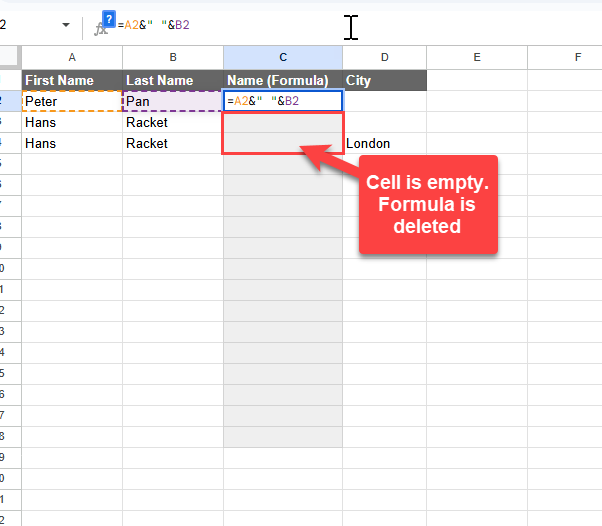
Hello @sven-bo,
The Google Sheets "Add New Row" API endpoint replaces any field containing a formula with a blank value upon execution. Unfortunately, this is how the endpoint functions, and we do not have a way to preserve the formula while adding a new row.
Ok, well noted. Thanks!
Ok, well noted. Thanks!
Actually you can easily overcome this issue by following this video guide where I show how you can pass formulas dynamically as well using google sheet- add new row action.