How to "Clear" a Field Value (ActiveCampaign Integration > Create or Update a Contact)
Status: Closed · Asked by avisin on · 0 views
Hello,
When I am using the action step
ActiveCampaign > Create or Update a Contact
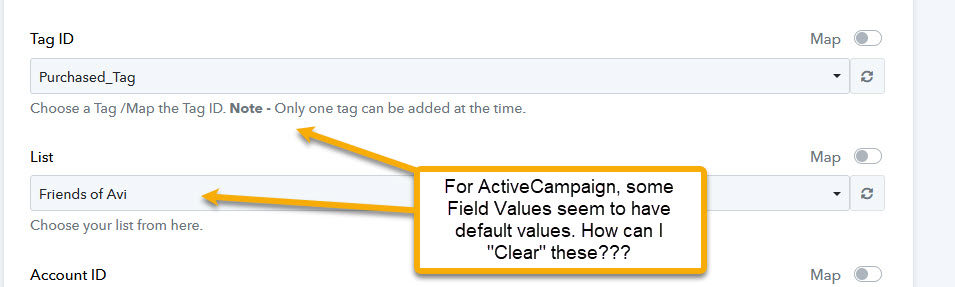
It shows me all my fields. But some fields seem to have a default value selected.
See screenshot below & Video at https://us02web.zoom.us/clips/share/jH_wgofYRXeqwAwb9F93iQ (36 seconds)
Question: How can I *clear* these values?
(And I think ideally it would be nice, if these values were *not* populated to begin with, and only showed up if I selected them from the dropdown)
Thanks / Avi
Hello,When I am using the action step
ActiveCampaign > Create or Update a ContactIt shows me all my fields. But some fields seem to have a default value selected.
See screenshot below & Video at https://us02web.zoom.us/clips/share/jH_wgofYRXeqwAwb9F93iQ (36 seconds)Question: How can I *clear* these values?
(And I think ideally it would be nice, if these values were *not* populated to begin with, and only showed up if I selected them from the dropdown)
Thanks / Avi
Hello @avisin ,
Click on map button which is located right side of the field and remove the tag.
FYI I'm not from pabbly connect team, I'm an automation freelancer who helps other pabbly users.