How to connect webhook to a php based landing page
Status: Open · Asked by beginnersworld02 on · 0 views
I want to use Pabbly Connect to connect my landing page leads to a google sheet. My landing page is made using php and html. How and where do i put in the pabbly webhook url on my website?
Hello @beginnersworld02 ,
Thank you for reaching out.
To connect your landing page to Pabbly Connect, you need to provide the Pabbly Connect webhook URL to your website developer or the person who created your landing page. They will be able to integrate the webhook into your PHP/HTML website so that all lead submissions are sent directly to your Google Sheet via Pabbly Connect.
Hi, i sent the code to our developer but unfortunately he doesn't seem to know where exactly to put in the webhook url. Was hoping you could offer us some guidance on that.
Hi @beginnersworld02,
You need to add the Pabbly webhook URL in the PHP file that handles your form submission (for example: submit.php or process.php).
In simple terms, after the form is submitted, a POST request should be sent to the webhook URL with the form data.
Example:
if ($_SERVER["REQUEST_METHOD"] == "POST") {$data = [
"name" => $_POST['name'],
"email" => $_POST['email']
];$webhook_url = "YOUR_PABBLY_WEBHOOK_URL";
$options = [
"http" => [
"header" => "Content-Type: application/json",
"method" => "POST",
"content" => json_encode($data)
]
];$context = stream_context_create($options);
file_get_contents($webhook_url, false, $context);
}
?>
So, please ask your developer to send the form data to the webhook URL right after form submission.
Once done, you can submit a test entry and capture the response in Pabbly.
if ($_SERVER["REQUEST_METHOD"] === "POST") {
$Full_Name = $_POST['Full_Name'] ?? '';
$Email = $_POST['Email'] ?? '';
$Your_Number = $_POST['Your_Number'] ?? '';
$age = $_POST['age'] ?? '';
$Centre = $_POST['Centre'] ?? '';
$Comments = $_POST['Comments'] ?? '';
/* BASIC VALIDATION */
if(empty($Full_Name) || empty($Email)){
echo "Invalid form submission";
exit;
}
/* SAVE DATA TO CSV FILE */
$webhook_url = "https://connect.pabbly.com/workflow/sendwebhookdata/IjU3NjcwNTZmMDYzMjA0MzU1MjZkNTUzNjUxMzci_pc";
$storage = "storage/submissions.csv";
$data = [
$Full_Name,
$Email,
$Your_Number,
$age,
$Centre,
$Comments,
date("Y-m-d H:i:s")
];
$file = fopen($storage, "a");
fputcsv($file, $data);
fclose($file);
/* EMAIL SEND */
/* PABBLY WEBHOOK */
$data = [
"name" => $Full_Name,
"email" => $Email
];
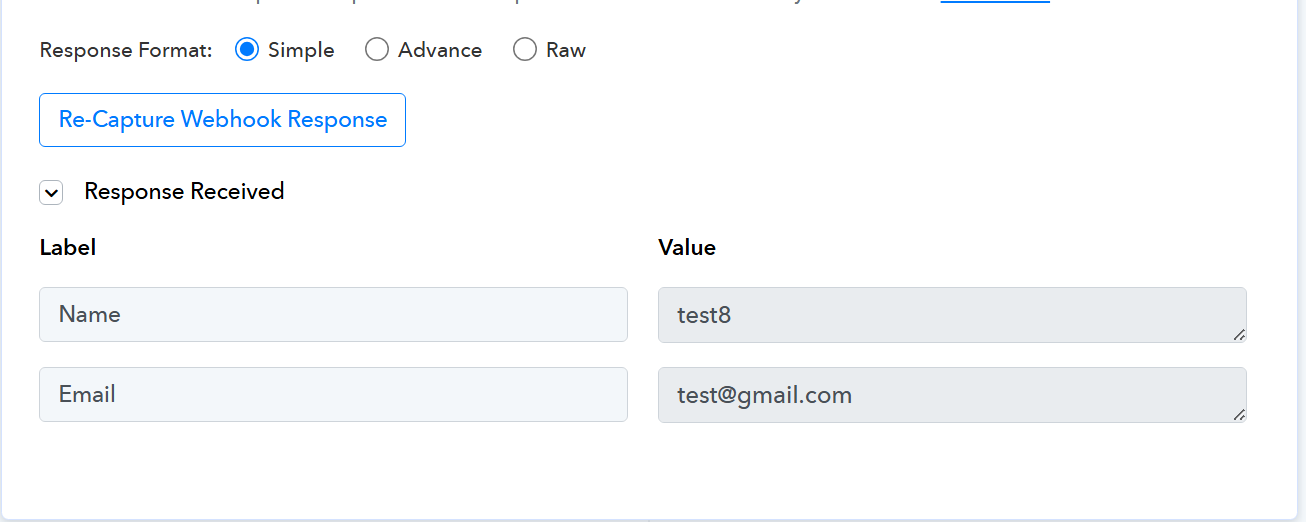
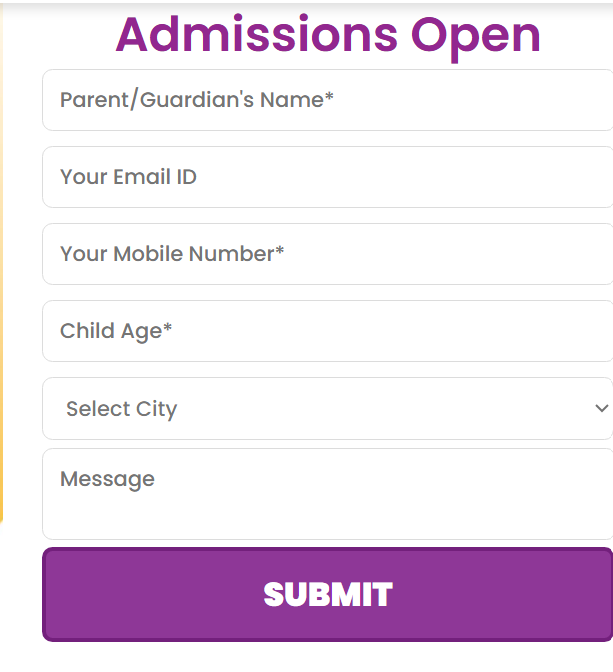
Currently after installing the pabbly webhook url onto my landing page, I am able to capture only 2 fields out of 6. I want to capture the respones of the whole form as well as the utm link data associated. I've attached my code also here for reference. Could you please let me know what i need to change in order to capture all the fields in my webhook response
Hi @beginnersworld02,
Upon reviewing the code you shared, it appears that only two fields are being sent to the webhook, which is why only Name and Email are being captured.
We recommend checking with your developer/IT team to ensure that all required fields are included in the webhook request payload. Since this involves custom code implementation, it falls outside our scope of support.
Once all fields are properly sent, Pabbly will be able to capture them accordingly.
Hi, thank you for your help, I'm now able to capture all the form fields from my leads onto pabbly using the webhook. By any chance do you know how to capture the utm link data as well. I understand that it relates to the website backend code but any guidance would help. For ref as explained above: My website is a php+html landing page
Hi @beginnersworld02,
Yes, it is possible to send UTM parameters to the webhook from a PHP-based website.
Since UTM values are captured from the URL, your developer will need to first store them (via hidden fields, cookies, or sessions) and then include them in the webhook payload along with the form data.
As this involves changes in your website’s backend/front-end code, we recommend coordinating with your developer to implement this.
Once the UTM fields are included in the payload, Pabbly will be able to capture them without any issue.
Please let us know if you have any further questions.