How to create Al Multi Agents workflow?
Status: Open · Asked by Ravi Mittal on · 0 views
Hi,
I am attempting to create workflows that use multiple AI agents.
1. Each AI agent should have:
- Memory to retain previous actions.
- A distinct character, personality, or role/job.
While I’ve managed to set up simple workflows, they currently lack memory of previously performed actions.
I need guidance on how to create workflows with the above features.
Thanks
Hello @ravimittal7,
Could you please let us know which application you are referring to for using AI agents? This will help us assist you more effectively.
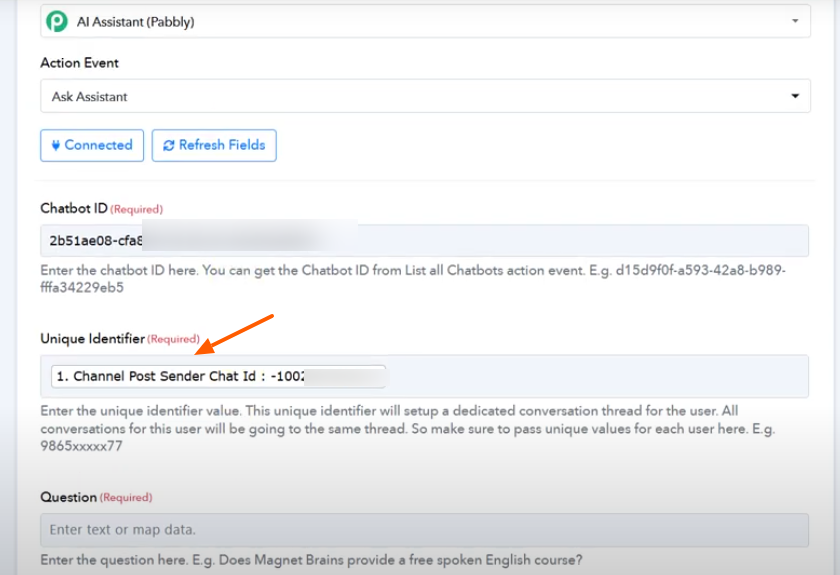
However, if you are using the AI Assistant (Pabbly), please note that when using the "Ask Assistant" action, a unique identifier is passed. This allows you to set up a dedicated conversation thread and retain the context of previous interactions.
Kindly refer to the attached image for more information.
Hi,
I am using OpenAI but can't have previous results as context.
Which LLM do you use for Pabbly assistant?
Hello @ravimittal7,
Thank you for sharing the details.
Please note that when working with OpenAI, the process involves creating a thread, and using the "List Messages" action, you can retrieve the complete conversation history within that thread. This allows you to maintain context across multiple interactions.
To assist you more effectively, could you please share a demo workflow you’re working on, along with details on how you intend to access or reference information from previous actions or conversations? This will help us guide you in implementing memory and context more accurately within your setup.
Also, to clarify, the AI Assistant by Pabbly uses OpenAI as its underlying LLM.
Looking forward to your workflow example so we can assist you further.
Hi,
Which model of OpenAI do you use, or is there an option for us to select one?
I can share the workflow link. The idea is to create a multi-agent system that consistently performs tasks without repeating content that has already been created, such as blog posts or email content.
Additionally, is there any way to add a review step to the workflow, so that the next action can only proceed once I approve it?
Thanks
Hello @ravimittal7,
You can select the OpenAI model as per your requirement. If the desired model isn’t listed in the dropdown, you can enable the Map button beside the Select Model field and manually enter the model name.
Regarding your second query, currently there’s no built-in feature in Pabbly Connect to add a manual review/approval step before proceeding to the next action. If such a feature is introduced in the future, we’ll be sure to update users about it.
Hi,
Should I share the workflow link so that you can understand it and provide or suggest a complete solution?
Thanks.
Hello @ravimittal7,
Sure, please share the workflow URL so we can take a closer look and assist you more effectively.
Hi,
I am waiting for the response.
Hello @ravimittal7,
Apologies for the delayed response.
We're currently reviewing your workflow and will get back to you shortly with an update. In the meantime, we recommend exploring the AI Assistant (Pabbly) feature to see if it can help you achieve your use case more efficiently.
Thank you for your patience and understanding.
Ok. I will wait for your revert.
Hi,
I am waiting for your response. I have gone through the video shared by you.
Thanks
Hello @ravimittal7,
My apologies, I missed your message. The use case you are looking to achieve doesn't seem to be achievable using OpenAI. However, you may try using an AI assistant by Pabbly and let us know if it works fine for you.
Hi,
Can you suggest how can following be done? I am creating Emails and Blogs using OpenAI but problem is content is getting repeated. If there were some memories inbuilt to AI assistant, it should not generate similar content which was generated previously.
Hello @ravimittal7,
You can refer to the attached tutorial to learn how to use the AI Assistant by Pabbly effectively.
While creating the assistant, please make sure to include a clear instruction, such as “Do not repeat content that has already been generated” in the Chatbot instructions field. This helps guide the assistant to avoid repetition and maintain unique responses across your emails and blogs.
Hi,
I have already used the prompt "Do not repeat content that has already been generated" but still getting almost similar content.
Thanks
Hello @ravimittal7,
Please share the workflow URL so we can review the issue.
Hello @ravimittal7,
Upon reviewing your workflow, we noticed that you're still using OpenAI in the configuration.
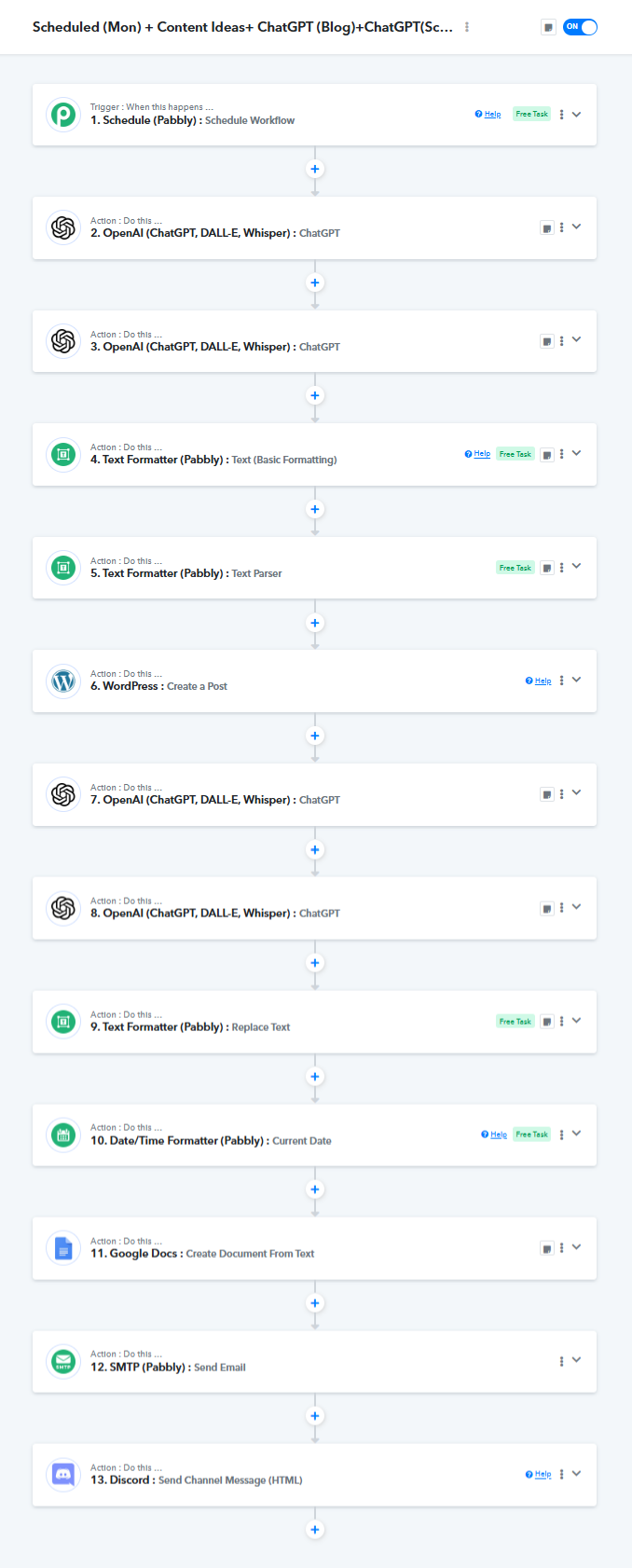
As previously mentioned, the use case you're aiming to achieve is currently not possible with OpenAI. We recommend switching to AI Assistant (Pabbly), which is better suited for your specific requirements.
The use case you are looking to achieve doesn't seem to be achievable using OpenAI. However, you may try using an AI assistant by Pabbly and let us know if it works fine for you.
Please try setting up the workflow using Ai Assistant (pabbly) and if you face any issues with that feel free to reach out to us.
Ok.. Can you please share videos links on how to use AI Assistant (Pabbly) & what should I write if I want to use o1 & o3 models?
Hello @ravimittal7,
Please refer to the attached video tutorial to learn more about using the AI Assistant (Pabbly).
You can select the required AI model by choosing it from the OpenAI Model dropdown. If the desired model is not listed, you can simply turn on the Map option and manually enter the model name to use it.
Let us know if you need any further assistance.

Hi,
I am using AI assistant (Pabbly) now but can't use GPT-o1 model. There was an error that temperature setting is not valid in this Model. Please suggest. I just want to use o1 model to write a title or content topic idea.
Hello @ravimittal7,
The model we use does support working with vector stores; however, the specific version you are trying to use (GPT-01) doesn't seem to support this functionality, which may be causing the issue.
This limitation could be why the temperature setting is not being accepted as well.
For generating a title or content topic idea, we recommend switching to a supported model version to ensure smoother operation.
Hi, where can we see the AI Agent created? How can we get AI Agent Id and how can we make changes to the prompt of these AI Agents?
You know there is HUGE LIMITATION to your AI Agents due to which actual automated workflows aren't achieved.
When can I expect AI Agent like in n8n be available in your system? n8n is an open source and it can be hosted easily on VPS.
We have responded to your query on the following thread:
? https://forum.pabbly.com/threads/ai-agent-like-n8n.31184/
Please refer to the thread for further clarification.