How to gather all the flow data in one google sheet
Status: Open · Asked by Manish Kumar Jha on · 0 views
Hi team, I have to create different whatsapp chatflow for different set of customers and i want to capture thier responses on one sheet. and i want to run 50 to 100 such unique campaigns using chatflow. to run these campaigns i will upload through contacts and briadcast trigerring template based chatflow's however i want all these campaigns response be captured on differenyt google sheet as thier flows are different, Pls suggest how can i do that?
Hi @Manish Kumar Jha,
Thanks for sharing your requirement.
Since you're running campaigns for different customers, you’re likely using multiple numbers and templates within your chatflows. Based on each campaign template, you can set up flows that trigger when a specific template is delivered. Once triggered, the response data can be sent to Pabbly Connect.
You can either:
- Use a single workflow to capture all responses, or
- Create separate workflows for different flows
As per your use case, keeping data separated would be more manageable. You can use a Router in one workflow to direct data to different Google Sheets (or tabs) based on the template/campaign, or send data to different workflows altogether.
This way, your campaign responses stay organized and easy to track.
Hi Preeti, I am unable to move forward on this...i am unable to connect chatflow with google sheets despite doing everything correct as per the video it is not happening, Pls help.
Hi @Manish Kumar Jha,
Thank you for reaching out again.
We checked the flow you shared, and it appears that there is no node configured for Google Sheets in your current setup.
Could you please clarify the exact issue you are facing? It would be helpful if you could share a screencast showing the steps you followed and where you are getting stuck.
Additionally, if you are unable to connect Google Sheets directly within Chatflow, you can use an alternative approach:
- Send the response data via the API node in Chatflow to Pabbly Connect
- Then use the Google Sheets action in Pabbly Connect to store the data
Please share more details so we can guide you accordingly.
Hi preeti, attached are all screenshots. as you can see i have completed the flow and using api connector when i am doing run test while it is showing successful it is not capturing the correct data. pls suggest.
Hi @Manish Kumar Jha,
Thank you for sharing the details.
Please note that when you use the API node and click on “Run Test”, it only sends sample/parameter values, not the actual user response data from the flow. That is why you are not seeing the correct data reflected.
To capture the actual response:
- Trigger the flow using a real test (live execution) instead of “Run Test”
- Once the flow executes, the actual response will be sent to Pabbly Connect
- Go to Task History in your Pabbly Connect workflow and verify the received data
- Then return to the workflow builder and click the refresh icon (next to the response dropdown) to fetch the latest response
- Map the fields accordingly and proceed
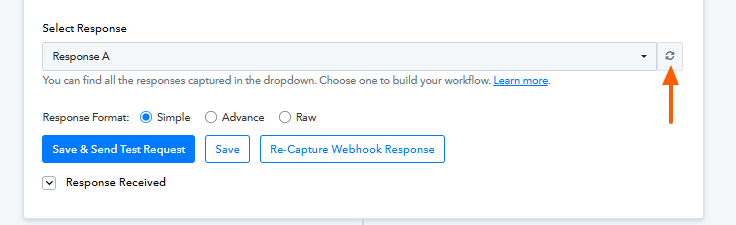
This is expected behavior, as real-time data is only available after an actual execution.
For better clarity, you can refer to this tutorial on using the API node with Pabbly Connect:
youtube.com/watch?v=TMu35XAOK0A
If you still face any issues, please feel free to reach out.