How to stop a workflow when it is in delay
Status: Open · Asked by Shahidul Islam Pranto on · 0 views
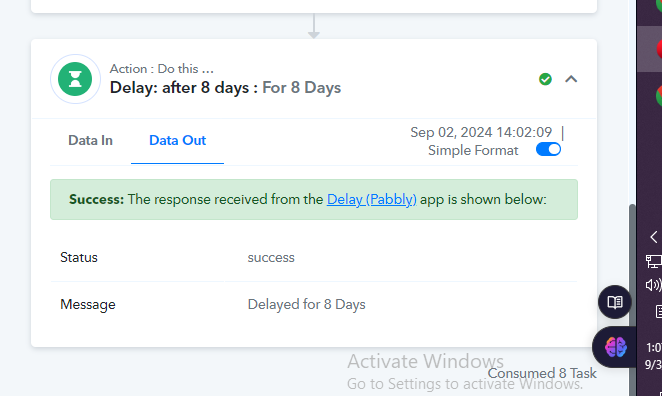
My workflow is running the delay step for new 8 days. But now, I do not want to it run further in the middle of that workflow run. How can I setp being the workflow rund after the 8 days delay?
Hello @shahidul islam pranto
Once the workflow has triggered, and reached the delay step it will run and execute the next step after the delay period(8 days) only.
Also, can you please clarify a bit more about your use case so that we can suggest a workaround?
I have basically not tested the automation. It is the first automation run, and I am doing the test with actual business customers. I do not want to send more emails to my customers.
Note: Can you please stop these four automations for me from your side?
- IjU3NjUwNTZkMDYzNjA0MzE1MjY4NTUzNzUxMzY1MTZiNTQzNzBmMzMi_pc
- IjU3NjUwNTZkMDYzNjA0Mzc1MjZmNTUzNjUxMzc1MTZiNTQzNzBmMzci_pc
- IjU3NjUwNTZkMDYzNjA0MzU1MjZjNTUzMzUxMzU1MTYwNTQzNDBmMzYi_pc
- IjU3NmQwNTY0MDYzZjA0MzQ1MjY1NTUzNjUxMzM1MTY2NTQzNCI_3D_pc
Hello @shahidul islam pranto
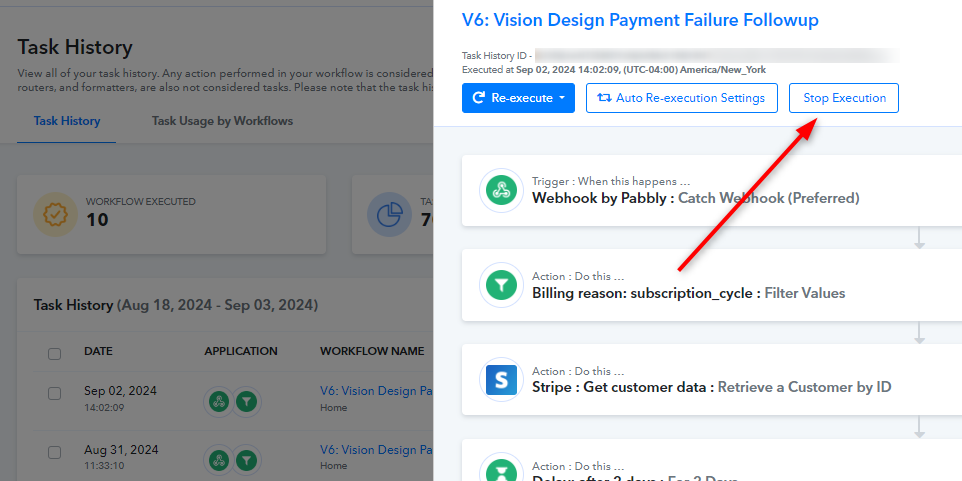
You can stop the execution of the concerned workflows by clicking on the task history and then click on the Stop Execution button as shown in the image attached.
Hope this helps.
Thank you for your very fast support system.
Hi @Preeti Paryani
I would like to know if it is possible to interrupt a flow via automation.
My case:
I have events that are registered and I receive the information, after that, I delay 1 day before the date to send a reminder that the event is coming.
But sometimes I need to make changes to the event and new information is sent. In this case, I would need to stop sending the previous information.
How do I stop it via automation or external request?
I await your response,
Thanks
Hi @Preeti ParyaniI would like to know if it is possible to interrupt a flow via automation.
My case:
I have events that are registered and I receive the information, after that, I delay 1 day before the date to send a reminder that the event is coming.
But sometimes I need to make changes to the event and new information is sent. In this case, I would need to stop sending the previous information.
How do I stop it via automation or external request?
I await your response,
Thanks
It’s not possible to stop the execution of a task through an external request or automation. It can only be stopped via the Task History.
Hi @ArshilAhmad,
Thanks!
Could you implement this solution, it would be very useful.
If you want this feature to be added to Pabbly Connect, you can submit your request on our dedicated platform.
https://roadmap.pabbly.com/b/Feature-Request
Our development team will look into your request and, if possible, add the desired feature to Pabbly Connect.