HTTP 429 (too many requests) Fix
Status: Open · Asked by Adam Henderson on · 0 views
Hi, I have a workflow that trigger when an invoice has been updated. Then we do a few steps then email teh invoice. There is a 60 requests per minute limit on the API for the sending email step but occasionally we go over this.
I have added a delay before the send step but it doesn't work because each iteration is a separate workflow. Is there a better way to do it? is there a way to have a delay between on a step being ran between workflows?
Hi @adamkse,
There is no specific tool that allows you to set a delay between the execution of two tasks.
As a workaround, you can add a Counter and Delay step to your workflow. The counter will increase the delay time by 1 minute each time your workflow is executed. So, the first execution will occur after 1 minute, the next after 2 minutes, and so on, until 60 minutes.
This approach effectively creates a delay between two tasks, but please note that it will also cause the action steps to execute with a significant delay due to the nature of this setup.
Currently, the counter is set assuming that your workflow triggers 60 times at once. You can adjust the Reset Counter time as per your convenience.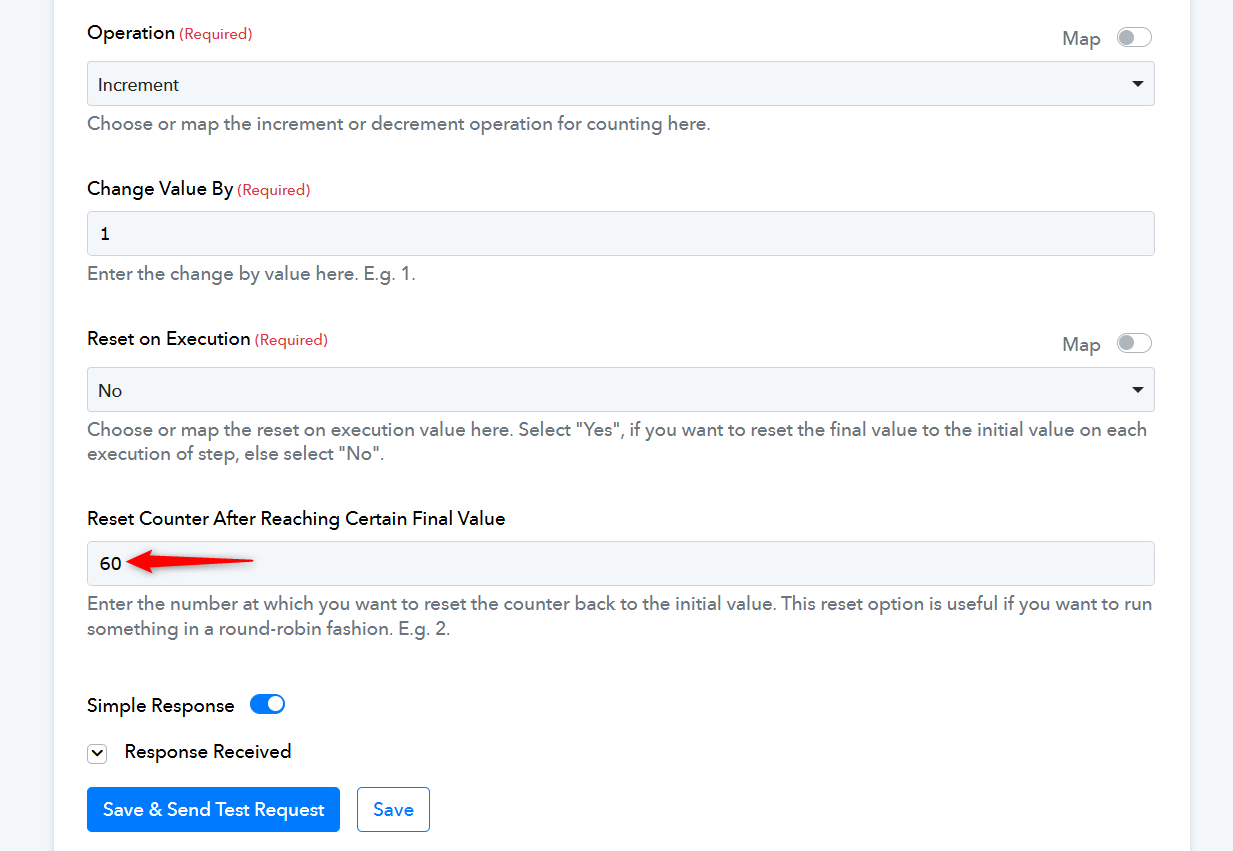
ah right, that wont work, it would have to be in seconds other than minutes.
Hello @adamkse,
You can use code(Pabbly) to add the delay for seconds.
Here is the code, it will add a 20-second delay:
await new Promise(resolve => setTimeout(resolve, 20000));
output = [{wait: "20000ms"}];