HTTP 500 "Error adding workflow step" when saving Notion → Query a Database action
Status: Open · Asked by Michael Alt on · 0 views
Hello Pabbly Support Team,
I am unable to save a "Notion – Query a Database" action step in one of my workflows. Every save attempt fails with HTTP 500 and the response {"status":"error","message":"Error adding workflow step."}.
Workflow / Account details
- Workflow name: 01 – AZ Jülich → Notion
- Workflow URL: https://connect.pabbly.com/v2/app/workflow/mapping/IjU3NjcwNTZlMDYzMjA0MzM1MjZlNTUzMzUxM2Ei_pc
- Existing structure (working fine): RSS (Pabbly) – New Item in Feed → Notion – Create Database Item
- Notion connection used: "Notion #1" (the same connection that works for the existing Create Database Item step)
- Target database: "Nachrichtenportal-DB" (loaded correctly into the Database dropdown after Refresh Fields)
What I am trying to do Add a "Notion – Query a Database" step to enable URL-based duplicate detection before the Create step (Artikel-ID is a URL property in the database).
Failing endpoint POST https://connect.pabbly.com/backend/api/workflows/IjU3NjcwNTZlMDYzMjA0MzM1MjZlNTUzMzUxM2Ei_pc/steps/upsert-action Returns: HTTP 500 — {"status":"error","message":"Error adding workflow step."}
Things I have already tried, all of which produce the same HTTP 500
- Inserting the Query step between the existing RSS trigger and Notion Create step.
- Appending the Query step at the very end of the workflow (after Notion Create).
- Filter Conditions with a mapped value from the RSS step.
- Filter Conditions with a static URL: {"and":[{"property":"Artikel-ID","url":{"equals":"https://example.com/test"}}]}
- Filter Conditions copied verbatim from the Pabbly help example: {"and":[{"property":"Status","select":{"equals":"In Progress"}}]}
- Refreshing the RSS trigger to produce a fresh response prior to building the Query step.
- Reloading the workflow and reconnecting the Notion connection.
In every case the save request to /steps/upsert-action returns HTTP 500 immediately. The Create Database Item step on the same connection and same database continues to work normally.
Questions
- Is there a known issue with the Notion "Query a Database" action right now?
- Is there something specific in the Filter Conditions JSON that the Pabbly backend currently rejects?
- Could you check the server-side logs for my workflow ID to see why the upsert-action call is throwing 500?
Thank you very much for your help.
Best regards,
Michael
Hi @Mike4711 ,
Thank you for providing the detailed troubleshooting steps and the workflow URL.
I have checked your workflow 01 – AZ Jülich → Notion, but I do not see the 'Notion – Query a Database' action step added there.
In order for our technical team to investigate the backend logs and identify why the server is rejecting this request, we need the step to be present (even in an error state) or attempted while we are monitoring.
Could you please try to re-add the 'Query a Database' step to your workflow once more? Even if it fails to save,
We are standing by to investigate as soon as you give it another try!"
Hello,
Thanks for the quick response. I have just attempted to re-add the step as requested, while leaving the Action Setup panel open so your team can inspect the current state directly on workflow IjU3NjcwNTZlMDYzMjA0MzM1MjZlNTUzMzUxM2Ei_pc (01 – AZ Jülich → Notion).
Reproduction performed at approximately 2026-05-12, 11:28 UTC, with the following configuration:
- App: Notion
- App Event: Query a Database
- Connection: Notion #1 (existing, working connection used by the Create Database Item step in the same workflow)
- Database: Nachrichtenportal-DB
- Filter Conditions: {"and":[{"property":"Artikel-ID","url":{"equals":"https://example.com/test"}}]} (static value, no field mapping, to rule out token-resolution issues)
- Sort by Property: Datum
- Sorting Order: Ascending
- Response Format: Simple
Clicking "Save & Send Test Request" produced the same failure as before:
POST https://connect.pabbly.com/backend/api/workflows/IjU3NjcwNTZlMDYzMjA0MzM1MjZlNTUzMzUxM2Ei_pc/steps/upsert-action
→ HTTP 500
→ {"status":"error","message":"Error adding workflow step."}
No step appears on the workflow canvas afterwards, and no toast / inline error is shown in the UI. The Action Setup panel is still open with the values above, so the unsaved step is still present in my browser session for inspection.
A few additional data points that might help your backend team:
- The Create Database Item step on the same workflow, same connection, same database continues to save and run normally.
- The same 500 occurs regardless of whether I insert the step between RSS and Notion-Create, or append it at the end of the workflow.
- The same 500 occurs with simpler filter payloads as well, including the literal example from your in-app hint: {"and":[{"property":"Status","select":{"equals":"In Progress"}}]}.
- Clicking plain "Save" (without test) produces the identical 500, so the failure is on the step-upsert itself, not on the downstream Notion API call.
Please let me know what your technical team finds in the server logs for the timestamp above, or if you would like me to keep the panel open and trigger another reproduction in a specific time window.
Best regards,
Michael
Hi @Mike4711 ,
Thank you for the detailed reproduction and for keeping the panel open.
I have escalated this issue to our technical team. Since the error occurs during the upsert-action (save) process and persists with standard examples, they will investigate why the backend is rejecting this specific configuration.
We will update you here as soon as we have word from the developers. We appreciate your patience!
Hi Hrishabh,
just checking in for a quick status update. My last note from you was on May 12th.
Could you let me know where things currently stand or if there's anything you need from me to move forward?
Thanks, Michael
Apologies for the delayed update.
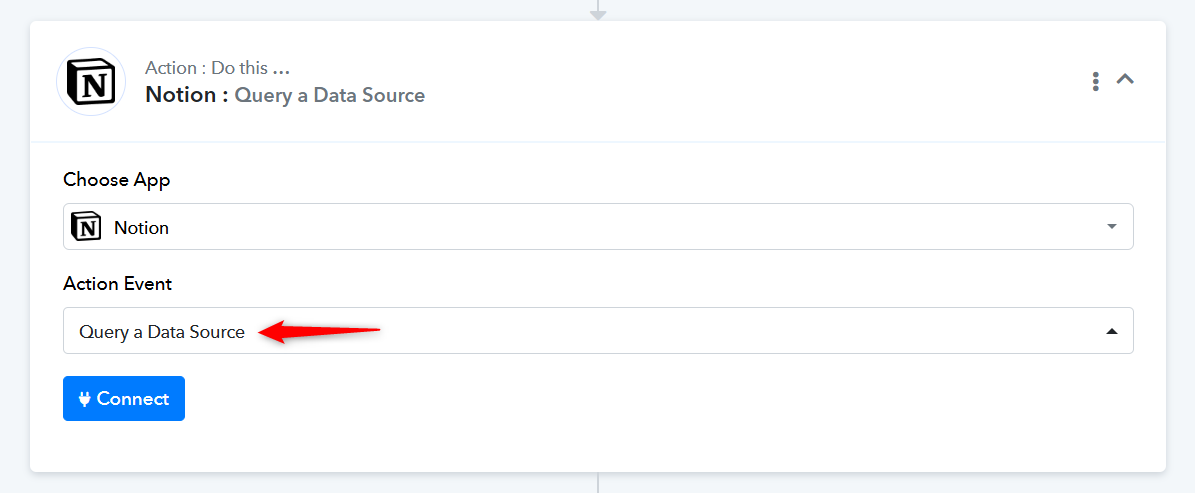
Our team has added the "Query a Data Source" action step to Notion and suggests that you try using the "Query a Data Source" action step to see if it resolves your issue.
Thanks & Regards,
Arshil Ahmad
Customer Support Associate
? Pabbly.com