HTTP request
Status: Open · Asked by Trinity One Social on · 0 views
Goo dday \\I have a URL from a service proider where they send our leads to. What modules for triggers and actions do i need to use to receive the Leads when they are populated in their URL - API?
Hello @Trinity One Social,
Could you please elaborate a bit more on your use case or let us know the name of the service provider and where you would like to send the leads? This will help us suggest the most suitable triggers and applications for your workflow.
In general, if the specific service provider or destination app is not natively integrated with Pabbly, you can use:
- Webhook by Pabbly (as the trigger) to capture the leads, and
- API by Pabbly (as the action) to send the data to any other platform.
Kindly share more details about your setup so we can guide you better.
Ok we received the following endpoint:
https://services.autotrader.co.za/api/lead/v1.0/leads?from=2025-11-01&to=2025-11-12
We want as soon as the leads are populated in this endpoin, pabbly needs to check for it every 5 minutes and then create a contact in leadconnector (Highlevel)
I am just not sure what the trgger and actions is to fetch the leads at the API endpoint above\\
Hello @Trinity One Social,
Thanks for sharing the details of your use case. Could you please provide us with the API documentation for Autotrader (not just the endpoint)? This will help us review the authentication method and data structure so we can guide you with the correct trigger and action setup.
Additionally, please check with the Autotrader team if they supports webhooks, as that would allow real-time lead capture instead of periodic checks. Once you share the API documentation, we’ll review it and assist you further with the configuration.
i have asked - but i managed to connect with a scheduler as a trigger and then user the api action - but how do i setup that it only pulls the data between now and when the previous execution was run so that it doesn't pull all the leads every time...the scenario url is:
https://connect.pabbly.com/workflow/mapping/IjU3NjYwNTY0MDYzMDA0MzM1MjZjNTUzNTUxMzMi_pc
what I am struggling with is to extract only the leads I have not extracted before and then if the scenario runs, to segregate the leads as you will see they are marked as 0, 1,2,3,4,5 etc...
see loom video: https://www.loom.com/share/debf93bb2f324bb0959c1dcbac808699
i got it right using the iterator - but I still cannot only pull the latest data
Please check for me
1) I am using the parameters as provided by the API documentation - see attached but still it pulls all the data and not just recent
2) when processing the LEadconnector action - it only processes one lead and not all retrieved.
Hello @Trinity One Social,
Please remove the query parameter from the endpoint and make sure the date mapped under parameters matches the format as per the API docs.
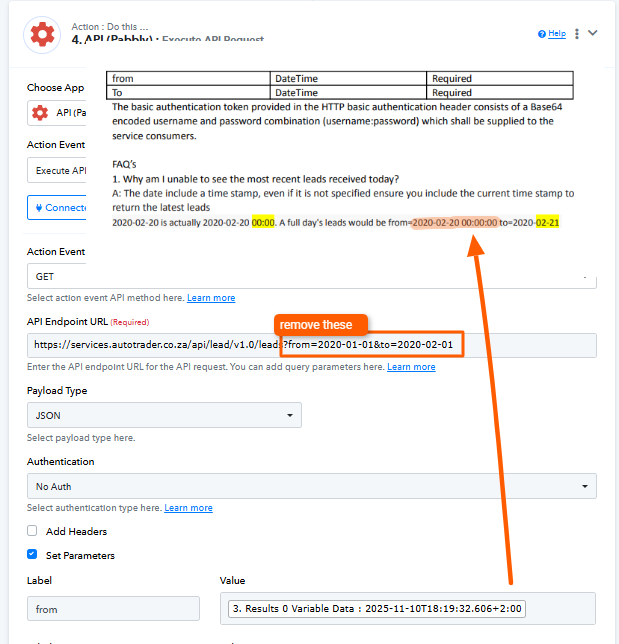
i got that right - but now how do i populater all leads: see loom video:
In the workflow setup, the Iterator only shows the first set of data. However, during automation, it will process each lead individually.
ok great - how do i check that?
when i run the automation - it just populates one contact to Leadconnector?
how do i also add that the Time is is set at GMT+2 in the date formatiing?
Hello @Trinity One Social,
I have recorded a short screencast demonstrating how the workflow processes all the objects and how you can use the Date/Time Formatter to convert the timestamp into the required format. Please refer to the video for a clearer understanding:
https://www.awesomescreenshot.com/video/46505073?key=d877f7656e8f7638bfabad0f89940666
If you have any further queries, feel free to let us know.