I have added the FB pixel code but it is not showing up when I checked
Status: Closed · Asked by Vireesh on · 0 views
As instructed by your team via mail and the screenshots share I have added the pixel code under FB pixel in the Chekout customizer settings. When I checked for the pixel functionality it is still not getting tracked.
How to fix it?
Hey Vireesh, thanks for reaching out. Can you share the name of the product and the plan that you're tracking via FB pixel? We'll have this checked.
Hi Avneesh,
Below is the product for which I am trying to track the conversion using FB pixel.
EZ-EWL-KAN-ENROLLMENT
Checkout page URL is: https://payments.pabbly.com/subscribe/614b49e5a1455277e90ee74a/ez-ewl-kan-enrollment
FB pixel ID is: 447764312612963
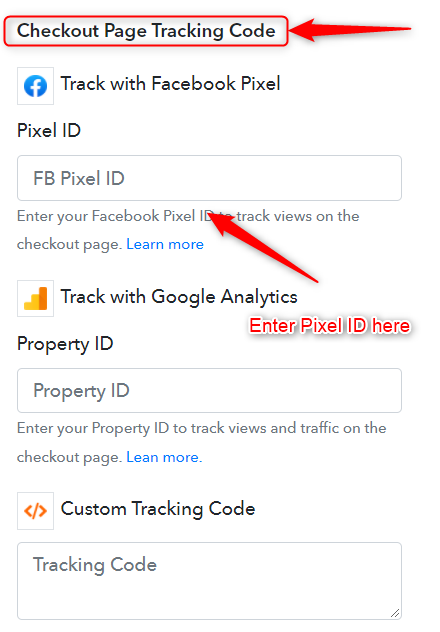
Thanks for sharing the information Vireesh. I checked your account and seems like you've inserted your pixel code only on the thank you page.
If you want to track the page view, you'll have to add tracking codes on the checkout page. To track the conversions, you'll have to add it to the thank you page. Please check the screenshot attached.
Got it,
thank you