I need to buy pabble connects for my multiple clients
Status: Open · Asked by susheel singh on · 0 views
Hello Team,
What if I have 5-7 clients who want their leads in a single google sheet ? How I can use pebbly connects to provide them their leads separately ?
Hello @susheelsingh,
Thank you for reaching out.
If you're capturing leads from Facebook Lead Ads and sending them to Google Sheets, you can follow this tutorial:
youtube.com/watch?v=sDYvI_BzXG4
Since you have 5–7 different clients, you'll need to create separate workflows for each client to keep their data separate.
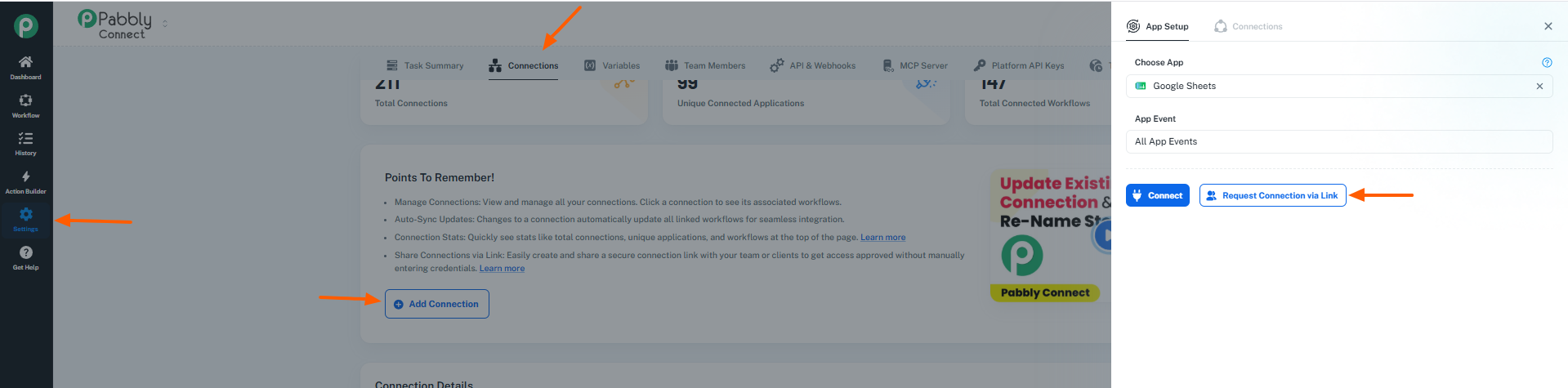
Also, we recently introduced the "Request Connection via Link" feature. Using this, your clients can securely connect their own Facebook Lead Ads and Google Sheets accounts without sharing credentials with you. Once the connections are created, you can use them while setting up their workflows.
Guide: https://forum.pabbly.com/threads/connection-sharing-via-link-%E2%80%94-user-guide.35949/
If you're using any platform other than Facebook Lead Ads, please let us know and we'll guide you accordingly.
what is 10,000 tasks in paid version ?
Hello @susheelsingh,
Thank you for your question.
Pabbly Connect is an automation platform that allows you to connect different applications and automate tasks between them using triggers and actions.
For example:
- Trigger: A Facebook Lead Form is submitted.
- Actions: Send an email, send a WhatsApp message, and add the lead to Google Sheets.
In Pabbly Connect, tasks are counted based on the paid actions executed in a workflow.
Let's say a lead is received and your workflow performs the following actions:
- Send a Gmail email
- Send a WhatsApp message
- Add a row to Google Sheets
In this case, a single workflow execution will consume 3 tasks, as 3 paid actions are being performed.
Please note:
- Triggers are free.
- Some internal Pabbly actions are also free.
- Most external application actions (Google Sheets, Gmail, WhatsApp, Facebook, etc.) consume tasks.
Therefore, if your plan includes 10,000 tasks, each workflow execution will deduct tasks based on the number of paid actions executed during that run.
I hope this clarifies how task consumption works. Please let us know if you have any further questions.
Hello @susheelsingh,Thank you for your question.
Pabbly Connect is an automation platform that allows you to connect different applications and automate tasks between them using triggers and actions.
For example:
- Trigger: A Facebook Lead Form is submitted.
- Actions: Send an email, send a WhatsApp message, and add the lead to Google Sheets.
In Pabbly Connect, tasks are counted based on the paid actions executed in a workflow.Let's say a lead is received and your workflow performs the following actions:
- Send a Gmail email
- Send a WhatsApp message
- Add a row to Google Sheets
In this case, a single workflow execution will consume 3 tasks, as 3 paid actions are being performed.Please note:
- Triggers are free.
- Some internal Pabbly actions are also free.
- Most external application actions (Google Sheets, Gmail, WhatsApp, Facebook, etc.) consume tasks.
Therefore, if your plan includes 10,000 tasks, each workflow execution will deduct tasks based on the number of paid actions executed during that run.I hope this clarifies how task consumption works. Please let us know if you have any further questions.
It means I can create multiple pabbly connects for my clients separately ?
Hello @susheelsingh,
Yes, absolutely. You can create separate workflows for each of your clients within the same Pabbly Connect account.
Each workflow can have its own connections, triggers, and actions, allowing you to manage your clients' automations independently and keep their data separate.
Just keep in mind that all workflows will consume tasks from the task quota available in your Pabbly Connect account.
Please let us know if you have any further questions.
OK So in 10,000 tasks means I can create so many sheets and Pabbly will combinedly give me 10,000 leads automation
Hello @susheelsingh,
Not exactly. The 10,000-task limit is based on the number of actions executed, not the number of Google Sheets or workflows you create.
For example, if a lead is captured and your workflow only adds that lead to Google Sheets, then 1 task will be consumed per lead.
So, if you have 10,000 available tasks and each lead consumes 1 task, you can process approximately 10,000 leads.
However, if your workflow performs multiple actions for each lead (for example, add to Google Sheets, send an email, and send a WhatsApp message), then each lead may consume 3 tasks. In that case, 10,000 tasks would process approximately 3,333 leads.
You can create multiple workflows and connect multiple Google Sheets for your clients, but all workflows will share the same task quota available in your account.
Hello @susheelsingh,Not exactly. The 10,000-task limit is based on the number of actions executed, not the number of Google Sheets or workflows you create.
For example, if a lead is captured and your workflow only adds that lead to Google Sheets, then 1 task will be consumed per lead.
So, if you have 10,000 available tasks and each lead consumes 1 task, you can process approximately 10,000 leads.
However, if your workflow performs multiple actions for each lead (for example, add to Google Sheets, send an email, and send a WhatsApp message), then each lead may consume 3 tasks. In that case, 10,000 tasks would process approximately 3,333 leads.
You can create multiple workflows and connect multiple Google Sheets for your clients, but all workflows will share the same task quota available in your account.
Yes that will be sufficient, what about monthly subscription ? I am interested for 10k tasks package but I want to go with month on month subscription. please share the link so I can buy the subscription
Hello @susheelsingh,
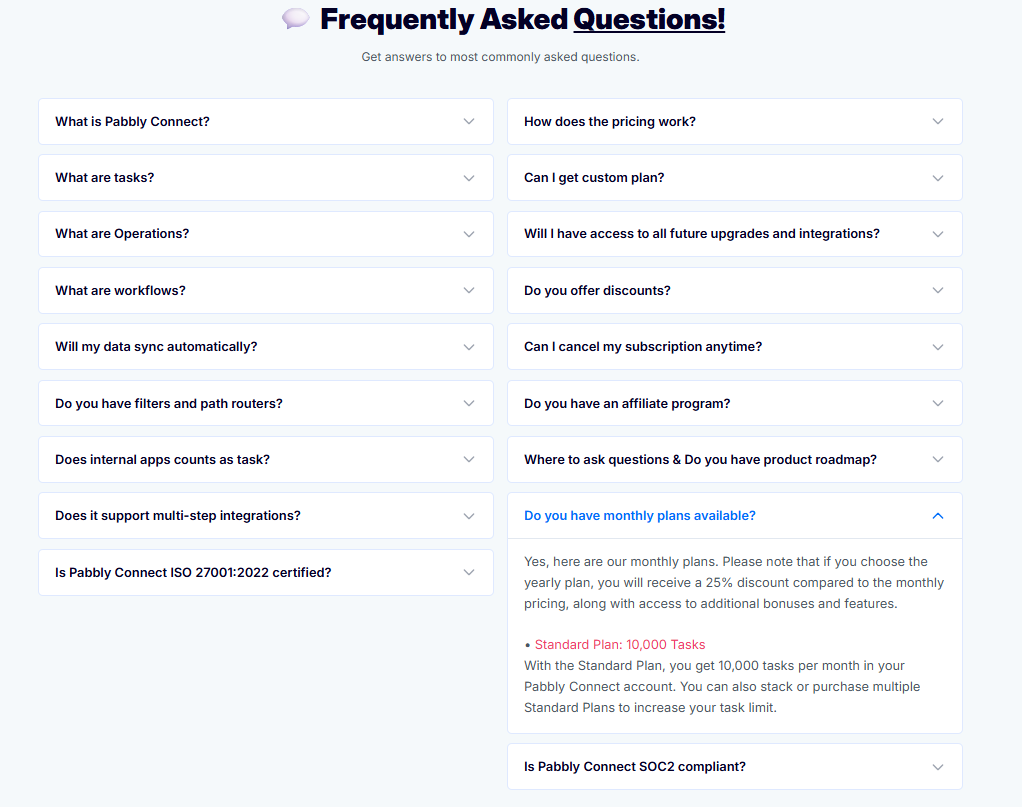
Certainly! You can purchase the monthly subscription plan for Pabbly Connect directly from our pricing page.
Please refer to the FAQ section on the pricing page, where the monthly plans are listed, including the Standard Plan with 10,000 tasks per month.
Link: https://buy.pabbly.com/connect/#faq
Before making the purchase, please ensure that you are logged in with the same email address that is associated with your Pabbly account.
If you have any questions regarding the plans or task limits, please feel free to let us know.
Hello @susheelsingh,
Certainly, we can provide you with the purchase link.
Before that, could you please confirm the following details:
- Which email address would you like to use for purchasing the subscription?
- Would you like to make the payment in USD or INR?
Once we have these details, we'll provide you with the appropriate purchase/invoice link for the monthly 10,000-task plan.
Hello @susheelsingh,Certainly, we can provide you with the purchase link.
Before that, could you please confirm the following details:
- Which email address would you like to use for purchasing the subscription?
- Would you like to make the payment in USD or INR?
Once we have these details, we'll provide you with the appropriate purchase/invoice link for the monthly 10,000-task plan.
Great Thanks
Hello @susheelsingh,
You're welcome!
Could you please confirm whether you've purchased the subscription?