I set workflow but it sheet not respond
Status: Open · Asked by safargenie on · 0 views
Hello Sir/ Ma'am
I set a workflow with whatsapp Api & google sheet. I want that when customer trip will start then before 1 day google sheet respond to customer whatsapp msg. I set workflow but it sheet not respond kindly check it and help us.
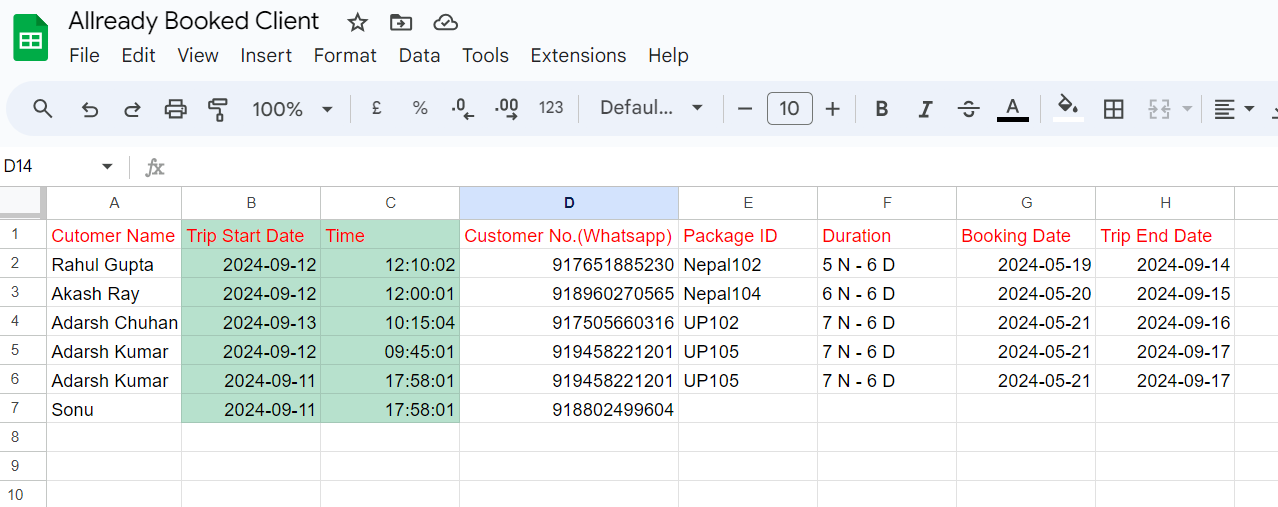
We provide our google sheet link Click Here & check
Our Google Sheet
Pabbly work flow check it
https://connect.pabbly.com/workflow/share/WBBRYwdQA2AASgRuUQ5XcFpOBwMDWlY0UElWRAcIUSkGSFMoUBEMZgtHBCYDRANiXhdQOgJeAzsMGFdTBlBTIF1HABJcX1AqWxYCeQVUW2hYBlF5B2Y#
Attachments
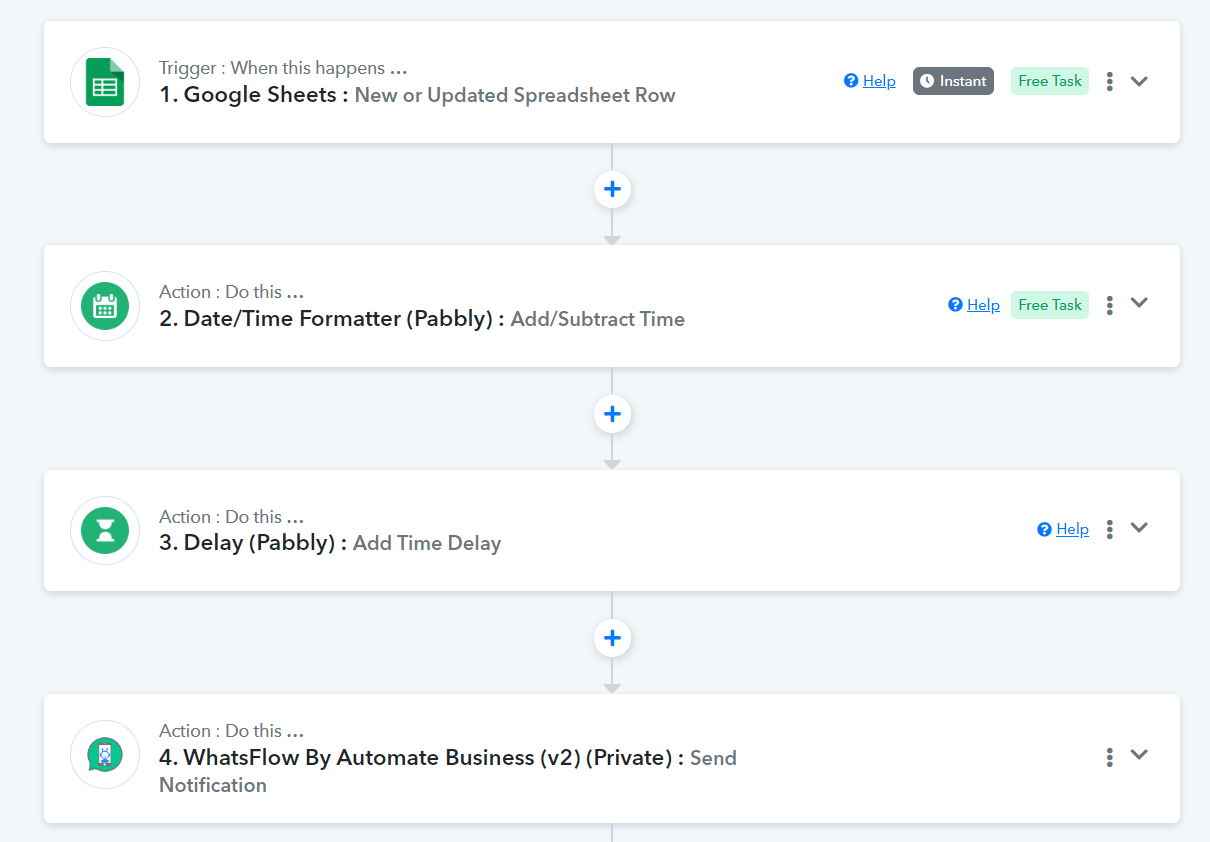
Hello @safargenie
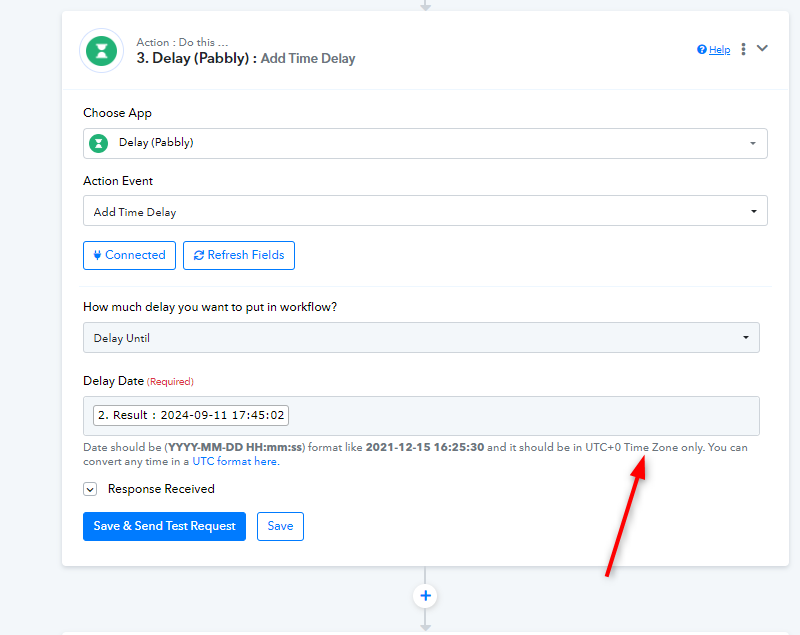
It appears that the Delay date you entered is not in correct format. Kindly refer to the image below,
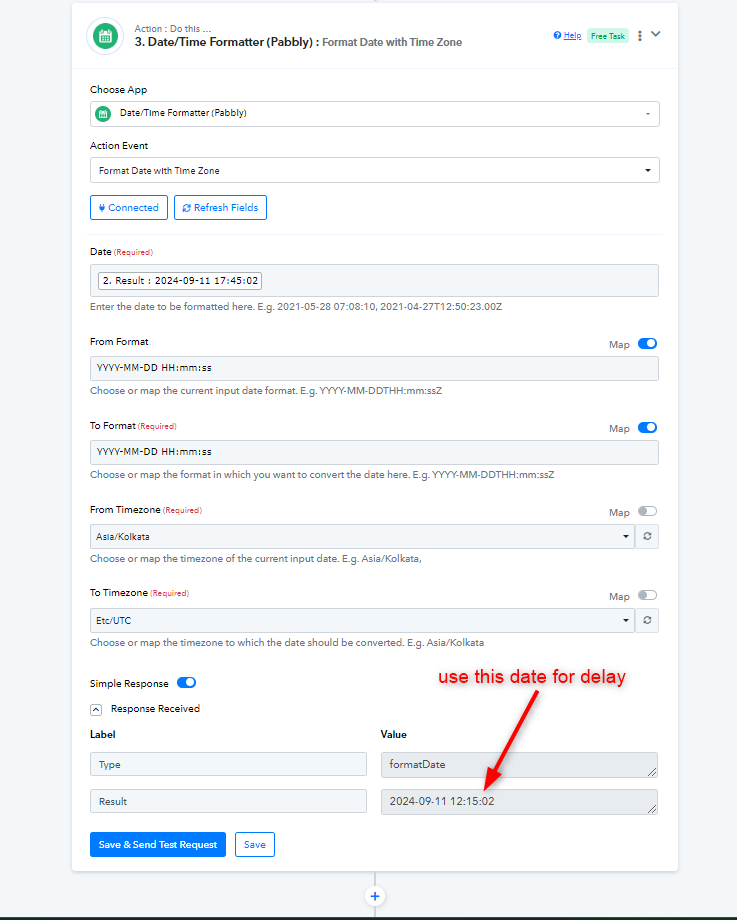
For rectifying this issue, you can use Date/Time Formatter to Format Date and Time Zone and the use that response in the delay. You can do the same as mentioned in the image below.
You can learn more about Date/Time Formatter here -
youtube.com/watch?v=XpRkxwytOOg
Let us know if this works for you.
I'm Again try but it is not work please check it :
Dear Team,
I have been trying to do the steps advised by you. But things are not moving. I am sharing you the link of Workflow. Kindly check & advise.
Google Sheet Link : https://docs.google.com/spreadsheets/d/1XqUCcyyVOKKgSczBq5CsGQIlNtOR6VhFT2lstGfrz8M/edit?usp=sharing
Thanks & Regards
Rahul.
Dear Team,
I have been trying to do the steps advised by you. But things are not moving. I am sharing you the link of Workflow. Kindly check & advise.
Work Flow Link : https://connect.pabbly.com/workflow...aAztfSwEFAlQGdVBKUUNSUVQuUx4DeFMCCzgKVAcvUTA#
Google Sheet Link : https://docs.google.com/spreadsheets/d/1XqUCcyyVOKKgSczBq5CsGQIlNtOR6VhFT2lstGfrz8M/edit?usp=sharing
Thanks & Regards
Rahul.
Hey @safargenie
We have made a few changes in your workflow according to your requirement. Kindly make a few test entries for tomorrow or day after tomorrow and let us know if you get the messages delivered in time.
Awaiting your positive response.
No. we are not found any positive result. Please try again.
Please Check again
Google Sheet
https://docs.google.com/spreadsheets/d/1XqUCcyyVOKKgSczBq5CsGQIlNtOR6VhFT2lstGfrz8M/edit?usp=sharing
Hello @safargenie
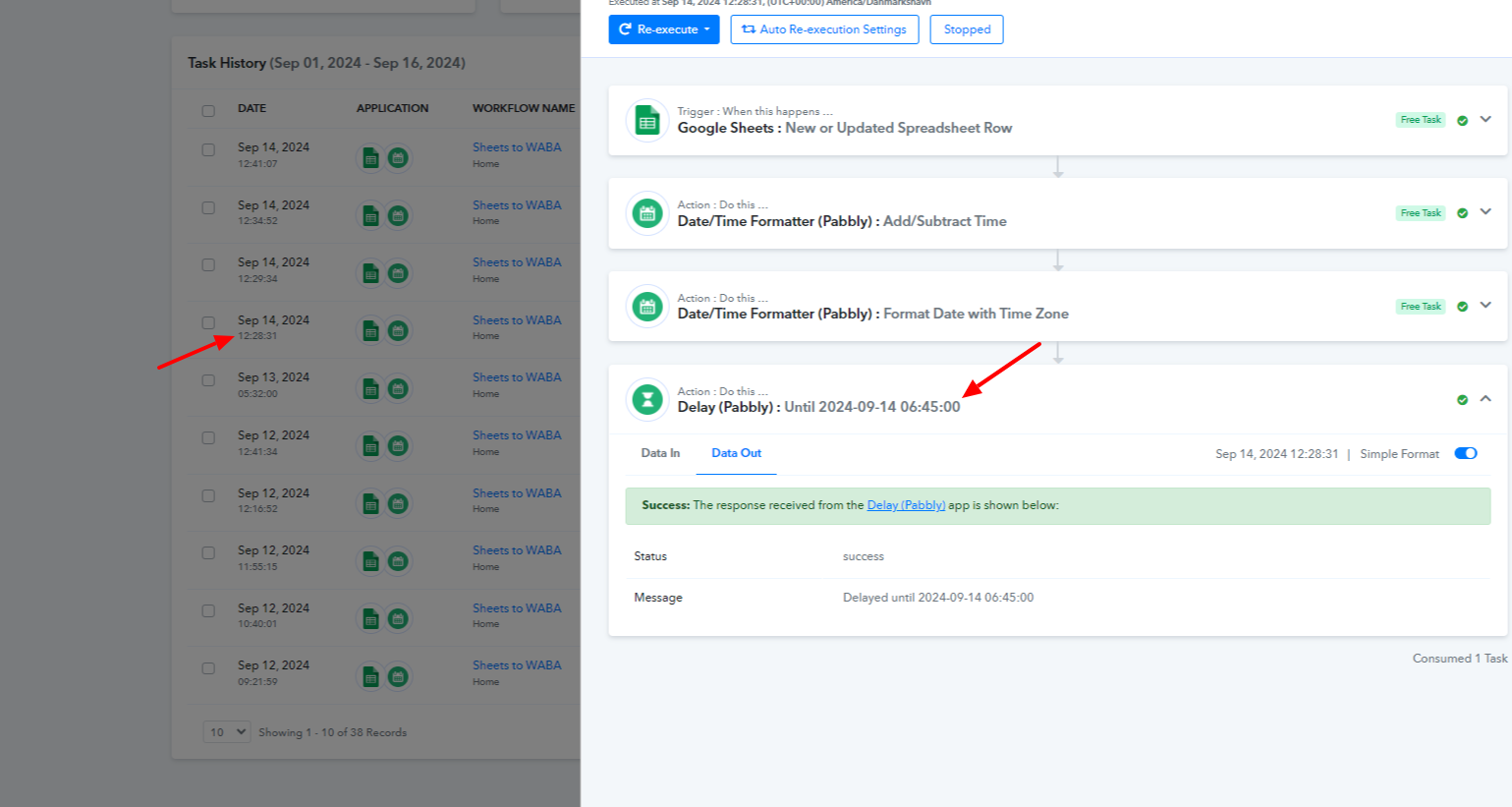
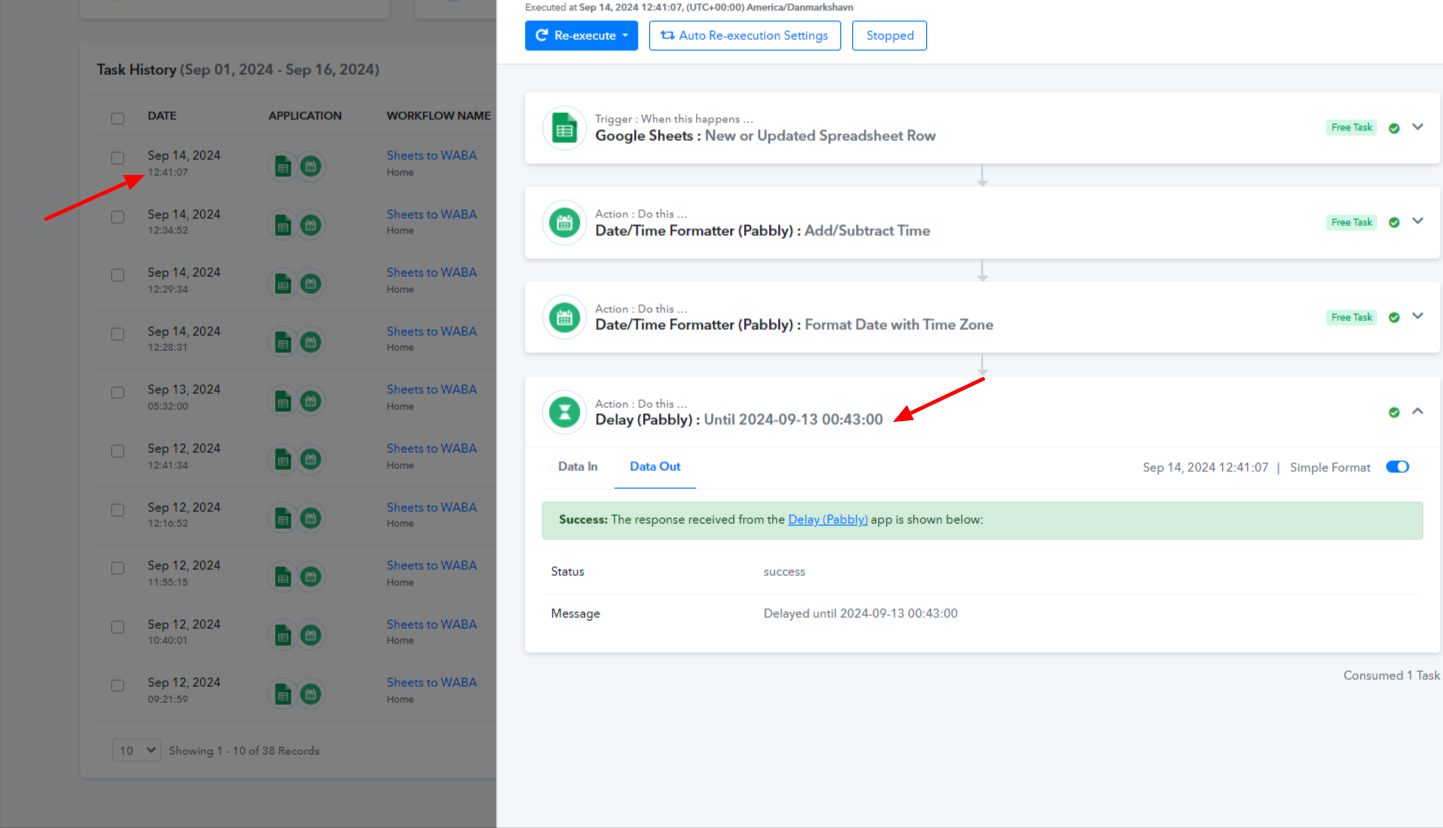
As we have checked on our end we have noticed that after subtracting one day from the trip start date, the calculated date and time falls before the workflow trigger time.
As a result, the message can't be sent further. Please refer to the attached screenshot for more information.
We are a tour operator. We have to develop bot. we share our requirement Kindly check it.
Audio link
https://drive.google.com/file/d/1J3wbdN0LWPLB3mcjzIdMCJziUO7nCfZD/view?usp=drive_link
https://docs.google.com/spreadsheets/d/1XqUCcyyVOKKgSczBq5CsGQIlNtOR6VhFT2lstGfrz8M/edit?usp=sharing
https://connect.pabbly.com/workflow/share/DkYDMVEGUzAASlA6Ug0BJlpOVVEHXghqBh8DEQEOUSlVGwhzUBEBawtHU3FVEgZnVh8BawNfBT0MGAsPCV8AcwMZAhBdXlUvURwHfAFQW2gOUAMrUTA#
Regards
Rahul Gupta
7651885230
Hey @safargenie
Kindly provide us the access for the drive file on [email protected] so that we can check your requirement and assist you accordingly.
We share you our requirement on [EMAIL][email protected][/EMAIL] please check it.
https://drive.google.com/file/d/1J3wbdN0LWPLB3mcjzIdMCJziUO7nCfZD/view?usp=sharing
Hello @safargenie
All the shared use cases seem to be possible. You can hire an automation consultant who can assist you with creating the same.
You can contact them here - https://forum.pabbly.com/threads/pabbly-connect-experts-and-consultants.22/
If you face any issues with Pabbly Connect please let us know.