Inaccurate Campaing Stats
Status: Open · Asked by Raymond St Clair on · 0 views
UPDATE
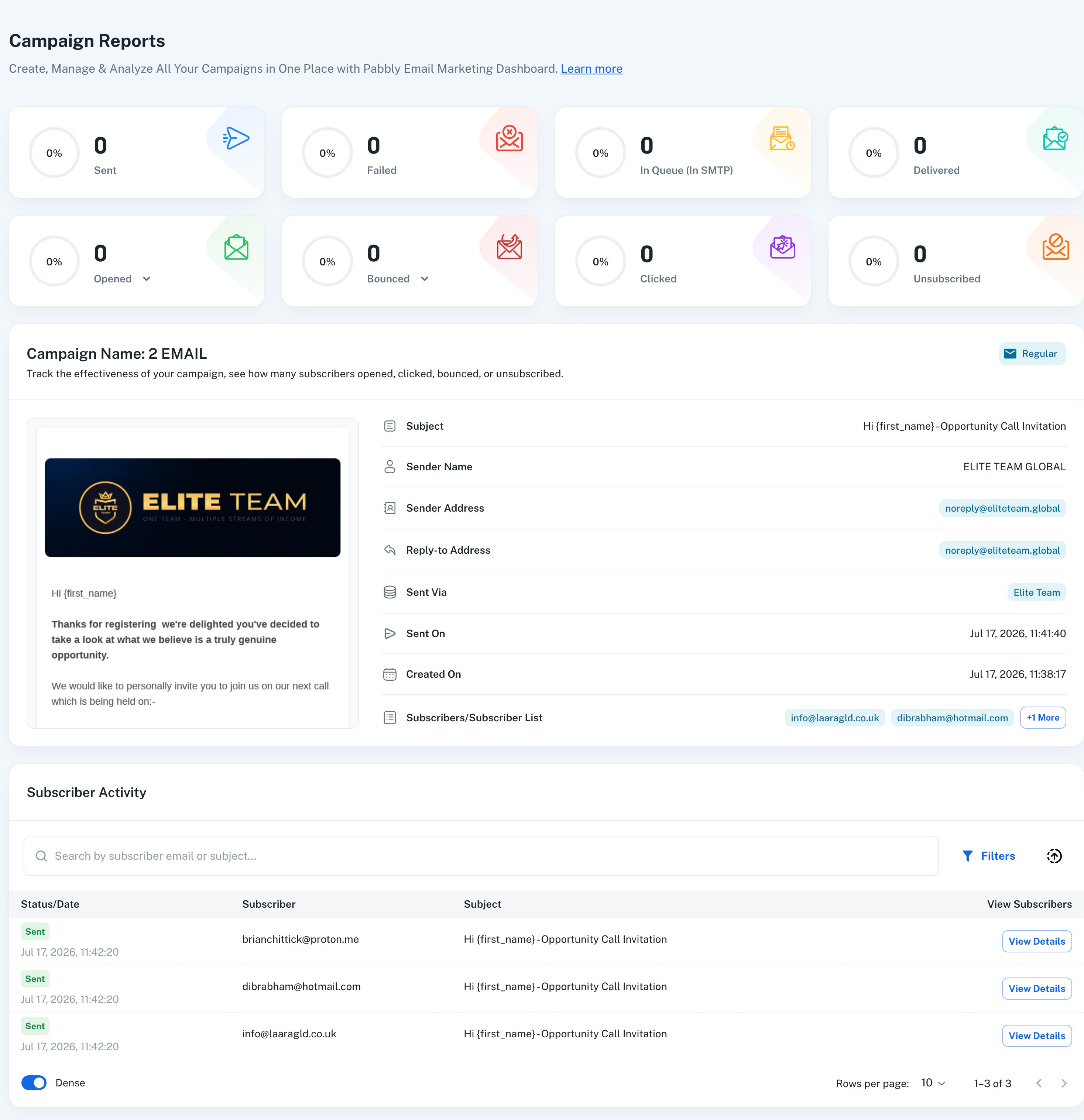
I can now see that it says S

ENT = 3 ... however it also says that there 3 emails in the SMTP Queue - I'm confused - either the emails are sent or they are not - which is it?
Hello,
The Emails in Queue status means that the emails are currently queued on the SMTP server and are waiting to be dispatched.
At this stage, the emails have neither been sent nor failed. They are awaiting processing by the delivery server, and their final status will be updated once the SMTP server attempts delivery.
Please allow some time for the delivery server to process the queued emails. Once processed, their status will change accordingly (for example, Sent or Failed).
If the emails remain in the Queue state for an unusually long time, please let us know, and we'll be happy to investigate further.
Thanks & Regards,Anushka Sahu
Customer Support Associate
🌐 Pabbly.com
OK so its still saying the they are in the SMTP Queue and I have just sent and received email to and from that email address successfully.
I just checked the Mail Queues on the server and there's nothing queued there.

Raymond St Clair:
OK so its still saying the they are in the SMTP Queue and I have just sent and received email to and from that email address successfully.I just checked the Mail Queues on the server and there's nothing queued there.
And its been more than 2 hours since I sent the campaign.
3 hours ..
Raymond St Clair:
Raymond St Clair:OK so its still saying the they are in the SMTP Queue and I have just sent and received email to and from that email address successfully.I just checked the Mail Queues on the server and there's nothing queued there.And its been more than 2 hours since I sent the campaign.
now 3 hours and still sitting in the SMTP queue - you'll appreciate I can't spend money on a platform until I know its working fully and correctly.
4 hours ...
Whats the result of your investigations please
Hello,
As per the report for the "2 EMAIL" campaign, the emails were sent to 3 recipients, and all 3 emails are currently showing as Queued.
This means that Pabbly Email Marketing has processed and sent the emails to your configured delivery server, "Elite Team", but we have not yet received a response from the delivery server confirming their delivery status. Therefore, the emails are still showing as Queued.
In this case, there is no further action required from the Pabbly Email Marketing side, as the emails are awaiting a response from your delivery server.
Additionally, we checked your account and found that the Spam and Bounce webhooks have not been configured. Without these webhooks, Pabbly will not be able to receive updates regarding the status of sent emails, such as spam complaints or bounces.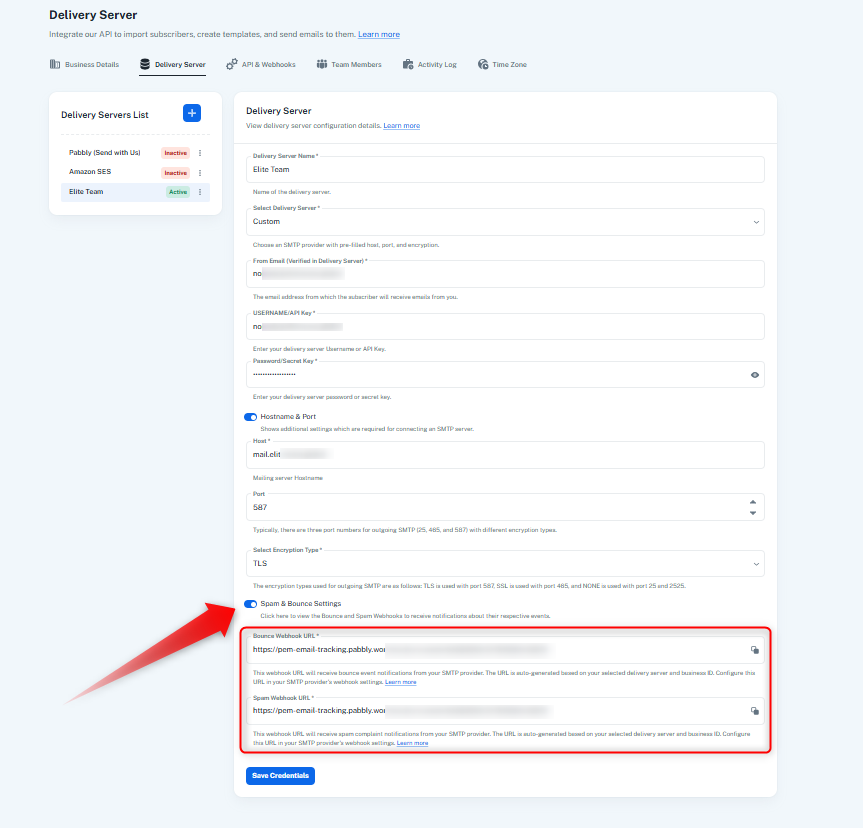
We recommend configuring the required webhooks on your delivery server. Once you've configured them, please save the credentials in Pabbly Email Marketing and run a test to check whether the email status updates are being received correctly.
If you need any assistance with the webhook configuration, please let us know.
Thanks & Regards,Anushka Sahu
Customer Support Associate
🌐 Pabbly.com
Too much messing around - however my SmartHost seems to confirm that the emails are going out.
For this campaign - https://emails.pabbly.com/app/campaign/campaign-report/6a5b9c8d38c570fa0b40dee3
41 emails we sent from Pabbly and it appears all of them reached my smarthost and were pushed through the smarthost - I know that people are receiving the emails as I have a test email in there as well.
Screenshot attached from the smarthost.

However the report seems to still indicate that some emails are in the Queue - how can this be - if you have handed the emails off to to my server and then my SMTP server and then my SMTP server has handed them off to my SamrtHost company who has sent all 41 emails - how can any be still in the queue, so I go back to my original point about the stats not updating correctly.
I don't need a webhook or API to see what's in front of me folks!
Here's a screenshot of the campaign

So this shows the 41 sent as confirmed by my smarthost - then it says 26 are in the SMTP queue??? Explain what that is and why please. Then it says 15 have been delivered which is disproven by the report from the smarthost that CONFIRMS 41 emails delivered so that figure is wildly inaccurate.
As for OPENS, CLICKS and UNSUBSCRIBED I think those are generally correct.
If you're selling an email platform that people are using for marketing the reporting has to be 100% accurate - this reporting appears to be very inaccurate so I'm interested to see what your thoughts are and what paths to resolution you're employing to resolve.
Thank you.
Could I get an update on this please
So further to this thread ...

These are the stats from this campaign:-
https://emails.pabbly.com/app/campaign/campaign-report/6a5b9c8d38c570fa0b40dee3
So ...

41 emails were sent. OK I agree with that because my SMARTHOST (smtp2go.com)
But now it seems to go completely wrong.

It states that there 25 emails in the SMTP queue - this is incorrect.
I checked my mail server queues and logs - there is NOTHING in the queues or logs on the server.
This is confirmed by my SMARTHOST (smtp2go.com) - the emails came from you, transited through my SMTP mailserver and were handed off to my smarthost (smtp2go.com) successfully and smpt2go.com logs confirm that all 41 emails were sent out (see the earlier screenshot in this overall thread of that log).
Therefore the reporting of 25 emails in the queue is wrong.

it states 16 emails were delivered!
We know, because my own SMTP mailserver logs and the records at smpt2go.com smarthost prove beyond any doubt that 41 emails were delivered not 16.
Unless "delivered" means something else?
If only 16 were delivered (and how do you know if they are delivered or not as you have no access to the smarthost and I received no bounceback messages from them after running this campaign - the smarthost smtp2go.com are confirming in the screenshot I gave earlier in the thread that they DELIVERED 41 emails SUCCESSFULLY.
They are the carrier. Their statistics are deadly accurate. So why are yours different and / or inaccurate.


It states 2 emails were clicked
It states 2 emails were clicked
I can't argue with this as it appears to be correct
however ...
12.5% of 41 emails is not "2" it is "5.99"
However 12.5% of 16 (DELIVERED) is "2"
However it is NOT clear what this figure is or how you derive it - there should be a little question mark on each of these panels that pops a modal explaining the mats behind the figure and how it is derived.

AND NOW THE BIG ONE
I cannot argue with the 39 "opened"
But hold on ...
41 (emails SENT) X 243% = 99 EMAILS SENT
or do you mean
16 (emails DELIVERED (inaccurate) X 243% = 38.88 EMAILS SENT
Clearly you are deriving this figure from the inaccurate DELIVERED figure of 16 emails (my smarthost logs confirm this is an inaccurate figure).
CONCLUSIONS:
The way you report these figures is wholly confusing
These figures are inaccurate as proven by my server logs and smarthost records.
Clicking on ANY of these panels should COLLAPSE this panel (shown below)

Clicking on any of the statistic panels should change this panel to show only those subscribers who meet the criteria being clicked on ...
For example -
if I click on unsubscribed the subscriber list should show only those who are unsubscribed
if I click on clicked the subscriber list should show only those who clicked.
if I click on Opened the subscriber list should show only those who opened the emails
if I click on Unique Opens the subscriber list should show only those who opened the emails
Make each of the individual PANELS Clickable and affect the subscriber list as I have explained, fix the data issues, then this page would be a lot better
Thats another 20 minutes of my very valuable time you have had - this stuff should work already properly - it appears nobody at Pabbly has really thought about this or understood what needs to be seen to be accurate.
Hello,
Thank you for sharing the detailed information. We understand your concern regarding the difference between the statistics shown in Pabbly Email Marketing and the reports from your SMTP server/SmartHost.
Since you are using a custom delivery server, it is important to configure the required Delivered, Bounce, and Spam Complaint webhooks on your delivery server. Pabbly relies on the responses received through these webhooks to update the delivery status and other email statistics accurately.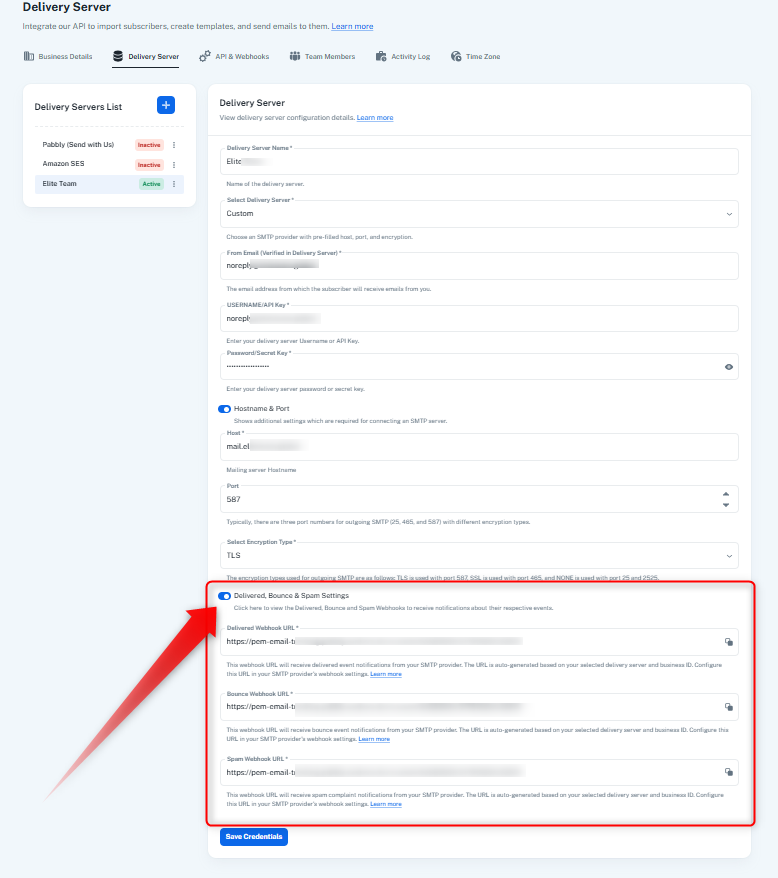
At present, these webhooks are not configured for your custom delivery server. Therefore, Pabbly is not receiving the actual delivery status from your SMTP/SmartHost, which is why you may see differences between the statistics shown in Pabbly and those shown by your SmartHost.
Also, regarding the Delivered count currently shown in Pabbly, since the delivery webhook is not configured, the system may assume an email as delivered when the recipient opens the email or clicks a link within it. This is why the Delivered figure may not match the actual number of emails successfully delivered by your SmartHost.
We recommend configuring the Delivered, Bounce, and Spam Complaint webhooks with your custom delivery server. Once these are properly configured, Pabbly will receive the actual delivery responses from your server, and the campaign statistics should reflect the correct delivery, bounce, and spam complaint statuses.
We hope this clarifies why the current figures differ.
Thanks & Regards,Anushka Sahu
Customer Support Associate
🌐 Pabbly.com
Hello,
This is our final follow-up regarding the difference between the statistics shown in Pabbly Email Marketing and the reports from your SMTP server/SmartHost.
As previously explained, since you are using a custom delivery server, the Delivered, Bounce, and Spam Complaint webhooks need to be configured on your delivery server. Pabbly relies on these webhook responses to accurately update the delivery status and email statistics.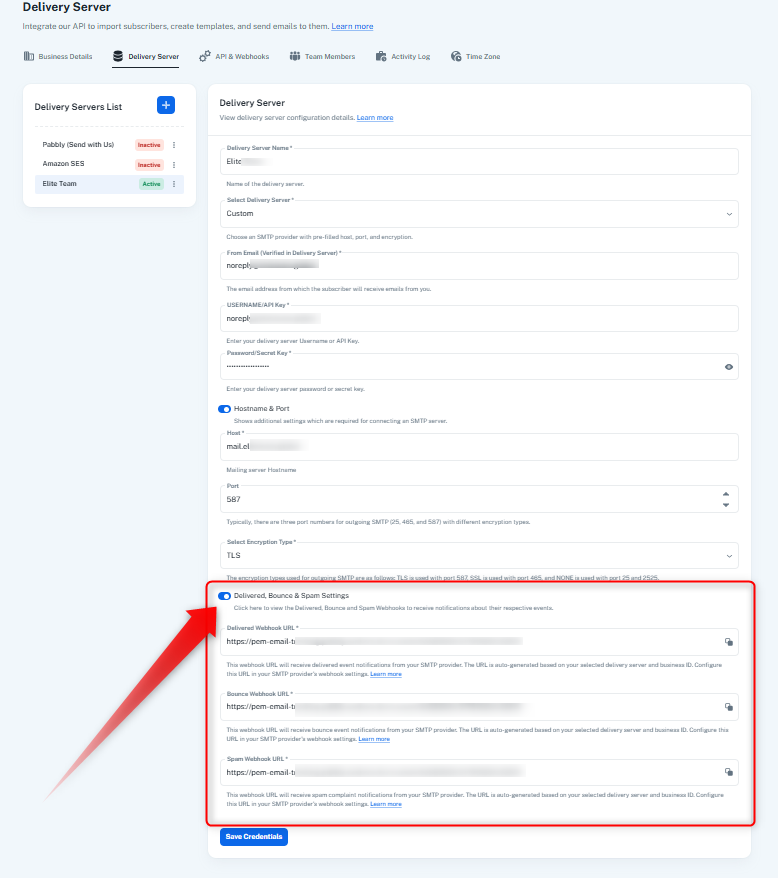
At present, these webhooks are not configured for your custom delivery server. As a result, Pabbly is unable to receive the actual delivery status from your SMTP/SmartHost, which may cause differences between the statistics displayed in Pabbly and those reported by your SmartHost.
We recommend configuring the required webhooks on your end. Once configured correctly, Pabbly will be able to receive the actual delivery responses from your server, and the campaign statistics should reflect the appropriate delivery, bounce, and spam complaint statuses.
Since we have shared the required information and the next steps, we will be closing this ticket for now. If you need any further assistance after configuring the webhooks, please feel free to reach out to us through a new ticket, and we'll be happy to assist you further.
Thanks & Regards,Anushka Sahu
Customer Support Associate
🌐 Pabbly.com
I just added the first webhook and tested it - it said it worked and gave me a response string. See picture!
Do I understand from this that brevo is the underlying platform that Pabbly is effectively a "front-end" for?
Please explain.

Hello,
Yes, Pabbly can be configured to receive delivery-related updates from your email delivery server through webhooks. However, Brevo is not an underlying platform or backend for Pabbly. If you are using Brevo or another custom delivery server, Pabbly relies on the webhook responses received from that delivery server to update the relevant email statistics.
Since you have now successfully configured the Delivered webhook and received a test response, Pabbly should start receiving the delivery status updates correctly for this event.
Similarly, we recommend configuring the Bounce and Spam Complaint webhooks as well. Once these are configured, Pabbly will receive the corresponding responses from your delivery server and will be able to update the Delivered, Bounced, and Spam Complaint statistics more accurately.
Please proceed with configuring the remaining webhooks, and let us know if you face any issues during the setup.
Thanks & Regards,Anushka Sahu
Customer Support Associate
🌐 Pabbly.com