Inquiry about Pabbly Connect + Pabbly Chatflow
Status: Open · Asked by Raulchong on · 0 views
I have a webhook in Pabbly Connect where the time is checked to verify customer service availability. I am connecting this webhook to Pabbly Chatflow, but I have a problem. When I send a message from Pabbly Connect and the message tells the user to type a specific word to activate a flow, it does not work and the bot restarts. How can I fix this?
I would like to run a Pabbly Connect webhook from Pabbly ChatFlow when the AI Assistant asks the user a question.
How can I make this possible? I want the AI Assistant to ask a specific question within your flow where the user has to select one of two options, and one option runs a Pabbly Connect webhook.
Hi @rfchong,
Please make a short screen recording and elaborate a bit more on the exact issue you are encountering. Also, share the workflow URL from Pabbly Connect and the email address associated with your Pabbly Chatflow account.
Please check out the video shared below:
Hello!
Thank you for your response, but I still have a question about how to make it so that when the user interacts with the AI assistant, it asks them a question with two possible answers, one of which triggers a Pabbly Connect flow.
Please let me know if you don't understand what I mean.
In this screenshot, I show you the initial Flow.
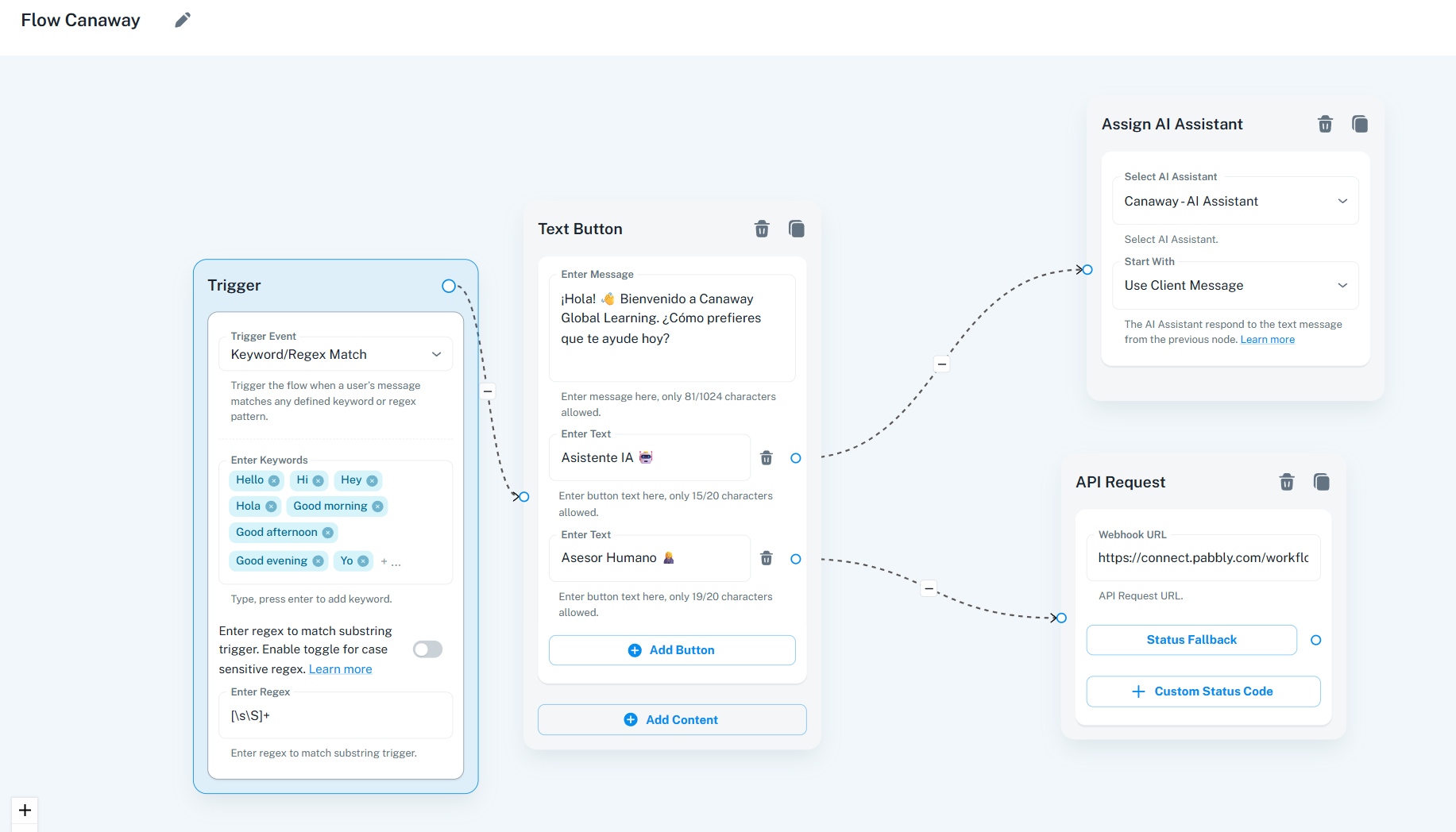
If the user chooses the “Asesor Humano” option, a Pabbly workflow is executed, which is https://connect.pabbly.com/workflow/mapping/IjU3NjYwNTZhMDYzMzA0M2M1MjY4NTUzZDUxMzUi_pc
This one with the account [email][email hidden][/email]
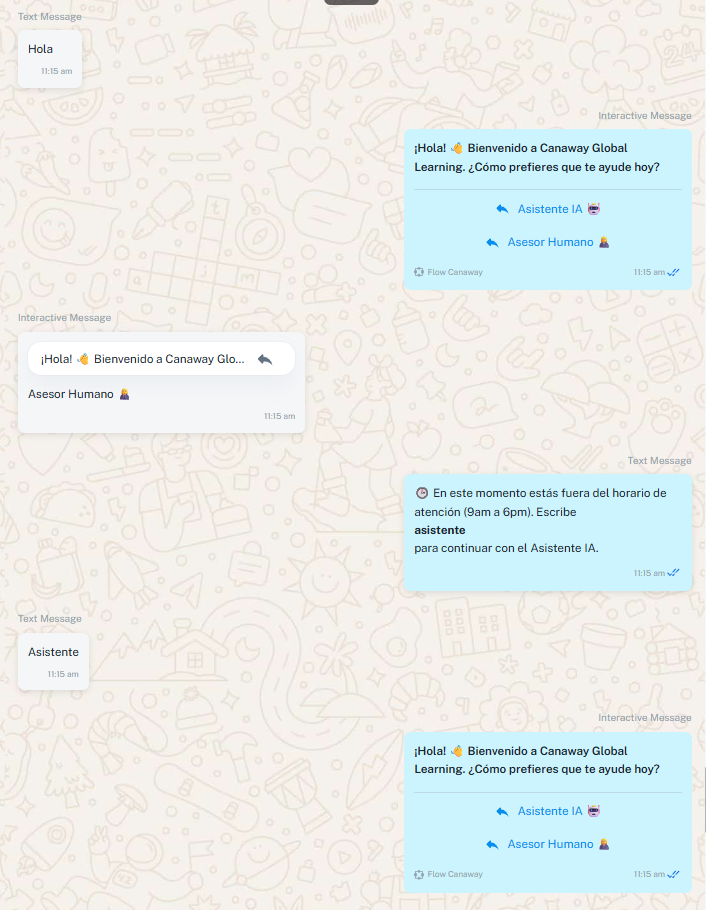
After interacting with the Flow, if it is not during a permitted time, you will receive a message asking if you want to talk to the AI assistant again. If you type the word “asistente,” it does not execute the flow it should, but instead executes the main flow.
This is the flow for returning to talk to the AI: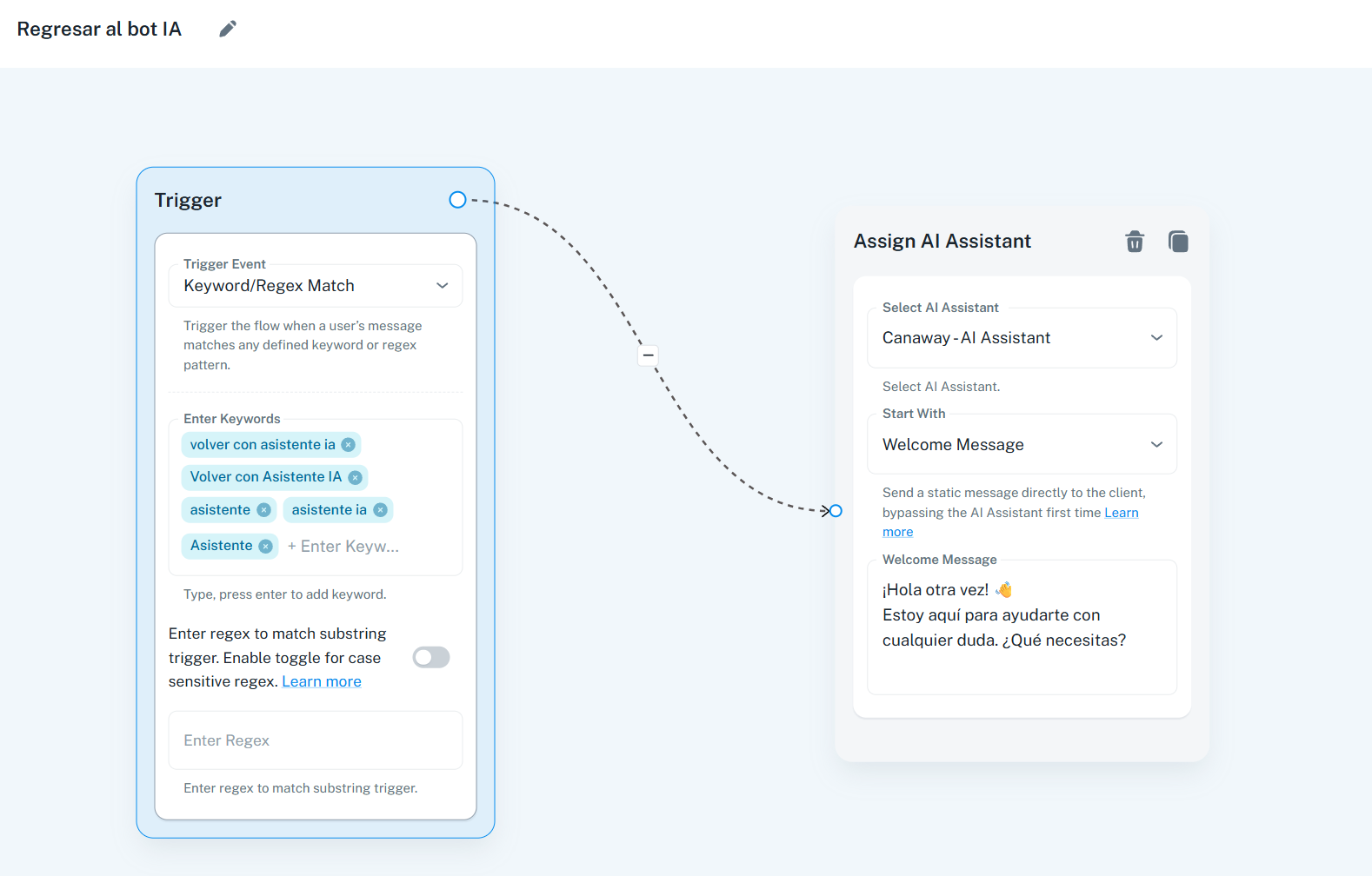
Here is a screenshot of how it works now, which is not correct:
Hello,
For your specific case, where you want to send a question to the user with two possible answers, these would most likely be implemented as quick replies. In such scenarios, we recommend using a template message for the question.
Hello @rfchong,
Could you please share the chat instance where you have tested this so that we can review it accordingly? Additionally, kindly provide the email address associated with your Pabbly Chatflow account and confirm permission to access it by stating in your next reply: "You can access my Chatflow account in case it is required."
Hello!
Here is what you requested.
Pabbly Connect: https://connect.pabbly.com/workflow/mapping/IjU3NjYwNTZhMDYzMzA0M2M1MjY4NTUzZDUxMzUi_pc
Pabbly Chatflow Flow 1: https://chatflow.pabbly.com/app/flows/edit/6892b14a154ae862c2b03313
Pabbly Chatflow Flow 2: https://chatflow.pabbly.com/app/flows/edit/6892e18f9fe7453235147e8d
This one with the account [EMAIL][email hidden][/EMAIL]
You can access my Chatflow account in case it is required.
Hello!
I understand, but is it possible for the AI Assistant to send that template?
Please allow us some time to look into this concern. We will get back to you with an update soon.
Hello,
Currently, the AI Assistant in Pabbly ChatFlow is not able to send template messages. However, based on your use case—where you want to ask a question to the user and store their answer—we recommend the Flow functionality of Pabbly Chatflow.
Hello!
So, while the AI Assistant is talking to a customer, it can activate a flow?
Hello,
Can the AI Assistant answer questions in multiple languages?
When I try to test it, it only tells me it can answer questions in English or Spanish.
Hello!
Is there a way for the AI Assistant to write a "Performing query..." message while it thinks about the answer?
Hello @rfchong,
Upon reviewing the active flows in your account, we found the following (names listed below) to be functioning as expected.
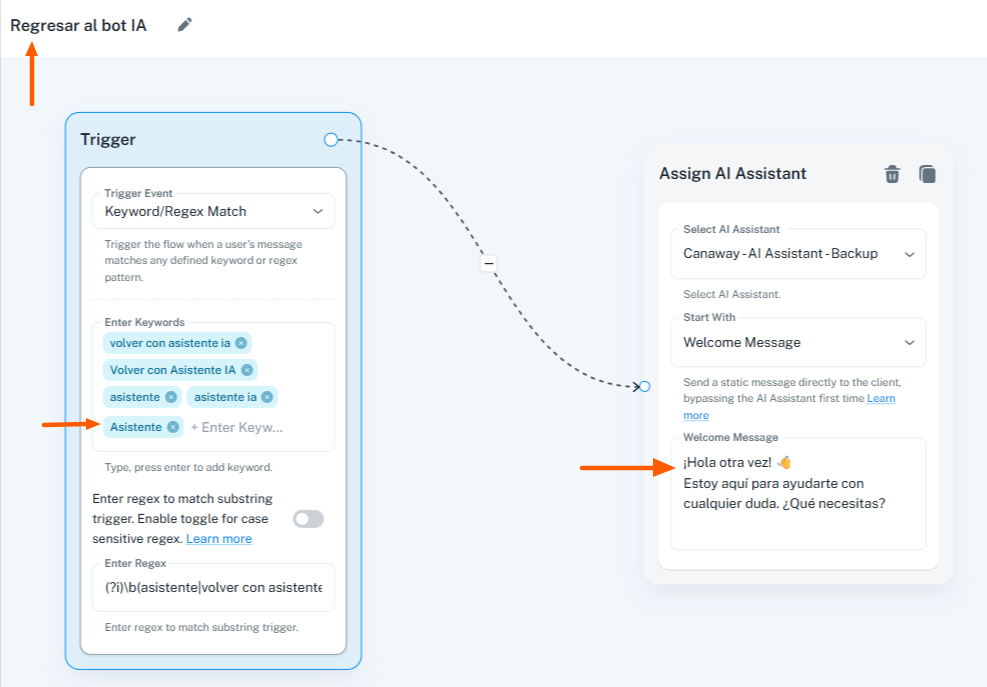
Regresar al bot IA
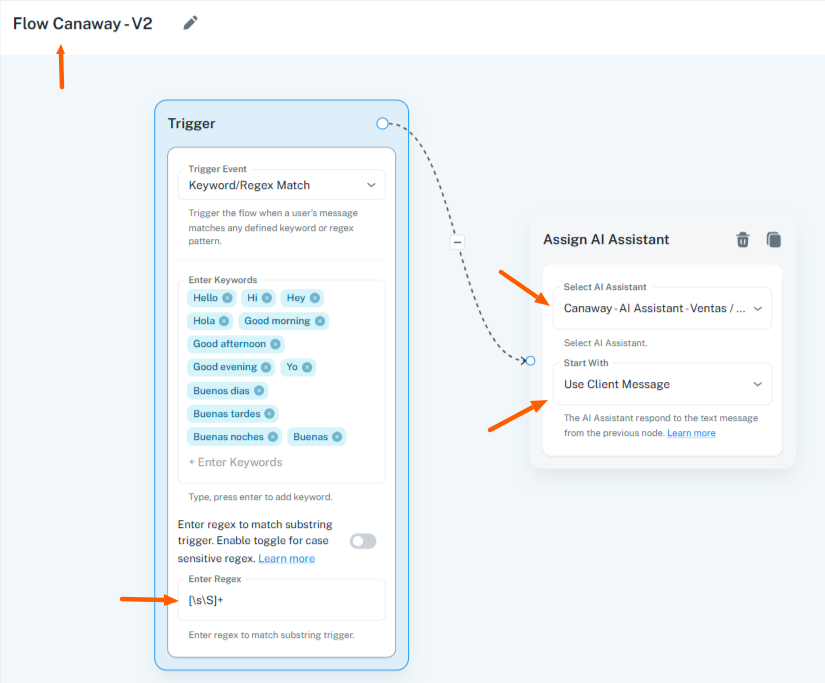
Flow Canaway - V2
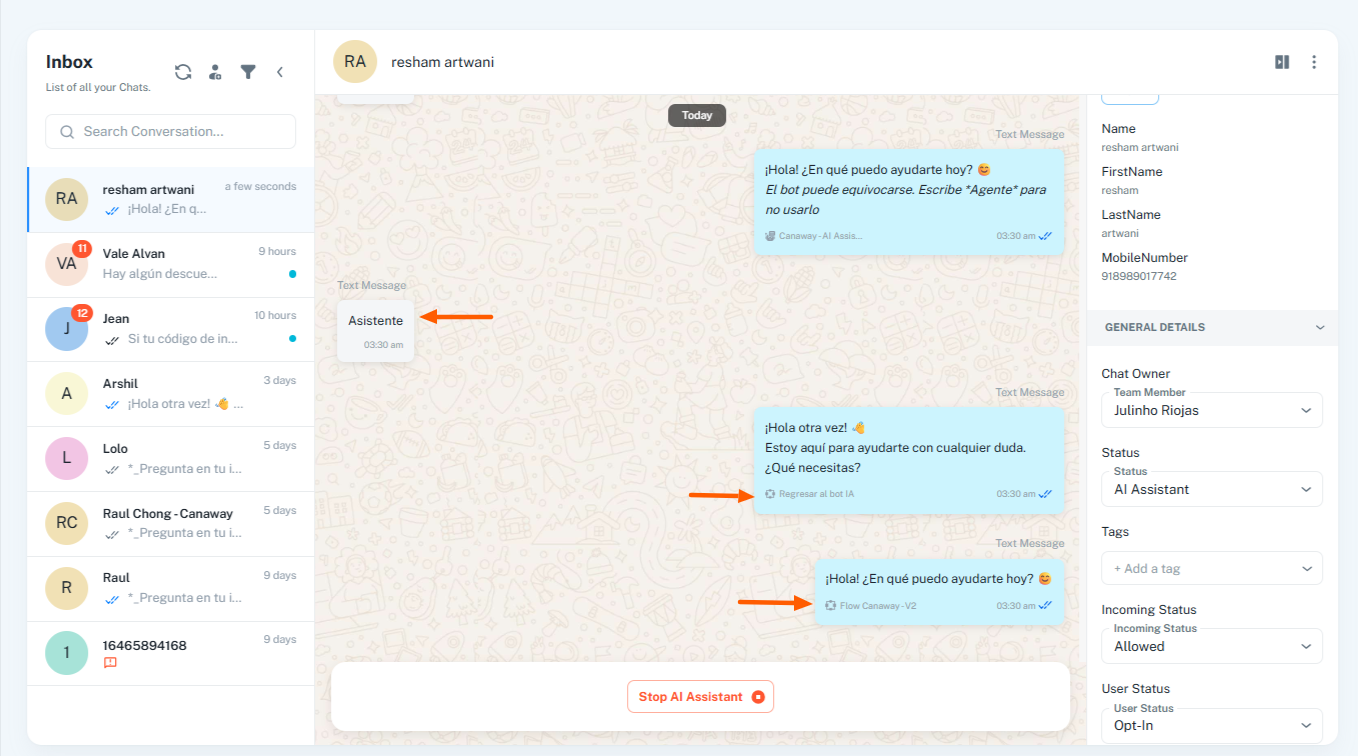
We conducted a test in which we attempted to send a text message with the Asistente. In both cases, the flows triggered as intended. One of the flows contains a regex that accepts any text string sent by the user that is longer than one character. As a result, such messages are being captured, triggering the flow, and subsequently assigning the AI Assistant with the welcome message.
This is why you are receiving two messages in this situation.
For further clarity, we have attached screenshots below illustrating the conditions and their impact.
Hello @rfchong,
No — if the AI Assistant is assigned to a chat, that chat will not be able to trigger a flow.
Hello!
Thanks for the replies. Could you please address my question about whether the AI Assistant can answer questions in languages other than Spanish or English?
Hello @rfchong,
This should be achievable if the prompt to the assistant is framed in a way that instructs the AI to respond to questions even when they are asked in different languages.
We suggest refining your prompt accordingly so that it ensures questions asked in any language are answered. Please try this and let us know how it goes.