Intermittent 401 auth failures across multiple workflows since yesterday
Status: Open · Asked by Sven Bosau on · 0 views
Since yesterday, multiple workflows are failing intermittently with 401 Unauthorized errors. This is affecting customer-facing product delivery workflows, meaning paying customers are not receiving their products when these failures occur.
Before anyone suggests it: NO, this is not an API key issue. The credentials are correct. I know this because the exact same steps succeed when re-run manually without changing anything. The problem is clearly on Pabbly's side, intermittently failing to pass authentication headers during automated execution.
Do NOT re-execute any of these tasks. They have already been resolved manually. The issue I need addressed is WHY this is happening in the first place, so it stops happening going forward.
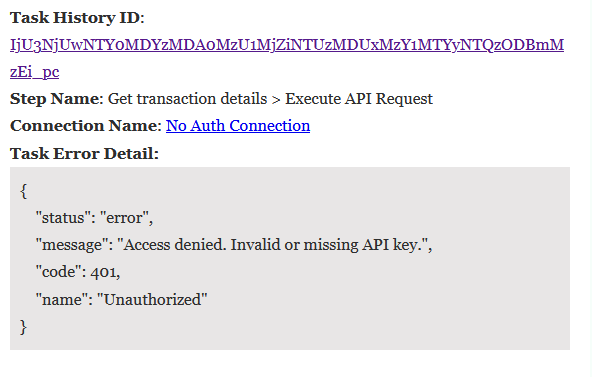
Affected Task History IDs:
1. IjU3NjUwNTYoMDYzMDAoMzU1MjZiNTUzMDUxMzY1MTYyNTQzODBmMzEi_pc
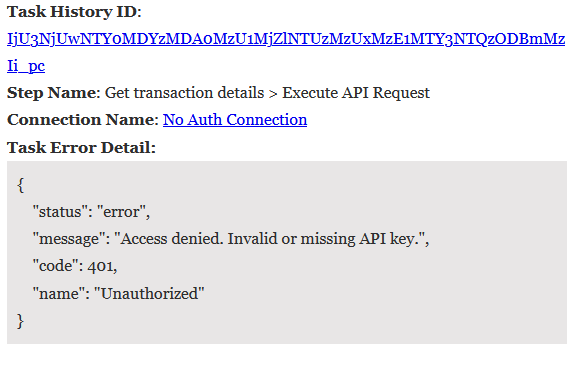
Step: Get transaction details > Execute API Request
Error: "Access denied. Invalid or missing API key." (code 401)
2. IjU3NjUwNTYoMDYzMDAoMzU1MjZiNTUzMDUxMzI1MTZiNTQzODBmMzki_pc
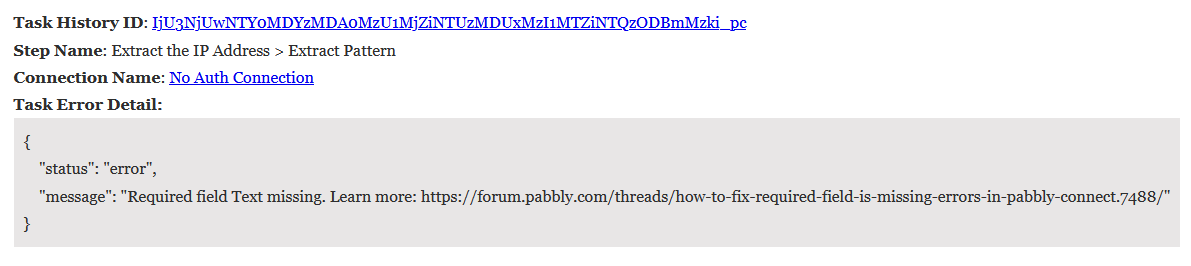
Step: Extract the IP Address > Extract Pattern
Error: "Required field Text missing" (downstream failure caused by auth step failing)
3. IjU3NjUwNTYoMDYzMDAoMzU1MjZmNTUzYzUxMzE1MTYxNTQzNjBmMzki_pc
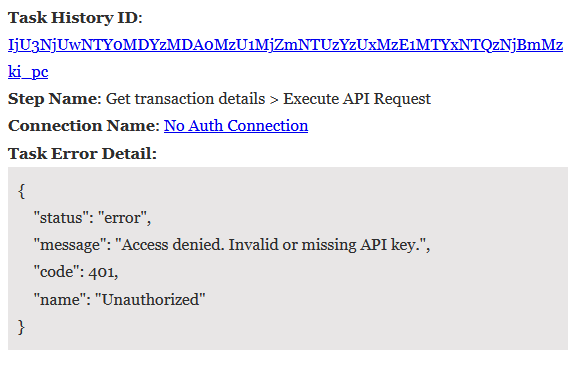
Step: Get transaction details > Execute API Request
Error: "Access denied. Invalid or missing API key." (code 401)
4. IjU3NjUwNTYoMDYzMDAoMzU1MjZlNTUzMzUxMzE1MTY3NTQzODBmMzIi_pc
Step: Get transaction details > Execute API Request
Error: "Access denied. Invalid or missing API key." (code 401)
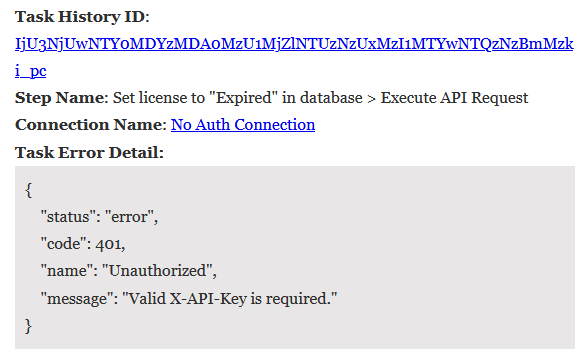
5. IjU3NjUwNTYoMDYzMDAoMzU1MjZlNTUzNzUxMzI1MTYwNTQzNzBmMzki_pc
Step: Set license to "Expired" in database > Execute API Request
Error: "Valid X-API-Key is required." (code 401)
All of these worked fine before yesterday. All use "No Auth Connection." All fail on automated runs but succeed on manual re-runs.
I need an actual investigation into what changed on Pabbly's infrastructure, not a suggestion to "check my API keys" or "try re-running."
Hi @sven-bo,
Thank you for reaching out and sharing the details.
Upon checking, we were unable to access the executions using the provided Task History IDs, as they appear to be invalid on our end. Due to this, we were not able to review those specific tasks.
Could you please share the workflow URL(s) associated with these executions so we can investigate the issue further from our side?
In the meantime, we recommend setting the Auto Re-execution attempts to 2 for these workflows and monitoring the executions to help mitigate intermittent failures.
Once we have the workflow details, we will be able to examine the configuration and assist you further.
Please see the screenshots below.
Regarding: "In the meantime, we recommend setting the Auto Re-execution attempts to 2 for these workflows and monitoring the executions to help mitigate intermittent failures."
See my inital post: "All of these worked fine before yesterday. All use "No Auth Connection." All fail on automated runs but succeed on manual re-runs. I need an actual investigation into what changed on Pabbly's infrastructure, not a suggestion to "check my API keys" or "try re-running."
Hi @sven-bo,
Thank you for highlighting this and for sharing the screenshots.
Could you please share the workflow URL(s) associated with these executions so we can review the workflow configuration and investigate the issue further from our end?
Once we have the workflow details, we will look into it and assist you accordingly.
https://connect.pabbly.com/workflow/mapping/IjU3NjYwNTY5MDYzMDA0MzY1MjY1NTUzNDUxMzci_pc
https://connect.pabbly.com/workflow/mapping/IjU3NjYwNTZiMDYzNTA0MzU1MjZkNTUzMTUxMzIi_pc
https://connect.pabbly.com/workflow/mapping/IjU3NjYwNTZiMDYzMTA0M2M1MjZhNTUzMDUxMzYi_pc
https://connect.pabbly.com/workflow/mapping/IjU3NjUwNTY5MDYzZjA0MzM1MjY4NTUzMTUxMzYi_pc
https://connect.pabbly.com/workflow/mapping/IjU3NjYwNTZiMDYzNDA0MzQ1MjZmNTUzMDUxMzci_pc
Hey @sven-bo,
Thanks for the details. We have escalated this issue to our team for further review. Please allow us some time and we will be back with an update shortly.
I'm just guessing here, but perhaps the internal variables are not working. I'm using variables for the API keys, and if those are wrong, a 401 will be triggered. Look at this thread too, someone else mentioned the same issue with variables not working: https://forum.pabbly.com/threads/variables-not-working-need-some-help.35247/
This is really frustrating for me right now. Every time a customer makes a purchase, my workflow fails and the product isn't immediately registered in my database. This causes a ton of unnecessary support tickets on my end. Please fix this as soon as possible.
I'm just guessing here, but perhaps the internal variables are not working. I'm using variables for the API keys, and if those are wrong, a 401 will be triggered. Look at this thread too, someone else mentioned the same issue with variables not working: https://forum.pabbly.com/threads/variables-not-working-need-some-help.35247/This is really frustrating for me right now. Every time a customer makes a purchase, my workflow fails and the product isn't immediately registered in my database. This causes a ton of unnecessary support tickets on my end. Please fix this as soon as possible.
Our team is working on fixing this issue. We will get back to you as soon as it is fixed.
Thanks & Regards,
Arshil Ahmad
Customer Support Associate
? Pabbly.com
?Rate your support
Unauthorized API access attempt | provided_key={{InternalAPIKey}}
So the variable {{InternalAPIKey}} is not being resolved to its actual value during automated execution. I'm guessing it's not just this one, but all user-defined variables that are affected.
Thank you for the update. Our team is aware of this issue and is currently working on fixing it. We will get back to you as soon as the issue is fixed.
Thanks & Regards,
Arshil Ahmad
Customer Support Associate
? Pabbly.com
?Rate your support
we are also having this issue and I can also confirm that the variables are being sent without resolving the placeholders. on replay it seems to be working, however this is unduly aggravating and causing a lot of work.
Same here. I rely on variables across a ton of workflows, and every single one of them is failing right now. That means hours of manual work on my end to keep things running while this is broken.
Dear all,
Dear @ArshilAhmad
same here, custom variable is being passed to workflow as {{customvariable}} and not with the correct variable value.. I am following the thread to check when it's solved
Hey @sven-bo, @Stuart, and @Fabio,
Thank you for your patience. As per the latest update from our team, the issue has now been resolved.
We recommend checking the specific workflows where the variables were mapped and reviewing the task history to confirm that they are executing correctly. If you face any issues, please feel free to reach out.
Thank you, it seems resolved!
Hey @Stuart,
Thanks for the confirmation.