Invalid Date Issue
Status: Open · Asked by Abhilesh Jha on · 0 views
I am trying to create a workflow where WhatsApp message is triggered on Due Date if Case is not marked as "Completed" in Zoho CRM on the "Due Date" but unable to do so due to date issues, please check and resolve
https://connect.pabbly.com/workflow/mapping/IjU3NjYwNTZjMDYzMDA0MzQ1MjY1NTUzMzUxM2Ei_pc
Hello @taxajca
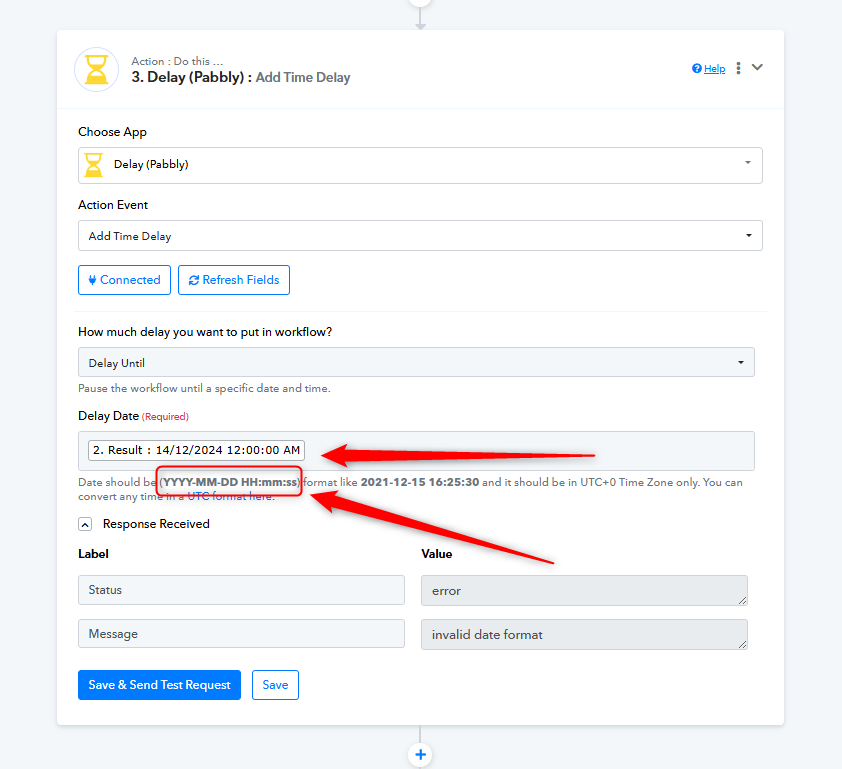
As we have checked, the date you are adding in the action step "Delay (Pabbly): Add Time Delay" is not in the correct format. The required date-time format for this action step is:
YYYY-MM-DD HH:mm:ss
Also, please note that the Delay step works only in the UTC+0 time zone. Make sure to convert your time accordingly before passing it in.
Updated, Thanks!
Hello @taxajca,
You're welcome. I hope the issue has been resolved and we can mark the thread as closed.
Yes Please :)