Issue Mapping Custom Fields from Brevo to Monday.com sales CRM
Status: Open · Asked by Quin Tan on · 0 views
Hi,
I'm currently integrating Brevo contacts with Monday.com through Pabbly Webhook. While standard fields like name, email, and phone number are syncing correctly, I'm unable to map custom fields such as "Child's Age" and "Message" from Brevo Form to Monday.com.
Could you please advise: Does Pabbly support the transfer of custom fields from Brevo Form to Monday.com? If so, what is the correct method to map these custom fields?
Thank you
Hello @qtc,
Could you please provide us with the Workflow URL where you are facing this issue? This will help us investigate the problem more effectively and assist you accordingly.
[IMG width="560px" height="168.718px"]https://lh7-rt.googleusercontent.com/docsz/AD_4nXeWhw79dHB03KqvuDw48bAdyHzMOPusJa_XqjcHYMuR0qaRng2Z3Wz2GHPGzH_Z3Rr5W_NegyWUDh63ORO9RBONMAR_tKauWPCeMoN3RYs4sVDixmUllaZLuKLWJJaakEr9WpZi?key=PL4GUVQWZ8u13PditD4i_cYb[/IMG]
Hello @qtc,
Yes, you can create an item with custom columns in Monday.com.
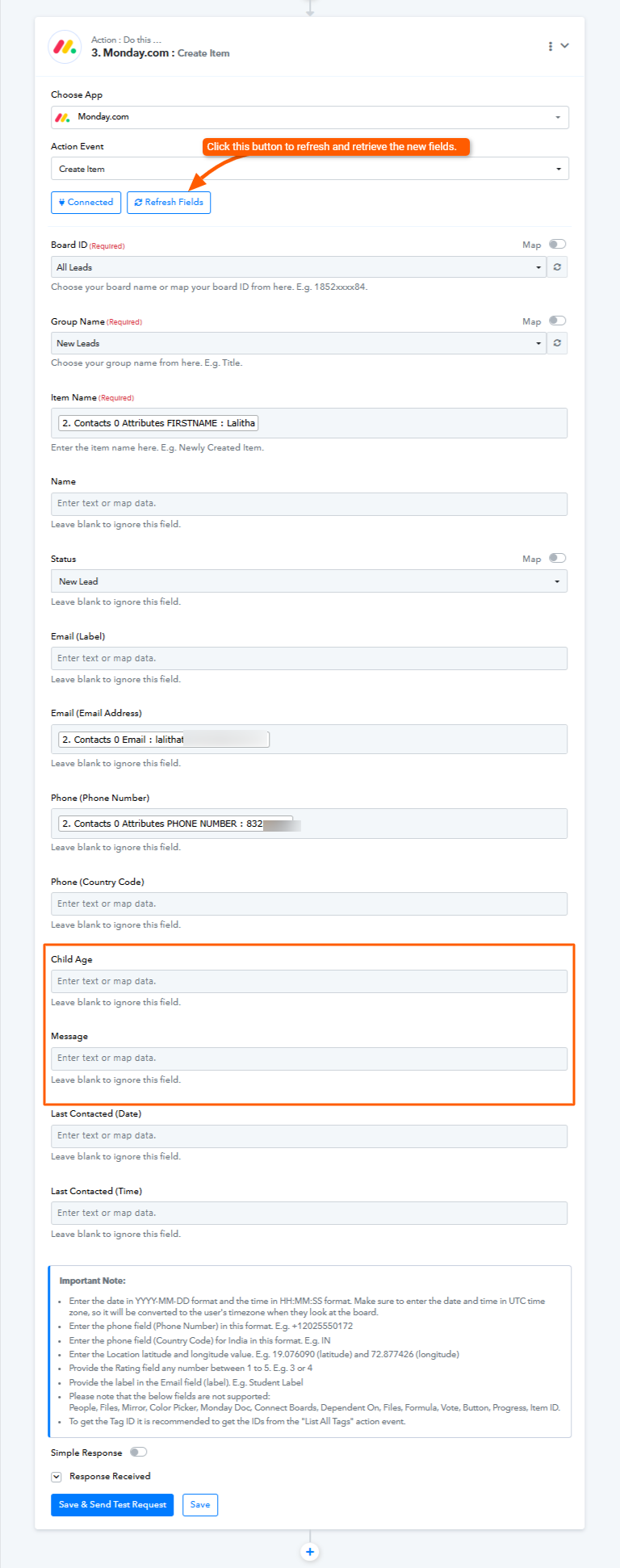
It appears that the custom columns were added after you initially set up the connection with Monday.com. That’s why the new columns didn’t appear at first. In such cases, you can simply click the "Refresh Fields" button within the action step. This will load and display the newly added columns.
Please refer to the attached image for more details.
Let me know if you need any further assistance—I’ll be happy to help!
Hello @qtc,Yes, you can create an item with custom columns in Monday.com.
It appears that the custom columns were added after you initially set up the connection with Monday.com. That’s why the new columns didn’t appear at first. In such cases, you can simply click the "Refresh Fields" button within the action step. This will load and display the newly added columns.
Please refer to the attached image for more details.
Let me know if you need any further assistance—I’ll be happy to help!
I see, Thank you Preethi!
I spent many hours trying to figure this out.
Hello @qtc,
Thanks for the update. Glad I could have helped. If you have a moment, please add a review on Google. Your feedback helps us improve.
Hello @qtc,Thanks for the update. Glad I could have helped. If you have a moment, please add a review on Google. Your feedback helps us improve.
Thanks Preethi. Will do. However I noticed the the leads coming in to monday.com takes 1 day to reach us, not instantly. Is there a problem?
Hello @qtc,
Task History ID - IjU3NjUwNTY5MDYzMjA0M2Q1MjY5NTUzNzUxMzA1MTY0NTQzMTBmMzgi_pc
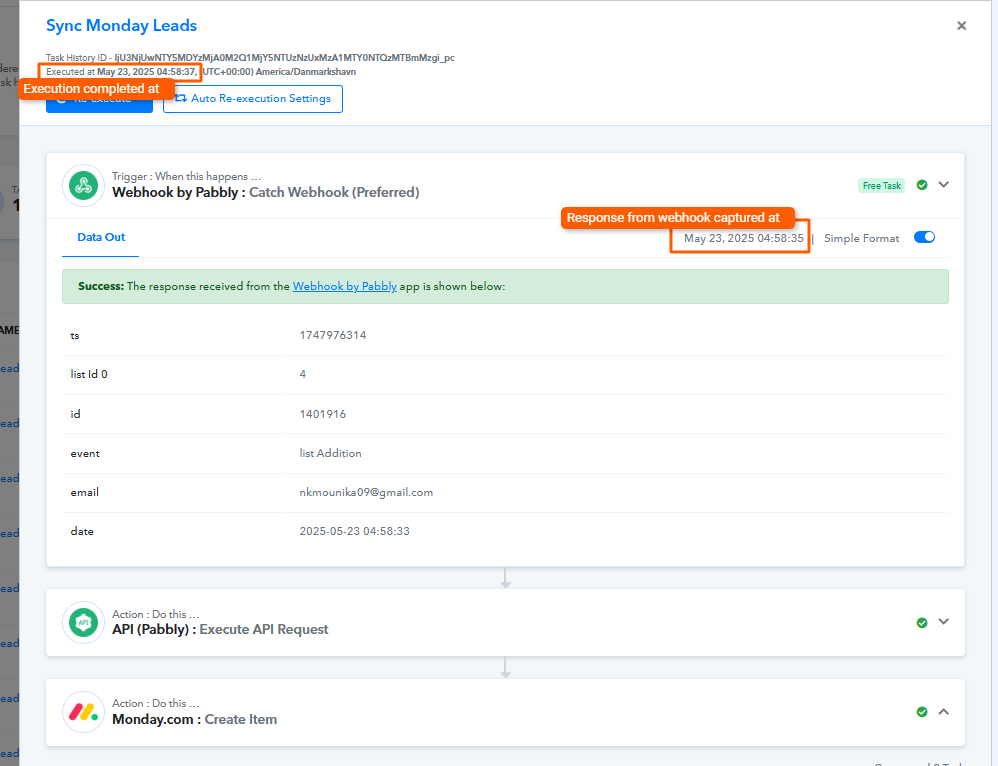
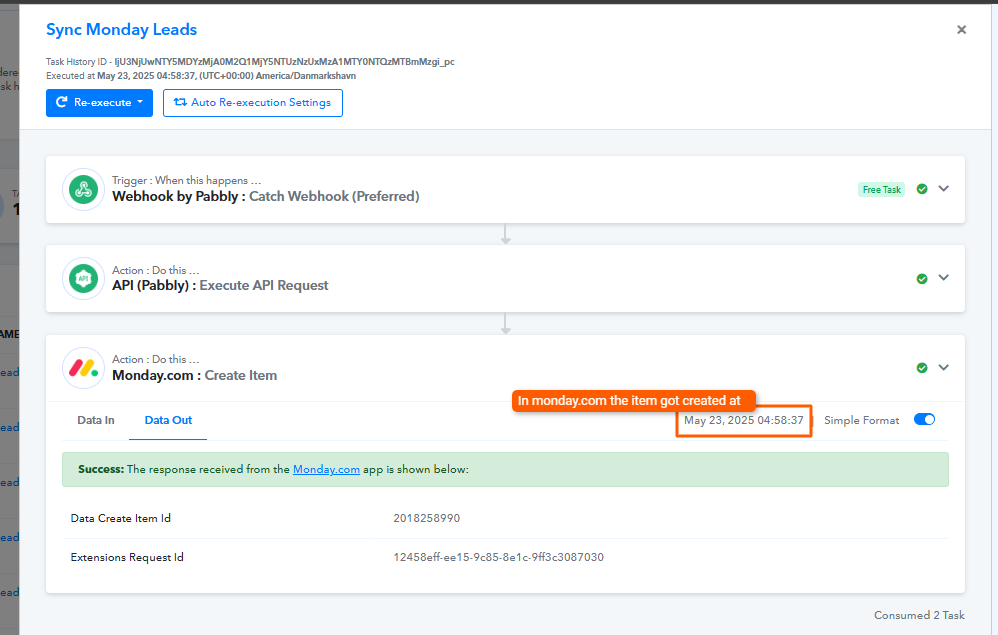
Upon reviewing the task history, we noticed that the webhook response was captured on May 23, 2025 at 04:58:35, and the item was created in Monday.com just 2 seconds later at 04:58:37. This indicates that the process was completed within a few seconds.
Could you please share the specific task history or item details where you observed a delay of one day? This will help us investigate further.
Hello @qtc,Task History ID - IjU3NjUwNTY5MDYzMjA0M2Q1MjY5NTUzNzUxMzA1MTY0NTQzMTBmMzgi_pc
Upon reviewing the task history, we noticed that the webhook response was captured on May 23, 2025 at 04:58:35, and the item was created in Monday.com just 2 seconds later at 04:58:37. This indicates that the process was completed within a few seconds.
Could you please share the specific task history or item details where you observed a delay of one day? This will help us investigate further.
Thank you Preethi, Let me monitor it.
Also I am stuck with something on Google Calendar to Monday.com Apt Sync: https://connect.pabbly.com/workflow/mapping/IjU3NjYwNTY4MDYzZjA0Mzc1MjZhNTUzMjUxMzYi_pc
I am working on 2 integrations:
? If we set up a new event (apt) on Google Calendar: Create a new item (lead) on Monday.com for tracking
It seems like this is working.
? If the client already exists on Monday.com, Update the date column under Apts Set/Booked when a new event on Google Calendar is created: using Phone Number as an identifier
I am struggling with this part. It seems like there are errors.
Thank you so much
Hello @qtc,
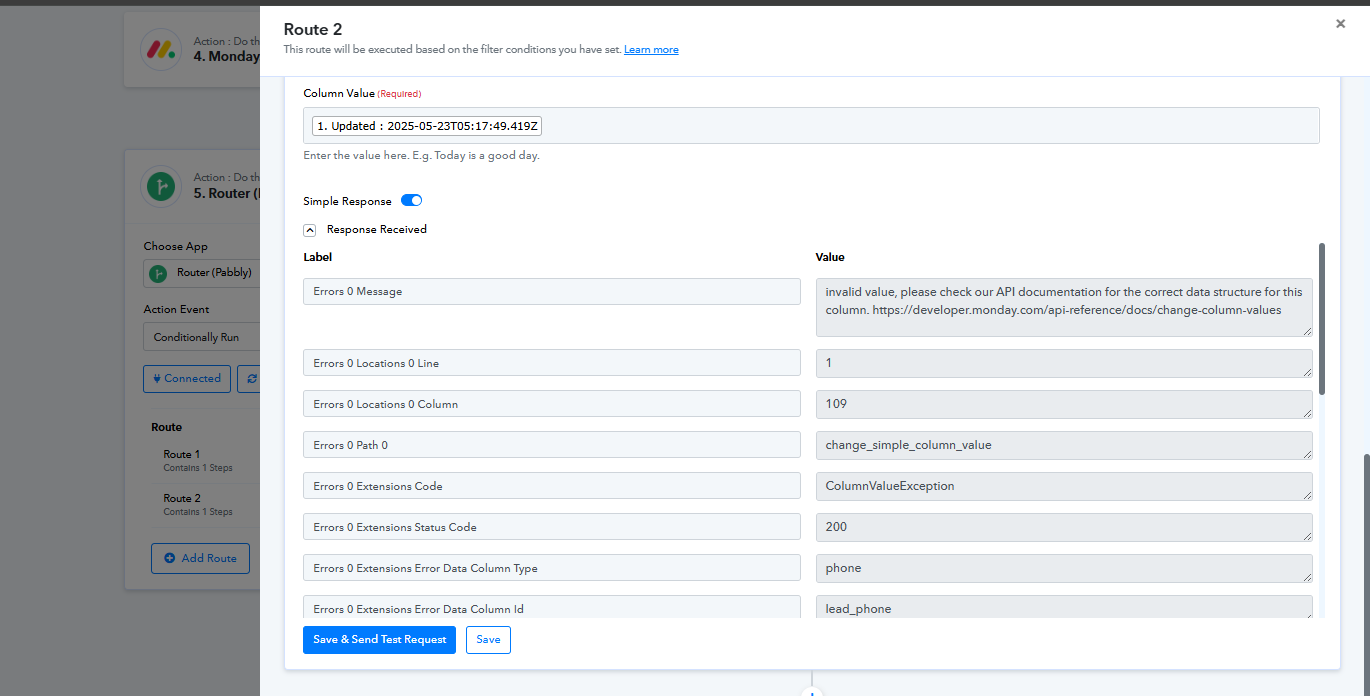
Upon checking your router setup, it seems that the error you're facing is related to updating a column value. We’ve attached an image highlighting the issue for your reference.
To assist you further, could you please share the following:
- A screenshot of your Monday.com dashboard, specifically showing the column ID in the browser’s address bar or UI, so we can confirm whether the column you're trying to update is the correct one.
- Additionally, please show the data type of the column you've selected for the update.
This information will help us validate your setup and guide you accordingly.
Looking forward to your response.
Dear Preethi,
Thank you for the reply.
The column ID is: date__1
In this format: Mon, May 26, 2025
Hello @qtc,
Could you please share a screenshot of your Monday.com interface displaying the required date format? This will help us better understand your setup and assist you more accurately.
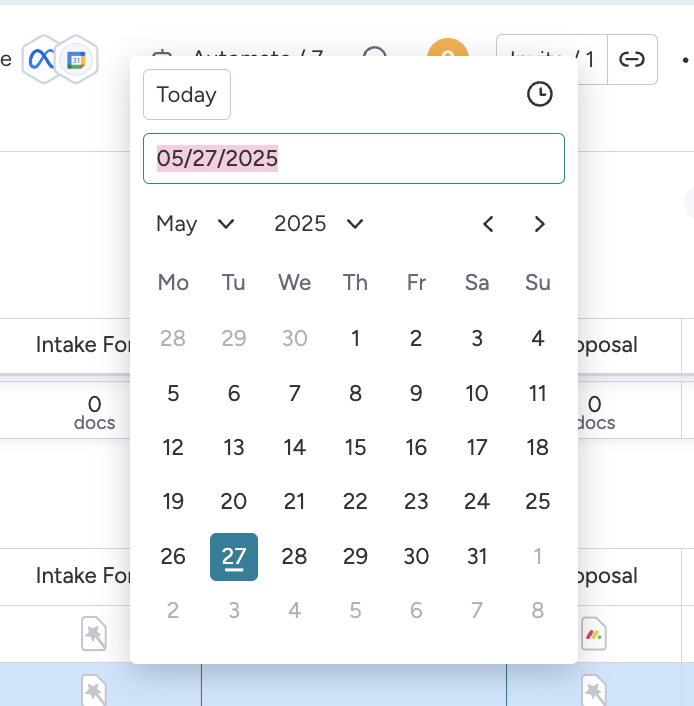
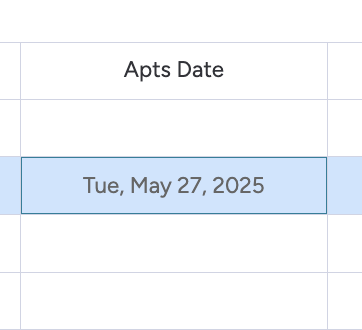
Hello @qtc,
Thank you for providing the details.
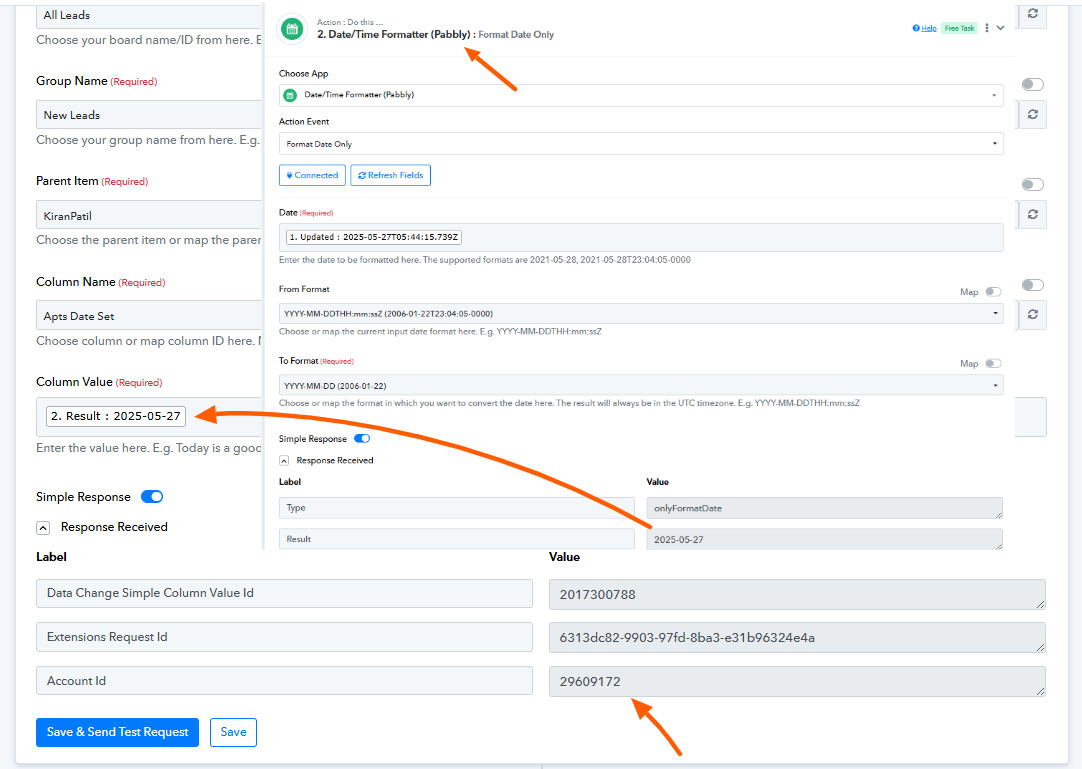
We’ve added a Date/Time Formatter action step in Route 2 and mapped the formatted date in the update step. It appears to be working as expected now.
Please refer to the attached image for more information.
Hi Preethi, thank you, i am actually looking at this Integration
- Trigger: New Google Calendar Event Created
- Search Step: Find Item in Monday.com board
- Match based on Phone Number in the item
- Conditional Logic:
- If match is found:
→ Update the Apts Set/Booked column with the new date - If no match is found:
→ Create a new item in Monday.com
- If match is found:
Now, it doesnt find a match. It just created whatever new entries created on Google Calendar, resulting in many duplicates.
Hello @qtc,
We’ve recorded a detailed video explaining the key points we observed in your workflow. Kindly refer to the video and review the highlighted steps.
Please try making the suggested changes, and let us know the outcome once you’ve tested them.
We’ll be happy to assist you further if needed.
https://www.awesomescreenshot.com/video/40797033?key=482ddcbd9753065982a3c24148fb0989
Thank you Preethi! Let me try.
I am getting a lot of new leads duplicate (Brevo > Monday.crm), do you have an idea why? Workflow: https://connect.pabbly.com/workflow/mapping/IjU3NjYwNTY4MDYzZTA0MzE1MjY1NTUzNjUxM2Ii_pc
I’ve been consuming quite a lot of free tasks during this testing phase. Would it be possible to provide us with some buffer or additional tasks until everything is settled?
Thank you.
Hello @qtc,
Sure, please take your time.
Thank you Preethi! Let me try.
Upon reviewing the workflow, we did not observe multiple executions occurring at the same timestamp, which is typically indicative of duplicate triggers. However, to help us investigate further, could you please share the task histories of the instances where the issue occurred?
Additionally, we noticed that the workflow is triggered via a Webhook (Pabbly), which receives data directly from the source. We recommend checking the source application (Brevo) to ensure that only one webhook is configured, as multiple webhook installations can also result in unexpected behavior.
Let us know once you’ve checked, and we’ll be happy to assist further.
I am getting a lot of new leads duplicate (Brevo > Monday.crm), do you have an idea why? Workflow: https://connect.pabbly.com/workflow/mapping/IjU3NjYwNTY4MDYzZTA0MzE1MjY1NTUzNjUxM2Ii_pc
We want to inform you that the free tasks or steps do not count towards your task count. However, we recommend managing the responses received from the trigger, but if you run out of tasks, we will look into the situation and allot the tasks if required.
I’ve been consuming quite a lot of free tasks during this testing phase. Would it be possible to provide us with some buffer or additional tasks until everything is settled?
Hi Preethi, thanks, I found out that the duplicates were because the contact entered to a new list in Brevo (marketing automation) after 1 month timer, hence triggered another workflow. I am working with brevo on that now.
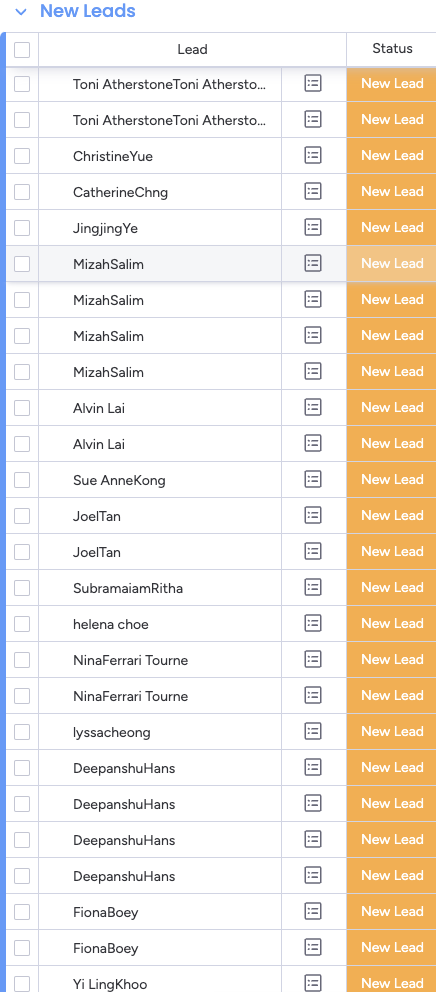
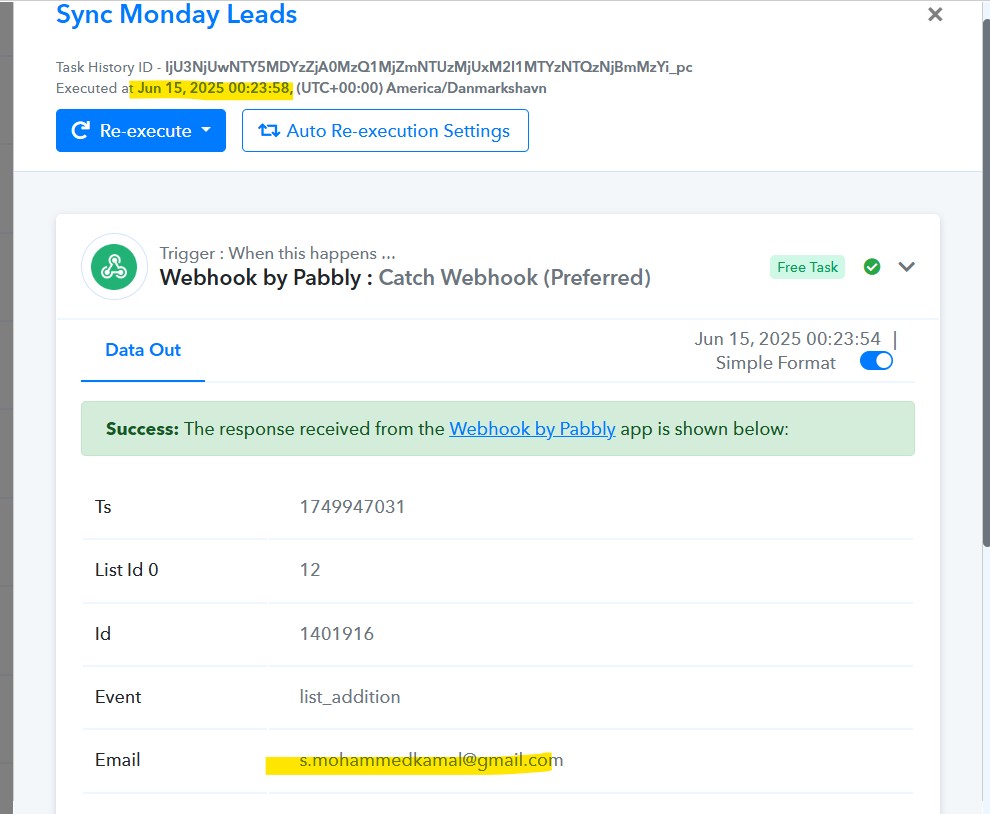
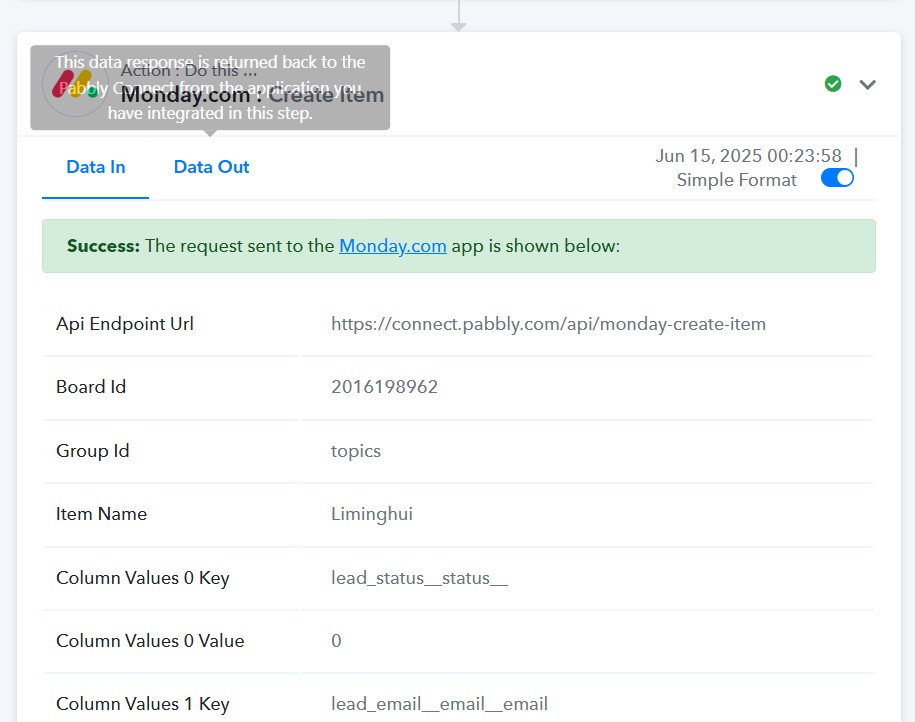
However I am curious how come the lead name came out differently? Attached is a screenshot. Mohammad Kamal entered the workflow (1st screenshot) but the new row created on Monday.com , lead name Liming Hui (2nd screenshot). Mohammad Kamal is a 15 May lead who entered the workflow again on 15 June after 1 month, and Liming is a 7th June new lead
Hello @qtc,
Thank you for your query.
To help us investigate this further, could you please share the task histories for both workflows corresponding to Mohammad Kamal and Liming Hui? This will allow us to better understand the flow behavior and assist you more effectively.
Looking forward to your response.
Task history ID:
IjU3NjUwNTY5MDYzZjA0MzQ1MjZmNTUzMjUxM2I1MTYzNTQzNjBmMzYi_pc
Executed at
Jun 15, 2025 00:23:58, (UTC+00:00) America/Danmarkshavn
You will then be able to view the above screenshots showing inconsistencies.
Hello @qtc,
Could you please share the task histories for both workflows corresponding to Mohammad Kamal and Liming Hui? This will allow us to better understand the flow behavior and assist you more effectively.
Dear Preethi,
No worries, I have worked with Brevo webhook to stop multiple triggers, just 1 trigger for 1 new lead.
I'm stuck with the last step of my workflow https://connect.pabbly.com/workflow/mapping/IjU3NjYwNTY4MDYzZjA0Mzc1MjZhNTUzMjUxMzYi_pc
Could you please advise me?
Workflow logic:
New leads comes in from Google Calendar appointment → ALL coming into Group 2 ✔️
Name of Group 1: New web leads from Brevo
Name of Group 2: Appointments Booked
2 Routers:
- If phone number exists in Group 1 → Move that existing lead from Group 1 to Group 2 (no need to create new row).
- If phone number does NOT exist in Group 1 → Create a new lead in Group 2.
Hello @qtc,
Thank you for reaching out.
Could you please elaborate on the advice or assistance you require regarding your second use case, along with the specific issue you’re currently facing?
Additionally, if possible, we kindly request you to create a new thread for this query, as it helps us manage and track different concerns more efficiently without confusion. Since the issue in this thread appears to be resolved, we’d like to close it and continue supporting you on the new thread. Once created, please share the link to the new thread here so we can transition smoothly.
Also, please share the workflow URL by stating that we have your permission to access your Pabbly Connect account and make changes if required.
Looking forward to your update.