Issue mapping Loop (Pabbly) (Beta) output to Data Transformer (Line Itemizer) – Instagram Carousel Workflow
Status: Open · Asked by Michele Bazzoli on · 0 views
Hello Pabbly Support Team,
I am encountering an issue while configuring a Pabbly Connect workflow designed to automate Instagram carousel publishing using Google Sheets links.
Current Workflow:
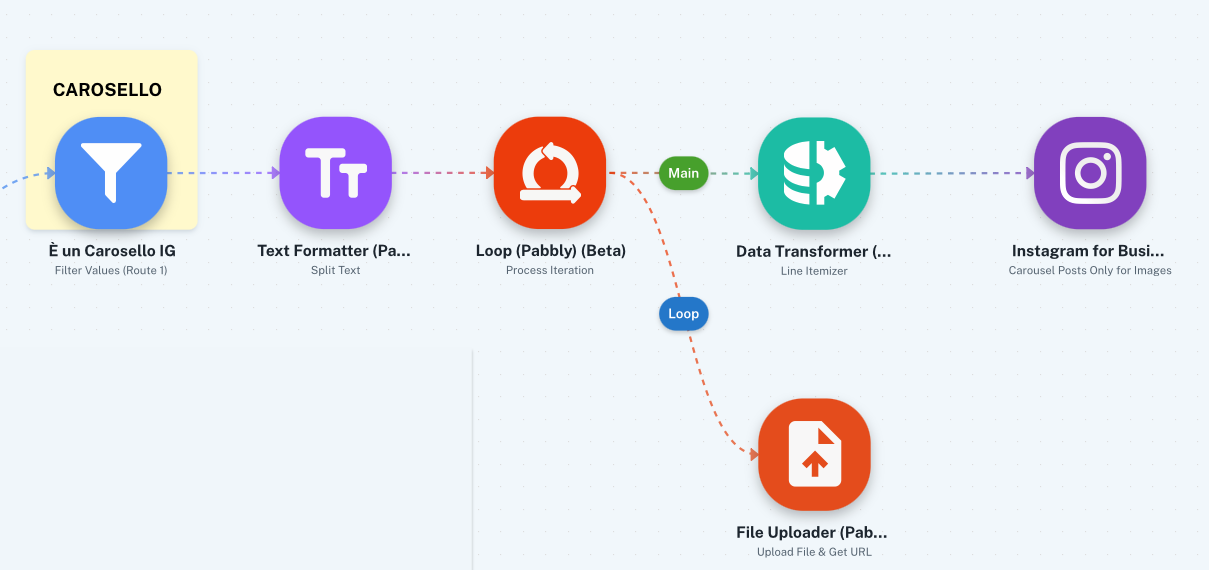
- A Text Formatter module splits the links (the number of links is variable).
- A Loop (Pabbly) (Beta) module iterates through these links.
- In the "Loop" branch, a File Uploader module processes each individual link.
- In the "Main" branch (after the loop), I have added a Data Transformer (Line Itemizer) to aggregate the URLs generated by the File Uploader into a comma-separated string, which should then be passed to the Instagram for Business module.
The Issue: I cannot complete the configuration of the Data Transformer (Line Itemizer) because, in the "Line Items Array" field, I cannot view or select the output of the Loop (Pabbly) (Beta) or the File Uploader as a data source.
Consequently, the Instagram for Business module does not receive the aggregated list of links required to create the carousel. I have already performed several tests on the Loop module and used the "Refresh Fields" option, but the data does not appear among the mappable options in the "Main" branch.
Goal: Could you please indicate the correct procedure to properly pass the data array from the "Loop" branch to the "Main" branch and map it correctly in the Line Itemizer? Is a specific configuration required in the Loop module to make the output visible in the main branch?
Thank you for your support.
Hello Michele,
Thanks for contacting us.
After the File Uploader action, add the link in the Google Sheet using Add new row action. Then, in the main branch, use Google Sheet: Get rows in Advanced format. You then have to use Code(Pabbly) to extract URLs from the Google Sheet: Get Rows output. Also, you may have to use Text Formatter to make adjustments. And at last after Instagram action, you have to remove data from the Google Sheet's particular range. So that in the next execution, the new data can be written.
For your clarity, the Loop branch data does not get share the output data with the Main branch, so you have to use a Google Sheet to store the data temporarily.
Thanks & Regards,
Adeel Akhtar
🌐 Pabbly.com