Issue with Automatically Adding Metadata to Stripe Payments Using Pabbly
Status: Open · Asked by Oscar Nihrane on · 0 views
Hello Pabbly Support Team,
We run a marketing agency and are looking to automate the tracking of which closer closed which client within our Stripe payment system. The easiest way for us to do this is by adding metadata in the backend of Stripe every time a new payment is successful.
Our Current Manual Process:
1. When we close a deal, we manually go into Stripe and add metadata under the Customer ID, specifying the name of the closer.
2. We use a Pabbly webhook to pull this metadata and automatically store it in a Google Sheet, where one of the columns contains the closer’s name (extracted from Stripe metadata).
What We Are Trying to Automate:
We want to fully automate this metadata addition using Pabbly:
• Trigger: A new successful payment in Stripe.
• Action: Pabbly should use the Stripe API (POST request) to automatically add the closer’s name as metadata in Stripe.
The Issue:
• We have successfully set up the Pabbly workflow to trigger when a new payment is successful.
• We then use Pabbly’s Stripe API request (POST method) to update the metadata.
• However, the metadata does not get added in Stripe when using Pabbly.
• We tested the same setup in Zapier, and it works perfectly, meaning Stripe does allow metadata updates this way.
Why This Matters:
Since Pabbly is not updating metadata correctly, we are forced to use Zapier, which requires us to subscribe to their 750 tasks/month plan at $30/month just for this one small feature. We’d prefer to use Pabbly instead.
Our Question:
How can we correctly set up Pabbly to automatically add metadata to a Stripe Customer ID when a new payment is successful?
Are there specific settings, payload structures, or request methods we need to adjust in Pabbly for this to work?
I've recorded a Loom video here to further explain our issue: https://www.loom.com/share/ab2e31adbea9459db98713b8b0afb681?sid=5f558d7c-f62f-44ce-ae4e-c7999c536e2a
Any help would be greatly appreciated!
Thanks,
Oscar Nihrane
Hi @oscarbnihrane,
Could you please share the Workflow URL where you have tried attempted to execute the endpoint?
Please try setting up the endpoint in this manner. It should help you add metadata to your customers.
https://connect.pabbly.com/workflow/mapping/IjU3NjYwNTY5MDYzMjA0Mzc1MjZlNTUzNzUxMzUi_pc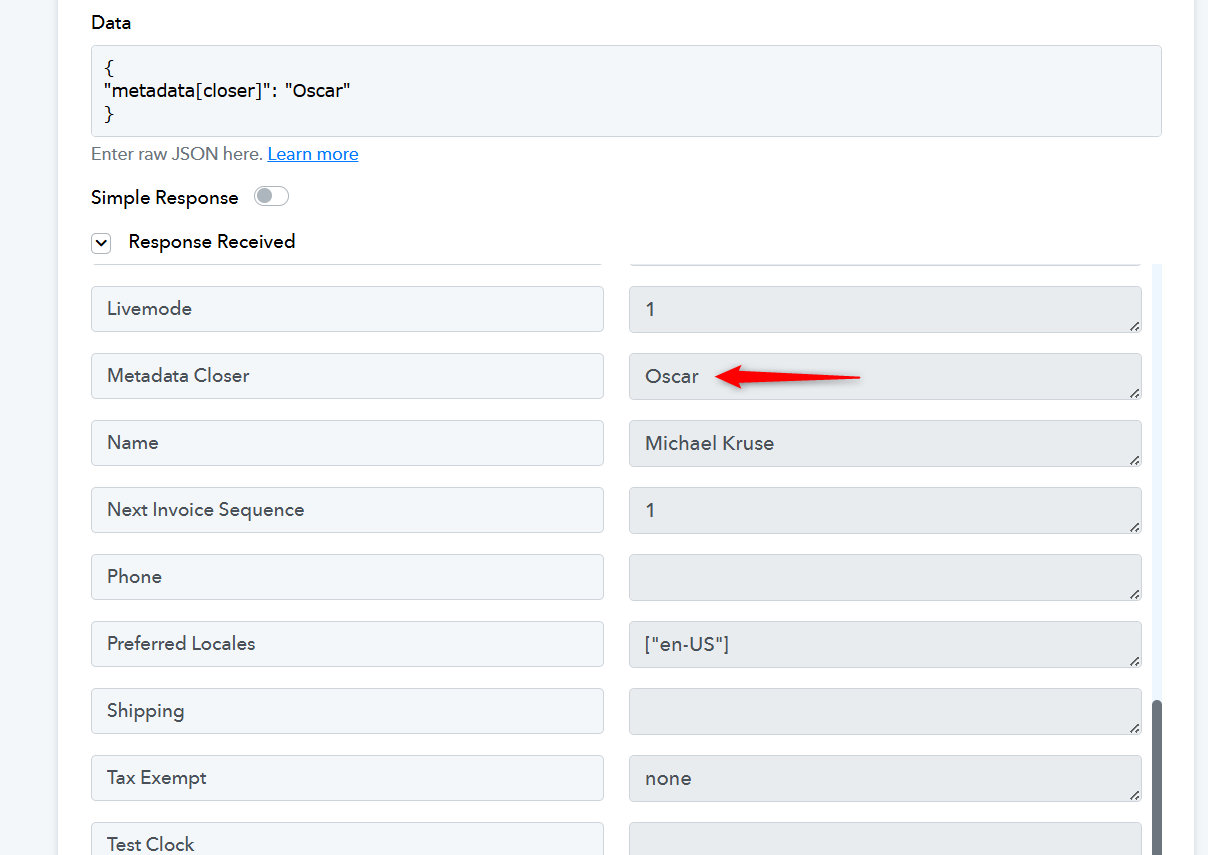
Got it, lemme try. Could you send a screenshot of the entire section so I can copy it just like you have?
We have shared the Workflow URL where the entire execution is visible. Here it is again:
https://connect.pabbly.com/workflow/mapping/IjU3NjYwNTY5MDYzMjA0Mzc1MjZlNTUzNzUxMzUi_pc
Thanks, it worked. Thanks a lot!
Hi @oscarbnihrane,
Thanks for the update, we'd love to hear your thoughts! If you have a moment, please rate us on Google. Your feedback helps us improve.