Issue with Field Mapping from ConvertKit : Phone Number Not Captured Reliably: many times it misses out
Status: Open · Asked by Trip on · 0 views
Hi Pabbly Support Team,
I hope you're doing well.
I'm currently using Pabbly Connect to automate a workflow where fields from ConvertKit are passed to WATI for sending WhatsApp messages to new registrations.
However, I’m facing an inconsistent data capture issue:
Problem:
- The email ID is always captured correctly from ConvertKit.
- Other fields like name, phone number, etc., are captured correctly sometimes, but many times they appear as null.
- Because of this, the next action (sending WhatsApp messages via WATI) often fails when the phone number is missing.
This inconsistency is disrupting my automation flow and affecting registrant communication.
Could you please help me with
Hello @Trip,
Upon checking your workflow, we noticed that sometimes the subscriber does not fill in the phone number field. As a result, the phone number is not getting mapped to the further steps properly, which causes the messages to fail.
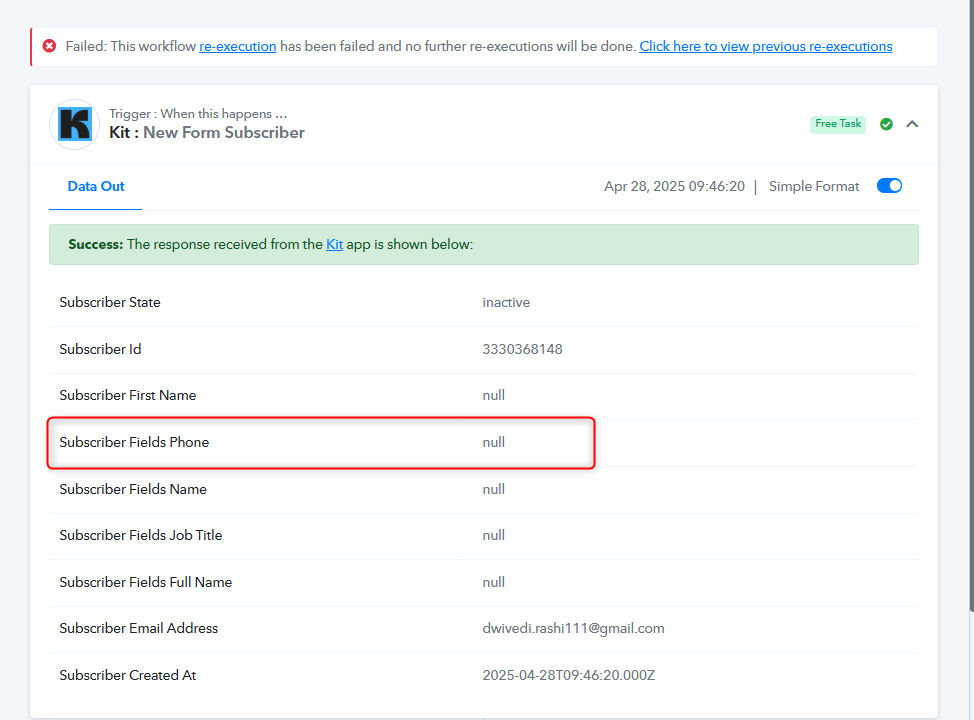
To fix this issue, I suggest making the phone number field mandatory in the Kit form submission. Alternatively, you can use the Filter by Pabbly feature to check if the phone number field is empty.
Thanks for your response.
- The phone number field is mandatory.
- Every user is filling it at the time of registration.
- When I check inside ConvertKit, the phone number is getting captured for every user without fail.
But in Pabbly Connect - many times the phone number (and other fields) are not being picked up, even though the data is present in ConvertKit.
Request you to kindly check this further from your end
Hello @Trip,
Could you please share two task histories with us? One where the data is fully captured, and another where a few fields are missing. Additionally, kindly include the details captured in ConvertKit for both cases.
This will help us better understand the issue and assist you more effectively.
Yes sure. Here are two task histories for your investigation:
- Task History 1 (Issue Case – Phone number not captured):
Task History ID - IjU3NjUwNTY5MDYzNjA0MzE1MjZkNTUzNTUxMzU1MTZhNTQzNDBmMzUi_pc - Task History 2 (Success Case – Phone number captured properly):
Task History ID -IjU3NjUwNTY5MDYzNjA0MzE1MjZlNTUzMTUxMzM1MTYwNTQzOTBmMzQi_pc
In both cases, the data was properly available inside ConvertKit.
Details captured in ConvertKit for the cases are
Email Address
Full Name
Job Title
Phone
Could you please share a screenshot of your Converkit dashboard showing the same? So we can better investigate the issue.
In both cases, the data was properly available inside ConvertKit.
Yes. sure. Please find the screenshots
Hello @Trip,
Thanks for the details.
Please allow us some time to investigate the issue and we will get back to you with the updates as we have some.
Hello @preeti,
Sure. Please let me know the steps once you identify the bottleneck
Hello @Trip,
Upon testing this concern on our end, we did not encounter the same issue. However, we recommend setting up a new workflow to see if that resolves the issue, as it appears to be specific to your case.
Please let us know how it goes.
I will create a new workflow, test it, and share the results
I would also suggest that you to try testing it with multiple data in a row- to check the inconsistency of capturing