Issue with setting up FB Instant Leads - not getting proper webhook response
Status: Open · Asked by JackieDJ on · 0 views
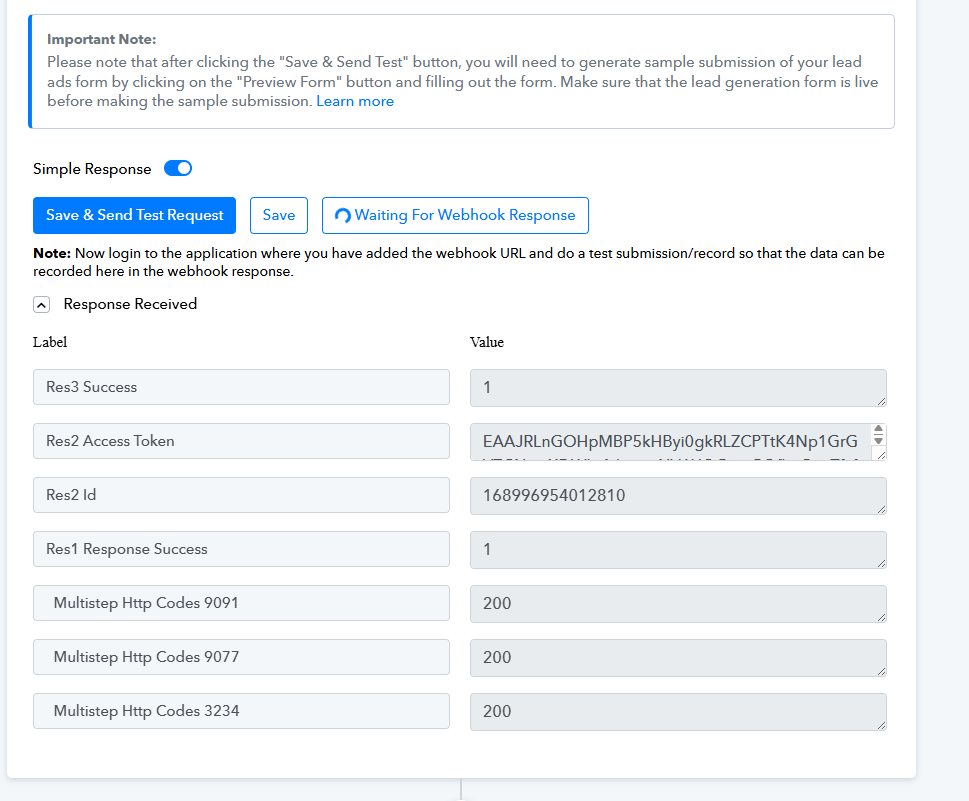
Hi there, I have followed videos, forum responses for the setup. I have tried both the New Beta Workflow builder and the Classic. I have deleted the Pabbly connection from FB. I have created new connections and deleted them when retrying. I am using the developers FB lead ads testing page to get my lead. Everything is connecting fine, lead forms are showing up fine. All I ever get is this returned for my lead when doing the Save & Send Test Request. So I am not able to continue with the trigger - I am really only mapping First Name/Last Name/Email. Can you please advise where I should try next?? Thanks.
Hi @JackieDJ,
Could you please share the Workflow URL where you have this concern?
Hi @JackieDJ,Could you please share the Workflow URL where you have this concern?
Hi, were the links I shared helpful?
Hello @JackieDJ,
Could you please confirm whether you have added a test lead or submitted one using the preview form link under the Testing Tool after clicking the Save & Send Test Request button? If not, please try doing so first.
If you have already completed this step and are still unable to capture the lead, please follow this video to recreate the connection: https://drive.google.com/file/d/1djc3M3-einvvfCXyuBmSQtFPnXHzYep1/view?usp=sharing
Once the connection is set up, please refer to this video and ensure your configuration matches what is shown: https://www.loom.com/share/326b3e6b49ad4bc9975c1a49d6331920?sid=bc6d8b6e-e6fd-4250-aca5-90ac827d4d78
If your setup differs or the issue persists, kindly share a screencast of the entire process with us so we can investigate further.