Issue: Zoom Events Integration Not Supported in Pabbly Connect
Status: Open · Asked by GLOBAL INSTITUTE on · 0 views
Hi Support Team,
I'm trying to integrate Zoom Events in Pabbly Connect, but I couldn't find the Zoom Events app or module.
The same integration is available in Zapier, where I can successfully use Zoom Events without any issues. However, in Pabbly Connect, the Zoom Events option is missing.
I have attached the screenshot of the error/issue for your reference.
Could you please let me know:
- Why is the Zoom Events integration not available in Pabbly Connect?
- Is this feature currently unsupported, or is there any way to enable it?
- If it is a known issue, could you please help me resolve it or provide an alternative solution?
Looking forward to your assistance.
Thank you.
Hello,
Thank you for reaching out to us.
The Zoom integration in Pabbly Connect is available, but the naming convention differs slightly from what you may see in Zapier.
For trigger-based events, you need to use the "Zoom (Triggers)" application in Pabbly Connect. Similarly, for actions such as creating meetings, registering participants, etc., you need to use the "Zoom" application under the action step.
We have attached screenshots showing both:
The Zoom (Triggers) application for configuring Zoom webhooks.
The Zoom application for performing Zoom actions.
Please note that the structure and configuration process for Zoom webhooks in Pabbly Connect may differ from Zapier, but the required functionality is available.
To help you with the setup, please refer to the tutorial below:
https://youtu.be/DS7jkojhNSg?si=iPkSaFomNTGhp1n3
This tutorial explains how to configure Zoom webhooks and connect them with Pabbly Connect.
If you continue to face any issues after following the tutorial, please let us know the specific use case or Zoom Event you are trying to automate, and we'll be happy to assist you further.
Hi Support Team,
I'm trying to integrate Zoom Events in Pabbly Connect, but I couldn't find the Zoom Events app or module.
The same integration is available in Zapier, where I can successfully use Zoom Events without any issues. However, in Pabbly Connect, the Zoom Events option is missing.
I have attached the screenshot of the error/issue for your reference.
Could you please let me know:
- Why is the Zoom Events integration not available in Pabbly Connect?
- Is this feature currently unsupported, or is there any way to enable it?
- If it is a known issue, could you please help me resolve it or provide an alternative solution?
Looking forward to your assistance.
Thank you.
Thanks and Regards,
Preeti Paryani
Customer Success Associate,
Pabbly.com
its working when i using zoom webinars, its not working when i use zoom events
Hello,
Thank you for the update.
Since the setup is working with Zoom Webinars but not with Zoom Events, we would like to review the configuration in more detail.
Could you please share the following:
The workflow URL where you have configured the Zoom Events integration.
A screen recording showing the complete process you followed to configure the webhook in Zoom Events, including the webhook setup and any related settings.
This will help us better understand the configuration and identify whether the issue is related to the Zoom Events setup, webhook configuration, or a limitation in the integration.
Once we receive these details, we'll investigate further and assist you accordingly.
We look forward to your response.
Thanks and Regards,Preeti Paryani
Customer Success Associate,
Pabbly.com
workflow URL : 1203320284576325
I attached screen record also
Hello,
Thank you for your response.
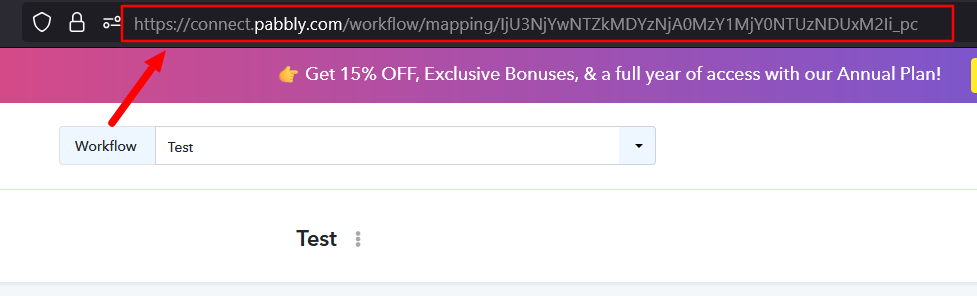
The value 1203320284576325 appears to be the Zoom Event ID. To investigate the issue further, we require the Pabbly Connect Workflow URL where you have configured the Zoom Events integration.
You can find the workflow URL by opening the workflow in Pabbly Connect and copying the URL from your browser's address bar.
Additionally, we could not find any screen recording attached to your email. Kindly resend the screen recording showing the complete process you followed to configure the webhook in Zoom Events.
Once we receive the workflow URL and the screen recording, we'll review the setup and assist you further.
We look forward to your response.
Thanks and Regards,Preeti Paryani
Customer Success Associate,
Pabbly.com
Hello,
Thank you for sharing the workflow URL and screen recording.
Upon further review, it appears that Zoom Webinars and Zoom Events are two different concepts within Zoom and are handled through different APIs.
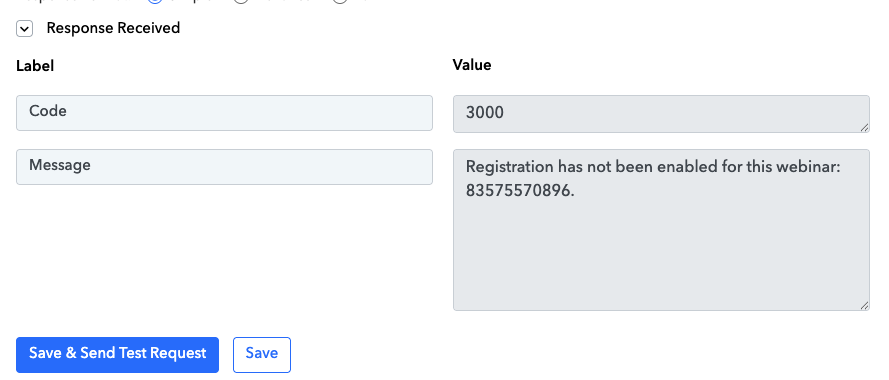
Currently, you are using the Add Registrant to Webinar action. This action is designed specifically for Zoom Webinars, which is why it is not working with Zoom Events. Additionally, the webinar that is currently being listed in the dropdown is a webinar resource, and registrations for that specific webinar are not open yet.
To add registrants to a Zoom Event, a dedicated Zoom Events action would need to be available in the Zoom application. Before we escalate this as an integration request to our development team, we would recommend trying our recently launched Action Builder feature.
With Action Builder, you can:
Bring your own API key/credentials.
Provide the Zoom Events API documentation or endpoint details.
Use AI prompts to generate the required custom action.
Publish the action and use it directly within your workflow.
You can refer to the following resources:
Pabbly Action Builder Guide:
https://forum.pabbly.com/threads/pabbly-action-builder-guide-for-creating-custom-action-step-apis.35633/
Zoom Events API Documentation:
https://developers.zoom.us/docs/api/events/#description/introduction
Please give this a try. If you face any issues while creating the action using Action Builder, let us know and we'll be happy to assist you further.
workflow id :https://connect.pabbly.com/workflow/mapping/IjU3NjYwNTZjMDYzNDA0MzA1MjZiNTUzMjUxM2Ei_pc
Screen Record : https://assets.cdn.filesafe.space/8djBdwoS5VPk0XyOEO9F/media/6a5aff7f9c9b37b5fdbe20cd.mov
Thanks and Regards,
Preeti Paryani
Customer Success Associate,
Pabbly.com
Hello,
I hope you're doing well.
We wanted to follow up regarding the Zoom Events integration.
Were you able to try the Action Builder approach that we suggested for creating the Zoom Events action using the Zoom Events API?
If yes, could you please let us know whether it is working as expected or if you encountered any issues during the setup process? We'd be happy to assist you further if needed.
We look forward to your update.
Thanks and Regards,Preeti Paryani
Customer Success Associate,
Pabbly.com
Hello,
I hope you're doing well.
We wanted to follow up regarding the Zoom Events integration.
Were you able to try the Action Builder approach that we suggested for creating the Zoom Events action using the Zoom Events API?
If yes, could you please let us know whether it is working as expected or if you encountered any issues during the setup process? We'd be happy to assist you further if needed.
We look forward to your update.
Hello,
I hope you're doing well.
We wanted to follow up regarding the Zoom Events integration.
Were you able to try the Action Builder approach that we suggested for creating the Zoom Events action using the Zoom Events API?
If yes, could you please let us know whether it is working as expected or if you encountered any issues during the setup process? We'd be happy to assist you further if needed.
We look forward to your update.
Thanks and Regards,
Preeti Paryani
Customer Success Associate,
Pabbly.com
Thanks and Regards,
Preeti Paryani
Customer Success Associate,
Pabbly.com