Lead conversion automation
Status: Open · Asked by JK on · 0 views
Can you please help to choose filter value for my lead conversion automation where I want to make route where user enters their ID like T001, RO130, B007 etc I take first filter value contai T, then user Type as tenant, but this will fetch all the rows containing T for update the sheet value.
If filter value taken as full user ID which varies every users,. Please help me
Hi @Jayesh patel,
Thanks for reaching out.
We’ve checked your workflow, and it seems a bit unclear how you want the filter to work. Currently, you are adding a row to Google Sheets and then retrieving all rows, but the filtering logic in the router is not clearly defined.
Could you please clarify on what exact basis you want the filter to work (e.g., full ID match, prefix like T/RO/B, or something else)?
Once we have this clarity, we’ll be able to guide you more accurately.
Thank you for your kind support.I just want filter as 'full ID' match which is just like T-002, RO-125,B-007 as you seen that I used filter as contain T value ,but when flow start it takes all the user ID that starts with T instead of full ID
If you want Route 1 (Tenant) to trigger for user messages that start with “T” and where the ID fetched from the user message exactly matches the full ID captured in your Google Sheets “Get Row(s)” action step, then you will need to set up the filter condition in your route accordingly.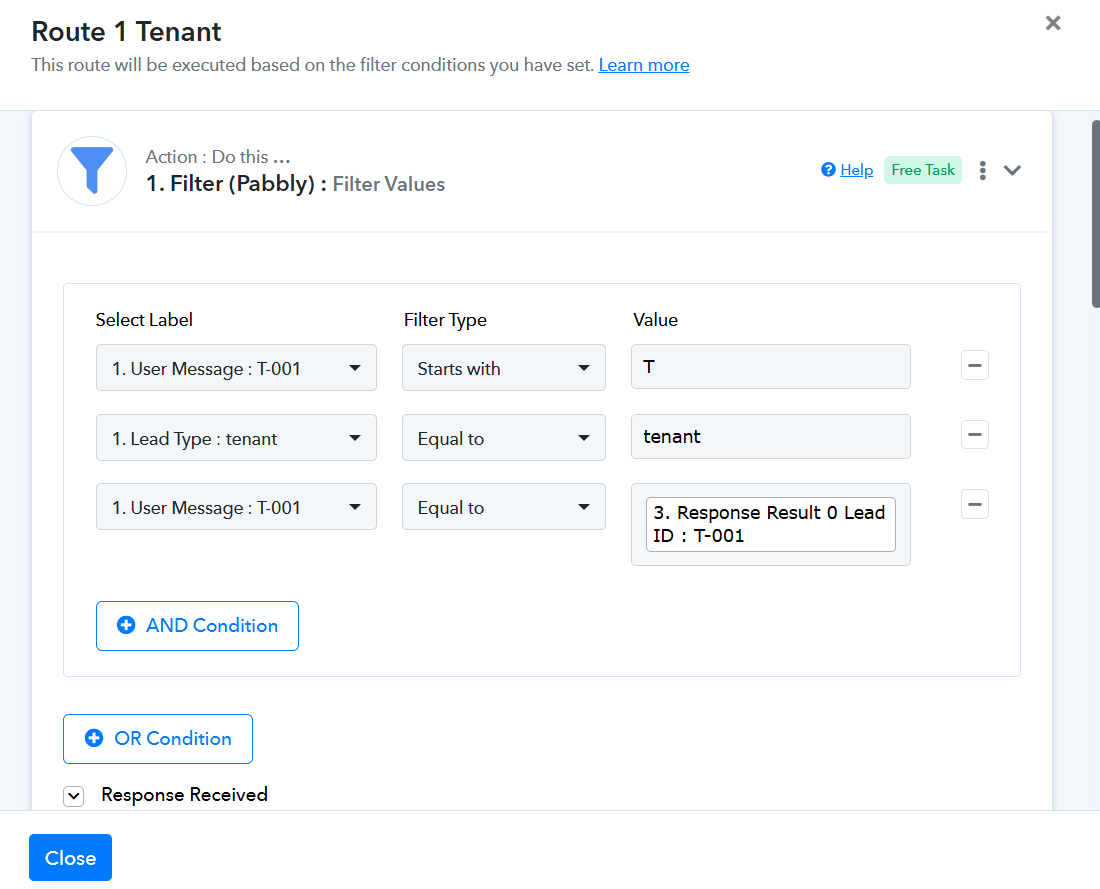
Thanks & Regards,
Arshil Ahmad
Customer Support Associate
? Pabbly.com
?Rate your support
Thank you sir, As per your suggestion filter show error as it fetch response result0 data which is not equal to response result1 during next user. Please check, you can check flow working by sending 'interested' on 8265058493,then insert wa. Me id as T-001 to T-009 any one and mobile number only 3 steps
Task History ID -
IjU3NjYwNTZkMDYzNDA0Mzc1MjY0NTUzNTUxM2E1MTY0NTQzMjBmMzki_pc
Executed at
Apr 15, 2026 07:21:28, (UTC+05:30) Asia/Kolkata
Hey @Jayesh patel,
Thank you for sharing the details.
The issue here is that you are currently capturing the Google Sheets – Get Row(s) response in Simple format, due to which only the first (0th) row is being considered in your filter.
Since your requirement is to check the incoming Tenant ID against all rows, please follow the steps below:
- In the Google Sheets – Get Row(s) step, change the Response Format to “Advanced”. This will return all rows as an array of objects.
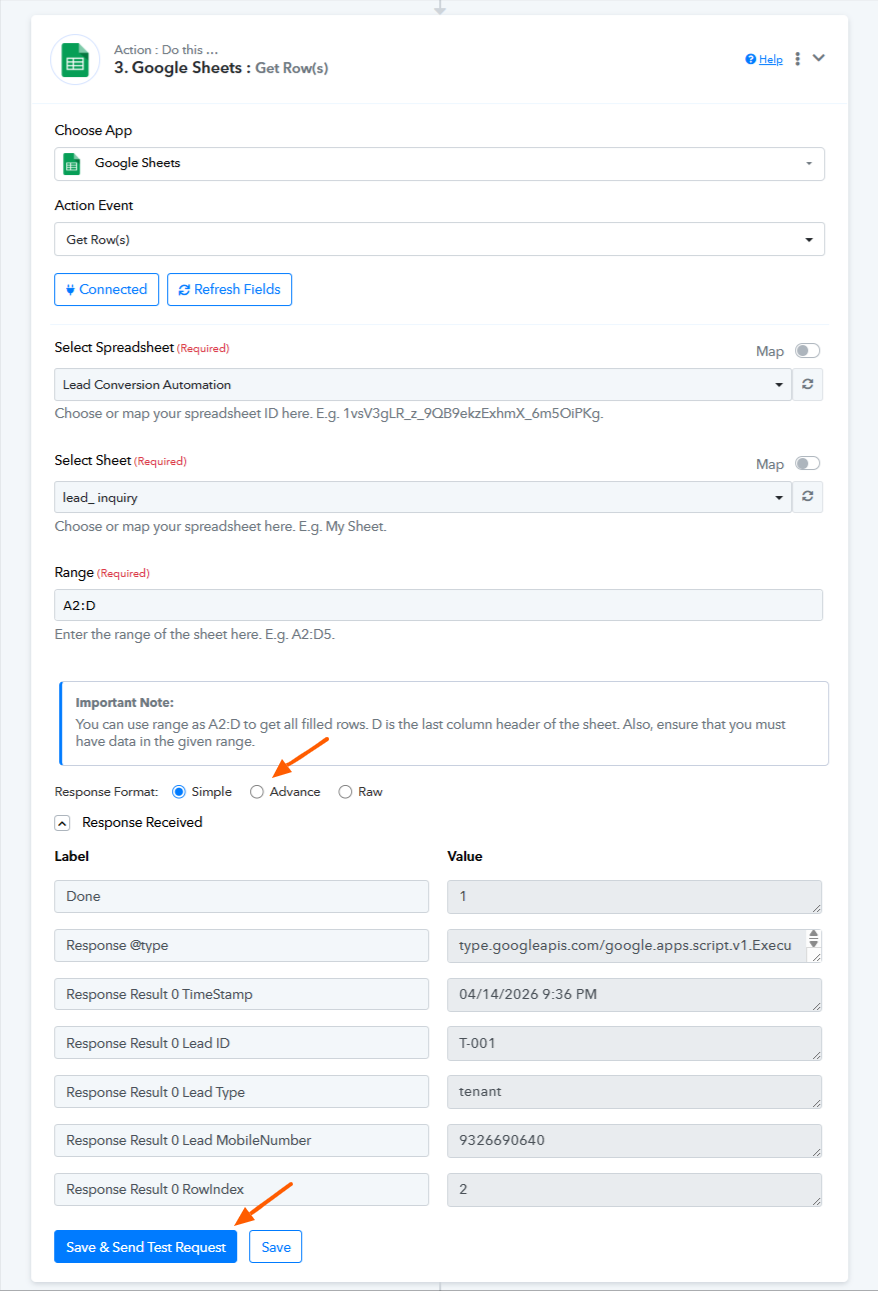
- Add an Iterator (Pabbly) step to process this array.
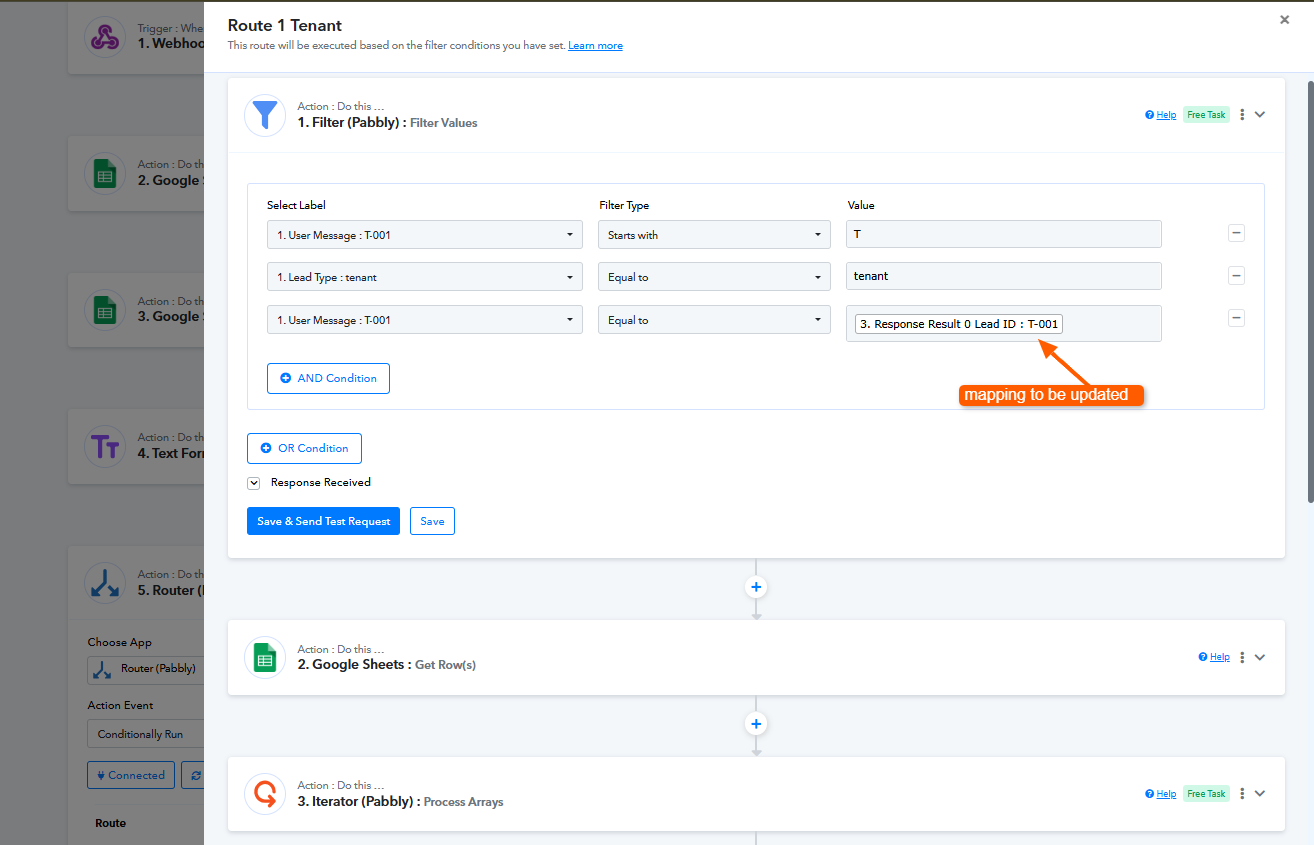
- In the Router’s filter, map:
- Tenant ID from the trigger step
- Tenant ID from the Iterator step (not Google Sheets step)
How this works:
- The Iterator will process each row one by one.
- The Router will then compare the Tenant ID from the trigger with the Tenant ID of each iterated row.
- If a match is found, the flow will continue for that specific row.
- All rows will be checked sequentially until a match is found.
So essentially:
- Advanced Response → Iterator → Router (with updated mapping)
Please implement this and let us know how it goes.
Now it's running too many times
×
Task History ID -
IjU3NjYwNTZkMDYzNDA0MzA1MjZkNTUzNDUxM2I1MTY3NTQzMzBmMzEi_pc
Executed at
Apr 15, 2026 11:42:52, (UTC+05:30) Asia/Kolkata
Hi @Jayesh patel,
Thank you for reaching out.
We checked your task history and found that the Tenant ID from the trigger is T-008. In your Google Sheets “Get Row(s)” step, multiple rows contain the same Tenant ID, which is why the workflow is executing multiple times.
Since the Iterator processes each matching row, the Router condition becomes true for each duplicate, triggering further steps repeatedly.
Please ensure that each Tenant ID appears only once in your Google Sheet. This will ensure the workflow runs only once per trigger.
Let us know how it goes.
But response sheet received records at 11.42 a.m. show user id from T001 to T011 in master_ lead sheet,as you noticed multiple T008 response in tenant sheet, I want to fetch that rows and then matched rows from owner sheet. Can you help me to arrange? Just now for testing data owner and tenant sheet having only one response for each user id
There's no many times T008 it's only once in my tenant sheet for setting up the flow please check in screen shot, and in maste_ lead sheet received response from T001 to T011 at 11.42 am time when the flow executed
https://docs.google.com/spreadsheets/d/1dmuPqpAU7fif-npeYhzVeUh5eDr6_SKceWAh9w4O-Fo/edit?usp=drivesdkdrivesdk
I want to fetch that all rows which is same as user id now from tenant sheet and there after matched id rows from owner sheet, can you please help to set?
Hi @Jayesh patel,
Thank you for getting back to us and for sharing the screenshots.
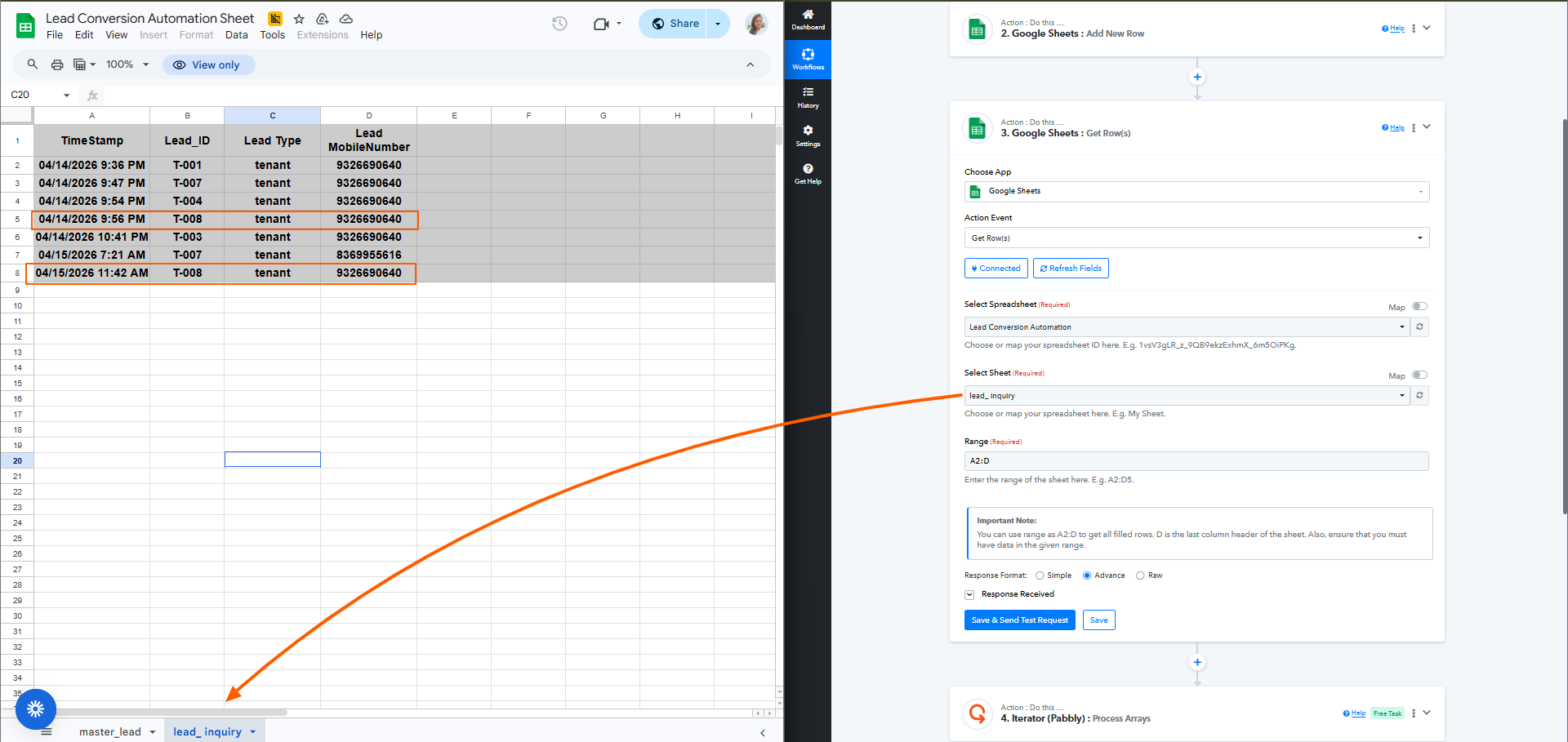
The screenshots you shared are from the master_lead sheet. However, in your workflow, the Google Sheets – Get Row(s) step is fetching data from the lead_inquiry sheet.
In the lead inquiry sheet, the Tenant ID T-008 is present more than once, which is why multiple records are being processed, and the workflow runs multiple times.
This behavior is expected based on the data in that sheet. Please update the sheet under the workflow if it isn't supposed to be lead_inquiry.
Thank you for your kind support.
Mam, as you show get rows from lead_ inquiry we taken to be used at filter value in route 1 and master sheet row update we are doing after filter get rows from tenant sheet check screen shot.
we will get single time user id in tenant sheet as it's not repeated, but when user re approach us to get matched lead that will come multiple times from lead_ inquiry. Please check and if you want I will send workflow link to check
Hi @Jayesh patel,
Thank you for sharing the detailed explanation .
I understand your use case, but it is a bit complex to fully interpret through text, especially with multiple sheets (lead_inquiry, tenant, owner) and matching logic involved.
It would be better if we connect over a short Google Meet so I can clearly understand your exact requirement and guide you with the correct setup step-by-step.
Please book a slot here:
https://calendly.com/d/cvtb-q7v-gfc
Once connected, we’ll help you structure this properly.
workflow run now but as route 2 created filter step not started show just action step Route-Route2 owner lead data out shows error but data in show success, then filter step not start ,please check
Task History ID -
IjU3NjYwNTZkMDYzNDA0MzE1MjZjNTUzNDUxMzE1MTYyNTQzNzBmMzci_pc
Executed at
Apr 15, 2026 23:17:01, (UTC+05:30) Asia/Kolkata
You have set the filter condition in your routes to execute when a Lead ID contains either "T" or "RO". However, the Lead ID captured in your trigger step contains neither, which is why the filter conditions for both routes were not met.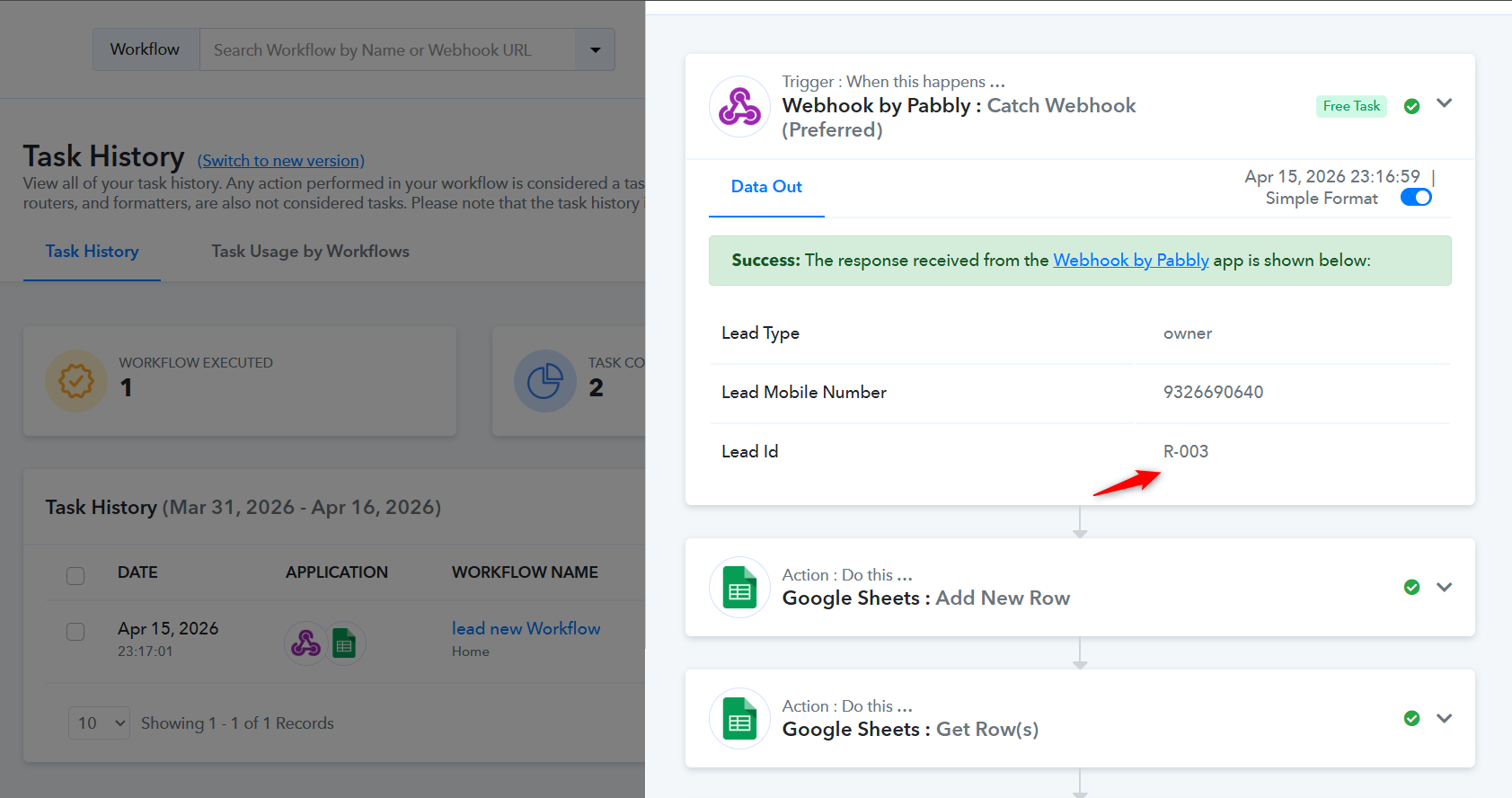
Thanks & Regards,
Arshil Ahmad
Customer Support Associate
? Pabbly.com
?Rate your support
Hi @Jayesh patel,
We noticed that you have not joined the meeting yet, and it appears the invite may have been declined.
If you are available, please feel free to join the meeting using the link below. In case you are facing any issues or would still like to connect, we would be happy to assist you:
https://meet.google.com/umw-gdbi-skc
Looking forward to connecting with you.
sorry , I have mailed to cancel the meeting as I got the solution as Iterator response selected was wrong.
now further flow execution one problem seen that execution runs too many times that shows error code 429 of google sheet quota exeeded. please check the flow.
Task History ID -
IjU3NjYwNTZkMDYzNDA0MzM1MjY0NTUzNDUxMzM1MTYyNTQzNjBmMzMi_pc
Executed at
Apr 17, 2026 21:05:19, (UTC+05:30) Asia/Kolkata
workflow id
https://connect.pabbly.com/task/history?filter_status=applied&filter_by_workflow_id=IjU3NjcwNTZlMDYzNjA0MzU1MjY0NTUzMzUxMzQi_pc
The RATE_LIMIT_EXCEEDED error you are encountering is from Google’s end. It occurs when you attempt to execute a particular endpoint—in your case, the “Update Row” action step—multiple times within a very short period, causing you to hit the write request limit.
It is not possible to fix this rate limit issue from our end. However, as a workaround, you can add a delay of 1 minute after the Iterator so that the data is not updated all at once. Instead, each row will be updated at 1-minute intervals.
Thanks & Regards,
Arshil Ahmad
Customer Support Associate
? Pabbly.com
?Rate your support
Thank you for your support, but I feel that our flow steps too many times for updating row value in a single line update. I think I have to do / edit some steps by which fetching cell value nd updating multiple times stopped. Please check flow that it shows more than 200 credits in single flow
lead new Workflow
Task History ID : IjU3NjYwNTZkMDYzNDA0MzM1MjZiNTUzZDUxM2I1MTYzNTQzNjBmMzEi_pc
Executed at : Apr 17, 2026 21:14:56, (UTC +05:30) Asia/Kolkata
Hello,
Thank you for sharing the details.
We have reviewed your workflow, and it is currently working as expected based on your configured use case. The higher task usage (200+ credits) is due to multiple fetch and update operations being performed within the flow.
To get better visibility, we recommend checking the new Task History UI, where you can review step-wise task consumption and understand how many tasks are used per execution.
If you would like, we can connect over a short Google Meet to better understand your requirement and help optimize the workflow to reduce task usage. You can book a slot here:
https://calendly.com/d/cvtb-79m-x6s
Kindly ensure availability at the scheduled time, as it will help us assist you more effectively.
Looking forward to your response.