Lead Feedback to Meta using Conversions API with Pabbly Connect
Status: Open · Asked by hypethatup on · 0 views
Hi, I'm running Meta Lead Ads Campaigns (Instant Forms). The leads are sent to Google Sheets using Pabbly Connect. I want to send lead feedback updated on Google Sheets to Meta via Conversions API for CRM using Pabbly Connect.
NOTE: I don't have a dedicated CRM, currently it's only Google Sheets and feedback of the leads is provided by team in Google Sheets itself.
I don't want to send purchase event. I want to specifically send Lead Feedback (Qualified, Converted, etc.) to Meta.
Hey @hypethatup,
Yes, this setup is possible using Pabbly Connect and Google Sheets.
You can add an additional column in your Google Sheet, for example, Lead Feedback, where your team can update the lead status (Qualified, Converted, Not Interested, etc.).
Then, create a new workflow with the trigger Google Sheets: New or Updated Spreadsheet Row. While installing the trigger, select the Lead Feedback column as the trigger column so that the workflow runs whenever feedback is updated.
After the trigger, you can add the Facebook Conversions action and use the action like send lead event, send other event or send event, depending on the type of feedback you want to send to Meta. You can then map the required lead details and feedback values from Google Sheets to the Facebook Conversions action.
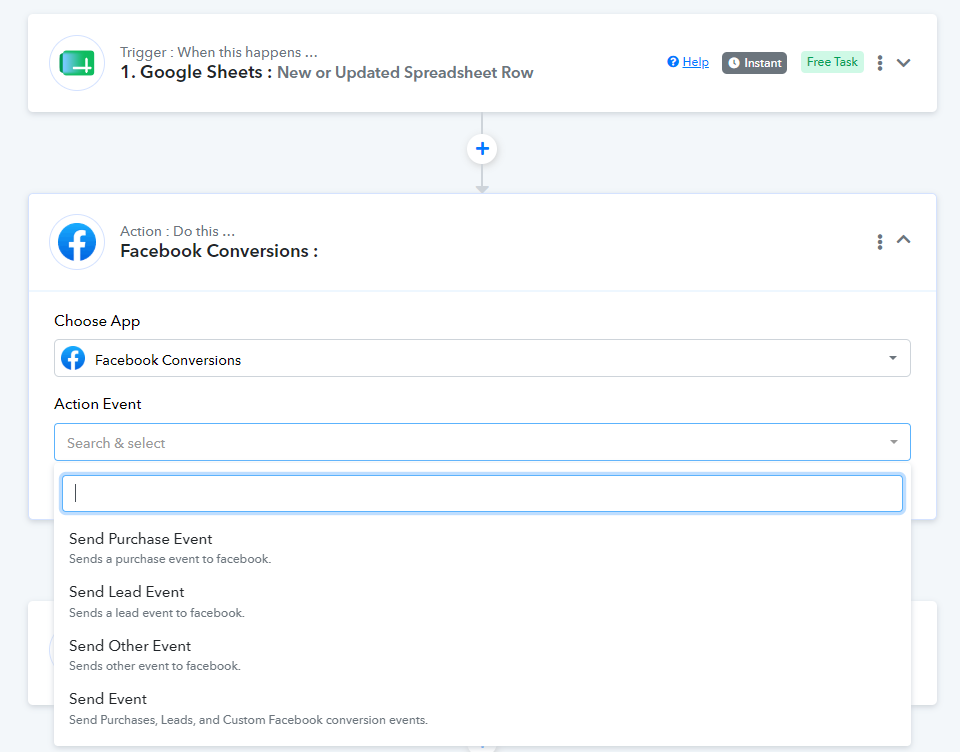
This way, whenever your team updates the feedback column in Google Sheets, the workflow will automatically trigger and send the corresponding lead feedback data to Meta via the Conversions API.
Please give it a try and let us know if you need any assistance with the workflow configuration.