Leadconnector V2 -> add tag -> replace all tags ???
Status: Closed · Asked by Clement on · 0 views
Hello it seems that when a "leadconnector V2" action is performed with a tag added , it actually removes all the tags from the contact in GHL + adds the tag ... instead of adding the tag on top of the other tags that are already associated to the contact ???
It should not remove all the tags , it should add the new tag (from the workflow) to the other ones the contact already has in GHL
Could you please fix this ????
Hey @Clement
We would recommend you to use "Add Tag to Contact" action step for this use case. Instead of removing the existing tags and adding the new one, this action step will append the new tag with the previously existing ones.
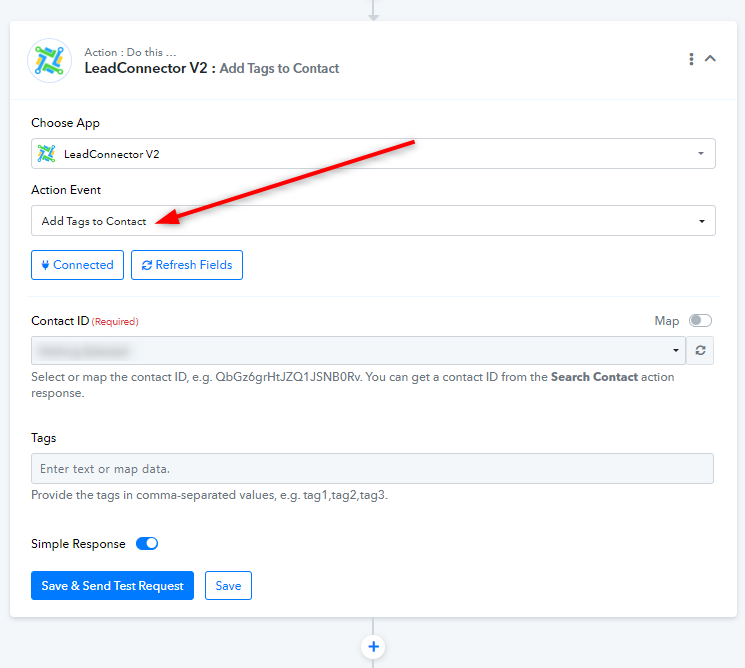
Thanks for this - suggestions on how I can have an automation that searches contact, creates one IF they do not exist, and then does 'add tag?' Thank you :)
@Donkeytron, Use the 'Search Contact', 'Create or Update a Contact', and 'Add Tags to Contact' action steps together to achieve your use case. The 'Search Contact' action step will search for a contact using their email address. Then, the 'Create or Update a Contact' action step will either create a new contact if it doesn't already exist or update the same contact if it does exist. Finally, the 'Add Tags to Contact' action step will add tags to those contacts.
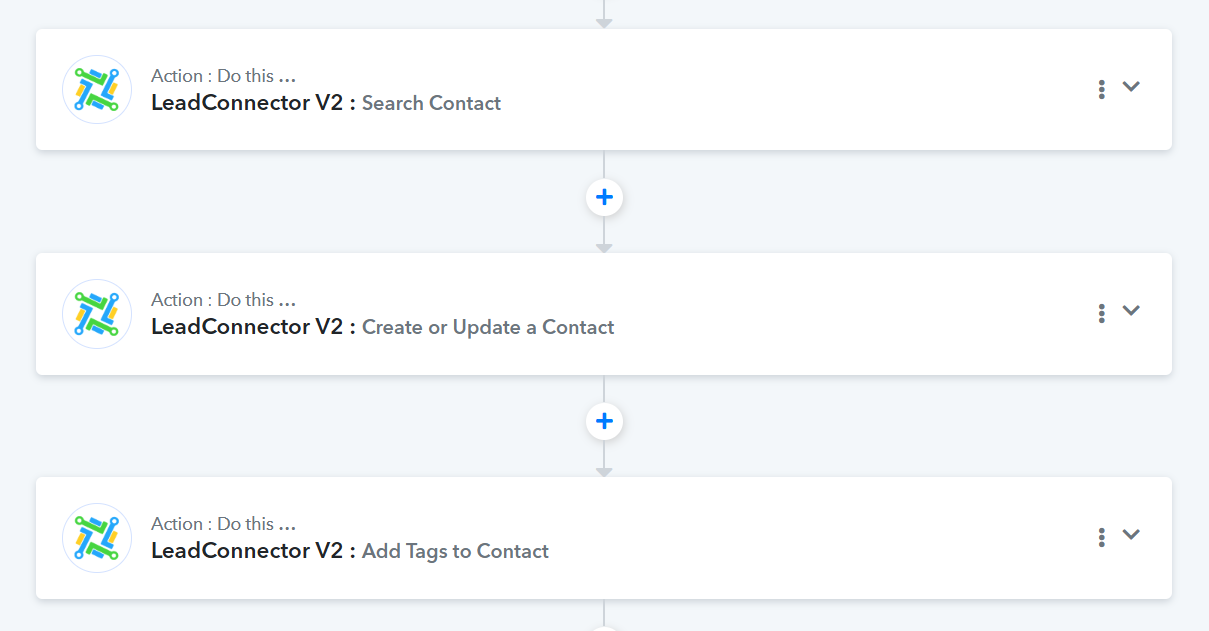
@Donkeytron, Use the 'Search Contact', 'Create or Update a Contact', and 'Add Tags to Contact' action steps together to achieve your use case. The 'Search Contact' action step will search for a contact using their email address. Then, the 'Create or Update a Contact' action step will either create a new contact if it doesn't already exist or update the same contact if it does exist. Finally, the 'Add Tags to Contact' action step will add tags to those contacts.
Thank you for your reply, however, step 2 'create or update a contact' deletes all of the users existing tags if they exist, which is the crux of this thread. 'Add tags' avoids this, but am seeing if there is a way for step 2 to happen ONLY if the contact does not exist-- unless I misunderstand? Thanks again.
Hello @Donkeytron,
Could you please share the workflow URL where you attempted to achieve this use case? This will help us review it thoroughly and provide more effective suggestions.
Hello @Donkeytron,Could you please share the workflow URL where you attempted to achieve this use case? This will help us review it thoroughly and provide more effective suggestions.
Thanks for any help
Here is a short loom explaining the issue - which I believe is GHL's problem but trying to figure out a solution:
https://www.loom.com/share/b8f7ab541fa143279302bd8b6653430a?sid=99d7ceab-e712-42d9-9982-4276b429f10e
the pabbly URL is this, but pabbly is working fine in terms of the functions, it's just the way it overrides tags as explained in the loom
https://connect.pabbly.com/workflow/mapping/IjU3NjUwNTY0MDYzZjA0M2M1MjZmNTUzNDUxMzYi_pc
Much appreciated :)
Hello @Donkeytron,
To achieve your desired use case, you can use the router in your workflow. I’ve created a detailed video explaining how to utilize the router effectively. Please refer to the video and set it up accordingly. Let us know if it works for you!
https://www.loom.com/share/6c8392821ae54ad78f75a158ad56847d?sid=72969568-2ed7-4812-811b-b709af814f01
Hello @Donkeytron,To achieve your desired use case, you can use the router in your workflow. I’ve created a detailed video explaining how to utilize the router effectively. Please refer to the video and set it up accordingly. Let us know if it works for you!
https://www.loom.com/share/6c8392821ae54ad78f75a158ad56847d?sid=72969568-2ed7-4812-811b-b709af814f01
This is amazing, thank you so much for your help!!