LeadConnector V2 - Search Contacts by Phone is missing
Status: Closed · Asked by Stewart Baker on · 0 views
Hello Pabbly Support,
I need some clarification regarding the LeadConnector integration in Pabbly Connect, specifically when migrating workflows from LeadConnector V1 to LeadConnector V2.
In the LeadConnector V1 integration, there is an action that allows us to search for a contact via phone number. We currently rely on this functionality in our workflows to find an existing GoHighLevel contact before performing the next automation steps.
I noticed that LeadConnector V2 is now available in Pabbly Connect. However, the Search Contact action only shows the following required fields:
- Location ID
- Query (Required) – “Enter text or map data. Provide contact name or email address.”
My questions are:
- 1. Can the Query field in the LeadConnector V2 “Search Contact” action also accept a phone number, even though the description only mentions contact name or email address?
- 2. If phone-number search is not supported by this action, what is the recommended V2 replacement for the V1 Search Contact via Phone functionality?
- 3. Is there another LeadConnector V2 action or API-based method within Pabbly Connect that can search for an exact contact using a phone number?
- 4. If this functionality is not currently available in the LeadConnector V2 integration, are there plans to add a dedicated Search Contact by Phone action before the V1 functionality is discontinued?
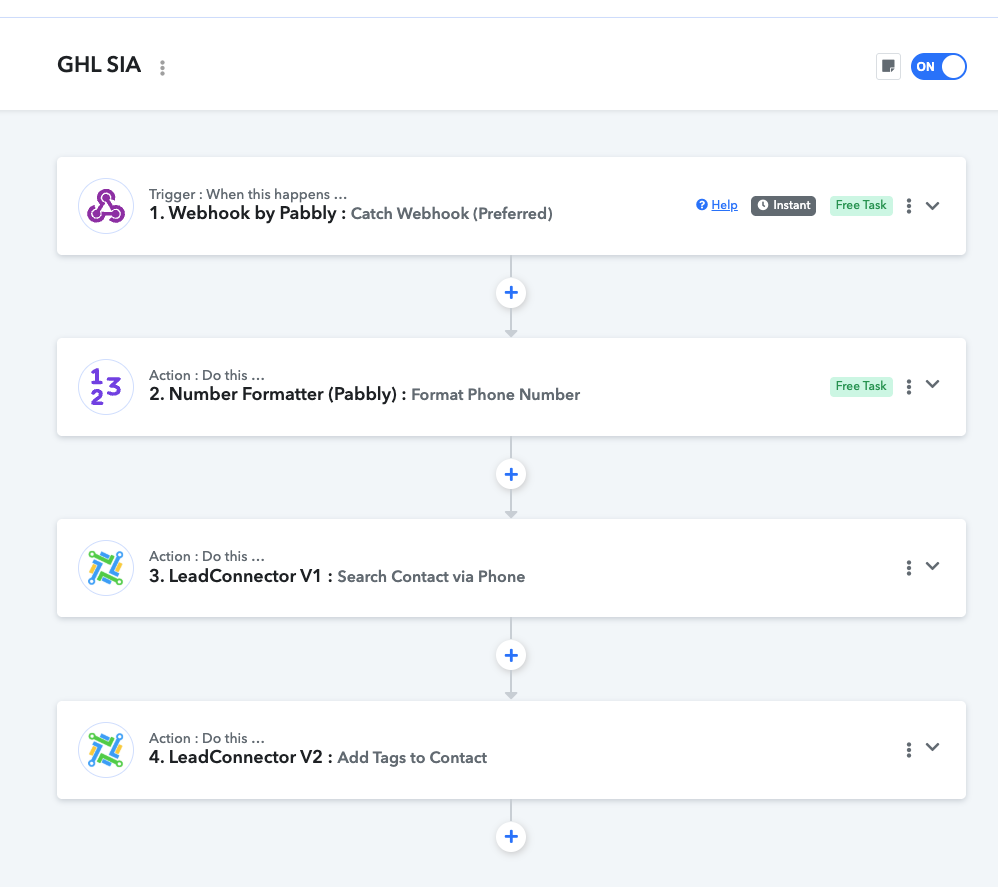
Our workflow essentially needs to perform:
Receive Web hook → Format Phone number → Search GoHighLevel/LeadConnector V1 for Contact via Phone → Add tag to contact using GHL/LeadConnector V2
We need to replace the GHL/LeadConnector V1 since GHL will remove that feature in their platform.
We would appreciate a step-by-step recommendation for migrating this functionality from V1 to V2 without breaking our existing workflows.
Thank you!
Hi Stewart,
Even though the Query field description says name or email, it supports phone numbers (e.g., +61422862769).
How to update your workflow:
Replace your V1 action with LeadConnector V2: Search Contact.
Select your Location ID.
Map your formatted phone number into the Query field.
Click Save & Send Test Request.
Map the returned
Contacts 0 Idinto your subsequent LeadConnector V2: Add Tags step.
That’s it! You don't need a separate V1 search action.
Thanks & Regards,
Hrishabh
Customer Support Associate
🌐 Pabbly.com
👉 Rate your support