Link Person to Deal in Pipedrive
Status: Open · Asked by SupportHubstrat on · 0 views
Hi, I'm here to ask for further support.
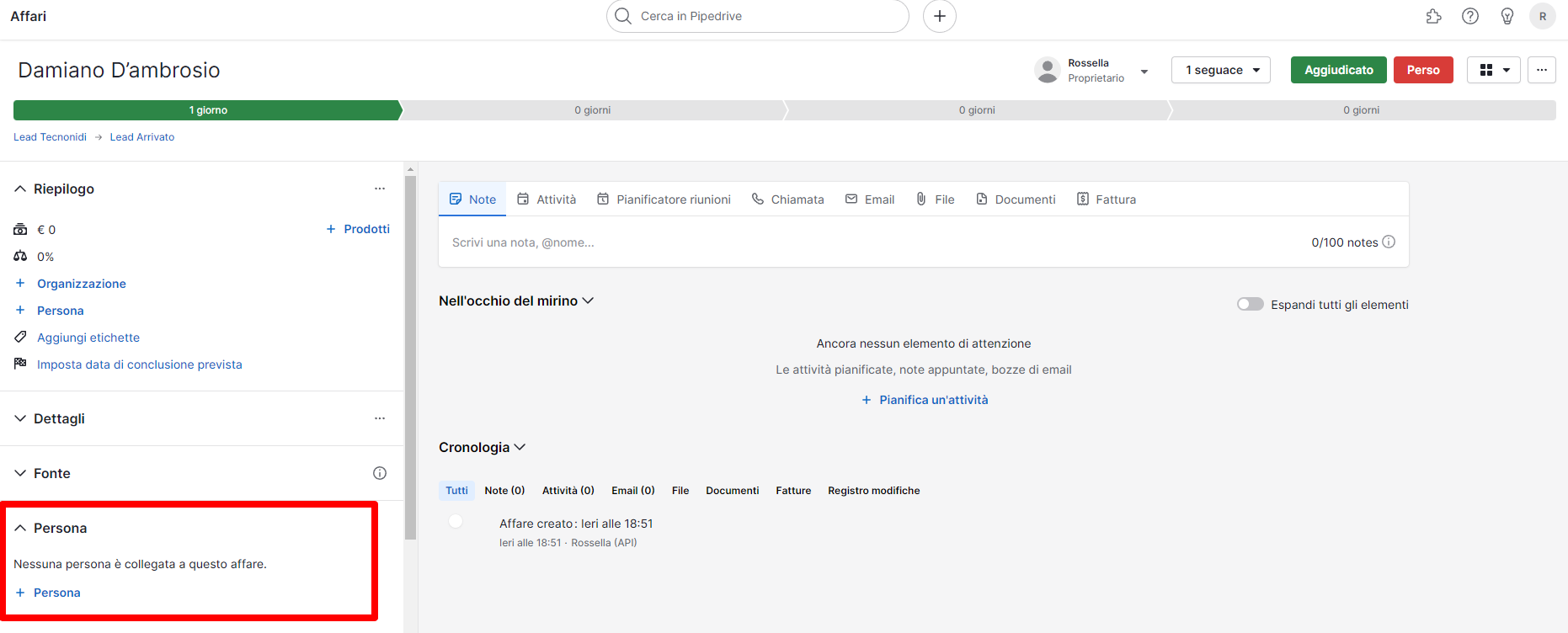
The automation of Person and Deal Creation works correctly, the only problem is that the deal is not linked to the person.
We need the field to be automatically linked to the contact person that is created in the Contacts section
Is it possibile that the problem is related to the missing Person ID in the action CREATE DEAL?
Thank you
Attachments
Hey @SupportHubstrat
To add an individual to the deal, you must input the person's ID during the 'Create Deal' action step, which can be obtained from the 'Find Person' or the 'Create Person' action step.

Ok thank you, I will do some tests
Hi, some time ago I opened this thread to get support in connecting Google Sheets with Pipedrive and its Pipelines https://forum.pabbly.com/threads/connection-google-sheet-to-pipedrive-contact-and-deal.24098/
The operation worked correctly.
I need to recreate the same workflow but connect the deals to other pipelines.
I replicated the same workflow that works on another workflow by simply changing the reference pipeline. But new deals are always created in the same pipeline
In the video I show all the step to send deal to pipeline. As you can see the pipeline selected is Landing Aitembot but on detailed report is linked to Vittorio (ID:3) Pipeline but should be connected to Lead Aitembot
How can I solve this problem?
Hello @SupportHubstrat
It appears that the attached video is corrupted. Could you please share a Loom video with us This will help us better understand the issue and provide more effective assistance.
Hi friend, this is Loom Link https://www.loom.com/share/0213fe24a66246c9a1de4e63738f28a3?sid=18f14596-cdca-4077-948a-7aa4e6391207
As you can see in Deal Creation is Selected LEAD_AITEMBOT PIPELINE but in the response the deal is send to Vittorio Pipeline
As I mentioned I had the same problem on other workflow and Pabbly Support solved the problem. I create the same tasks on another workflow and the problem is present again
This is the link to the workflow: https://connect.pabbly.com/workflow/sendwebhookdata/IjU3NjUwNTZiMDYzMTA0MzM1MjY0NTUzMDUxMzQi_pc
I need to make it work and I need to replicate on other workflow too.
Hello @SupportHubstrat
We have escalated your concern to the technical team, kindly allow us some time and we will provide you will updates as we make any progress.
Hello @SupportHubstrat
As we have checked your workflow thoroughly we have found that we were entering the Pipeline ID and Stage both at the same time hence the pipeline ID gets ignored.
I have recorded an explanation video please refer to this link to watch - https://www.loom.com/share/ec1fd7219d1c4e9ab40dd6ece2cbca6d sid=07a40bf4-6aff-458d-b9e3-8b5f3f923ac2
1. If you want to create the deal in the stage with ID -1, you can just simply select the Pipeline and leave the stage empty.
2. If you want to add the deal in the specific stage of a specific pipeline you can use the Get all Stages action step.
If you face any further issues please let us know.
Hi I tried to create another workflow same proble now the deal are added alway to pipeline ID 5
even if i put Pipeline ID: 6 in Pipeline ID fieald....
Hello @SupportHubstrat
Can you please provide us with the workflow URL of the mentioned workflow so we can check it
I tried to create another workflow same proble
Hi Preeti,
this is the workflow URL
https://connect.pabbly.com/workflow/sendwebhookdata/IjU3NjUwNTZjMDYzMjA0MzM1MjZhNTUzNjUxMzUi_pc
Hello @SupportHubstrat
As we have checked the workflow we noticed that both the pipeline ID and stage ID fields had been assigned with the IDs. Please note that 'pipeline_id' and 'stage_id' should not be used together as 'pipeline_id' will be ignored.
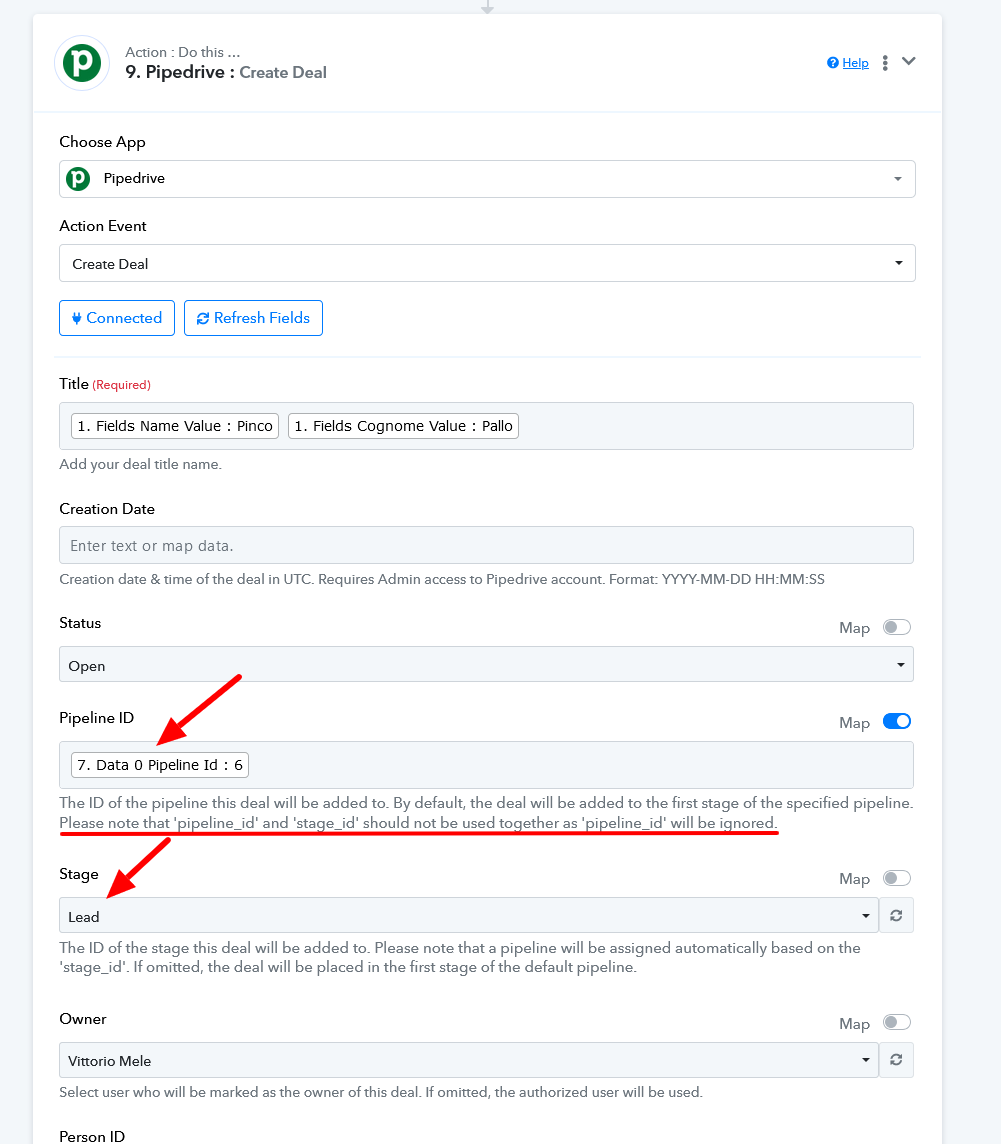
In order to add the deal in the required stage of a specific pipeline, you would have to get all the stages of a specific pipeline and then map the received id of the Create deal step. I have made the changes on your behalf, please refer to the attached screenshots for more info on the changes made.
1. Get the Stages of the required pipeline, in this case, pipeline with ID 6.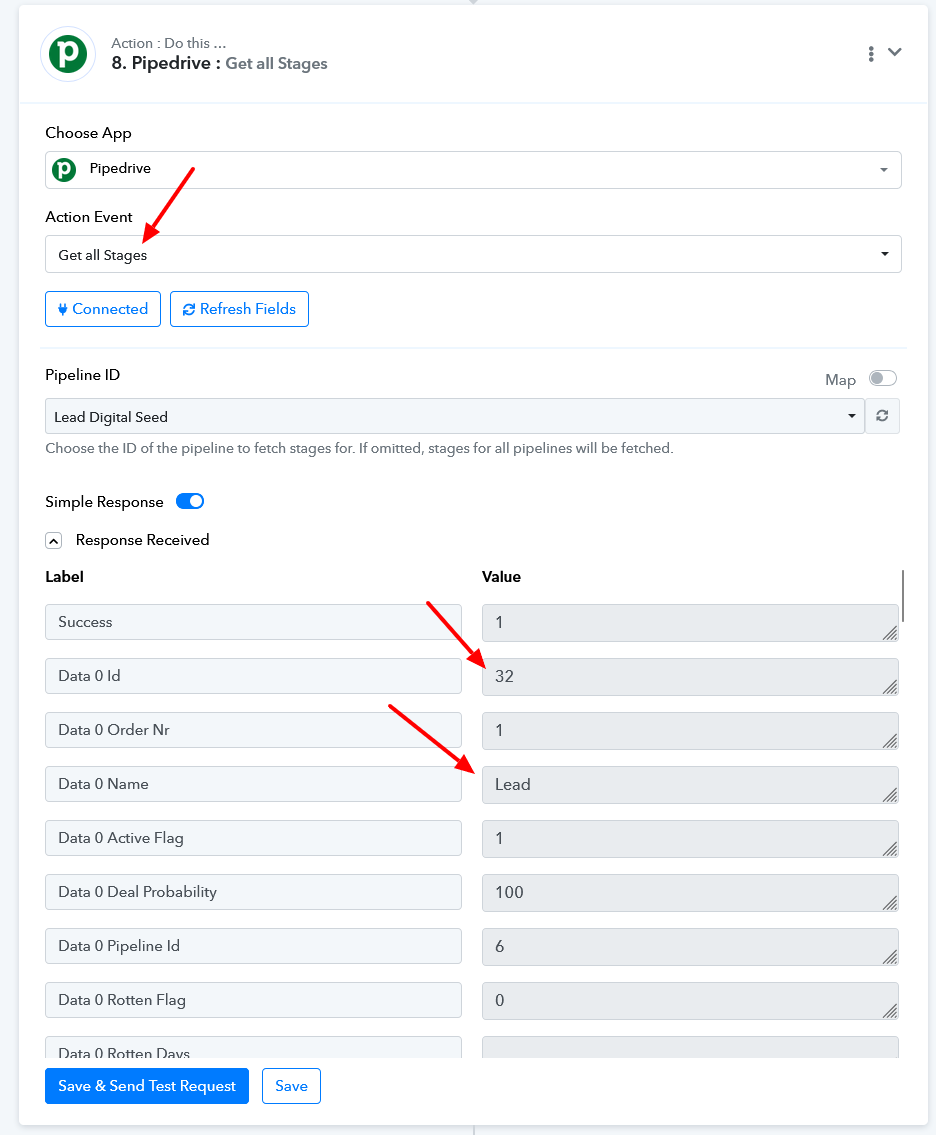
2. Map the stage ID and leave the Pipeline ID field empty and your deal will be added to the required stage, in this case, stage with ID 32.
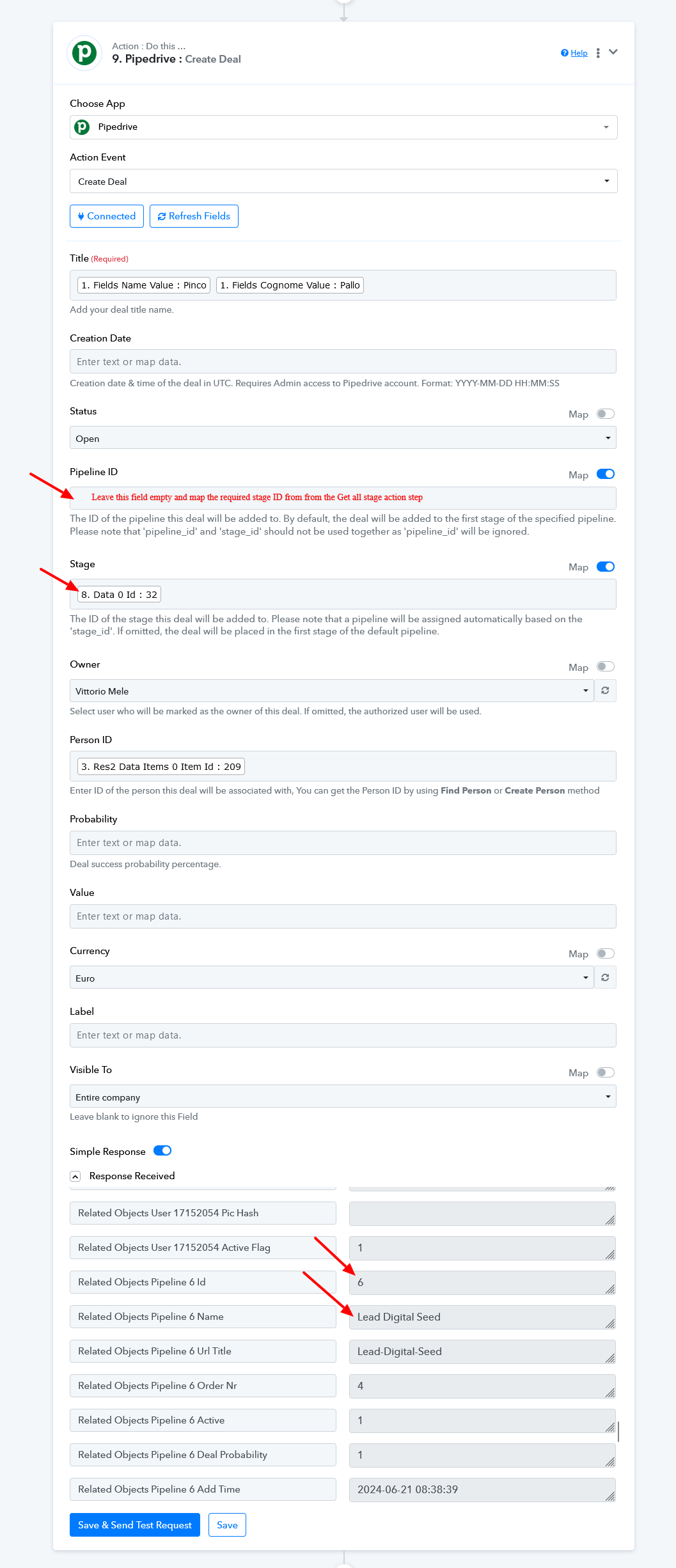
I hope this resolves your issue.
How do I prevent duplicates from being created in DEALs?
I launched the create DEAL command twice and 2 deals were created.
Before the create deal command there is the Find Deal command which should avoid the creation of duplicates
Please make sure that in Step 7 (Filter step), you select the Deal ID from Step 6 (Find Deal) of your workflow. It seems you have selected the Person ID from Step 4 (Update Person) action step, which is incorrect.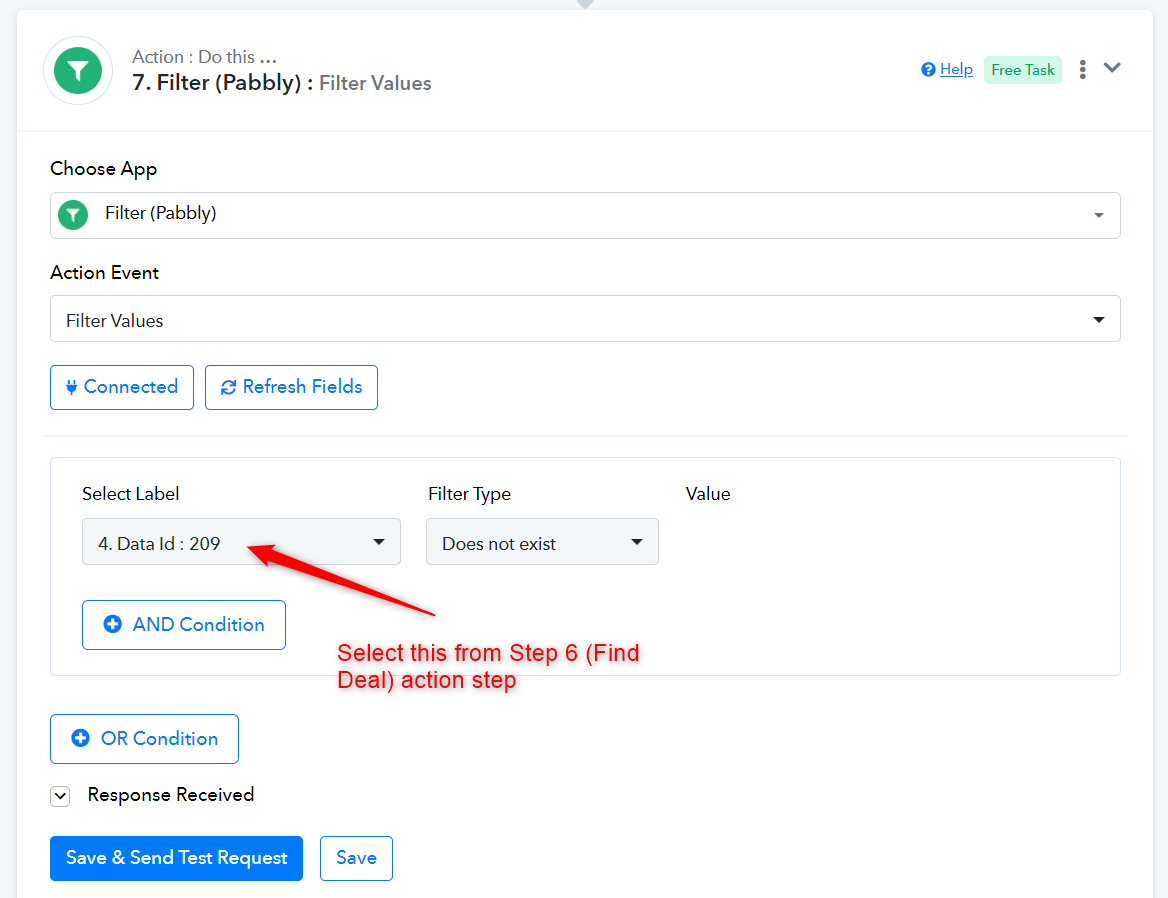
In step 6 I have no ID to select to fprevent double deal
What I need to achive is this:
- What I want to achieve is this:
- The customer leaves his data on the contact form.
- The data is transferred to a Google Sheet
- Create or find the contact on Pipedrive.
- If the contact exists, update the information
- Check if there is a related BUSINESS linked to the created person.
- If the deal does not exist CREATE the deal IF the deal exists a new deal must not be created
- Send the created deal to a very specific pipeline in the LEAD state
At this time I have a problem because the check on the presence of the deal don't work
You will receive the Deal ID if a deal with that title already exists in your Pipedrive account. We have made the necessary adjustments on your behalf. Please submit a new form and test your workflow now.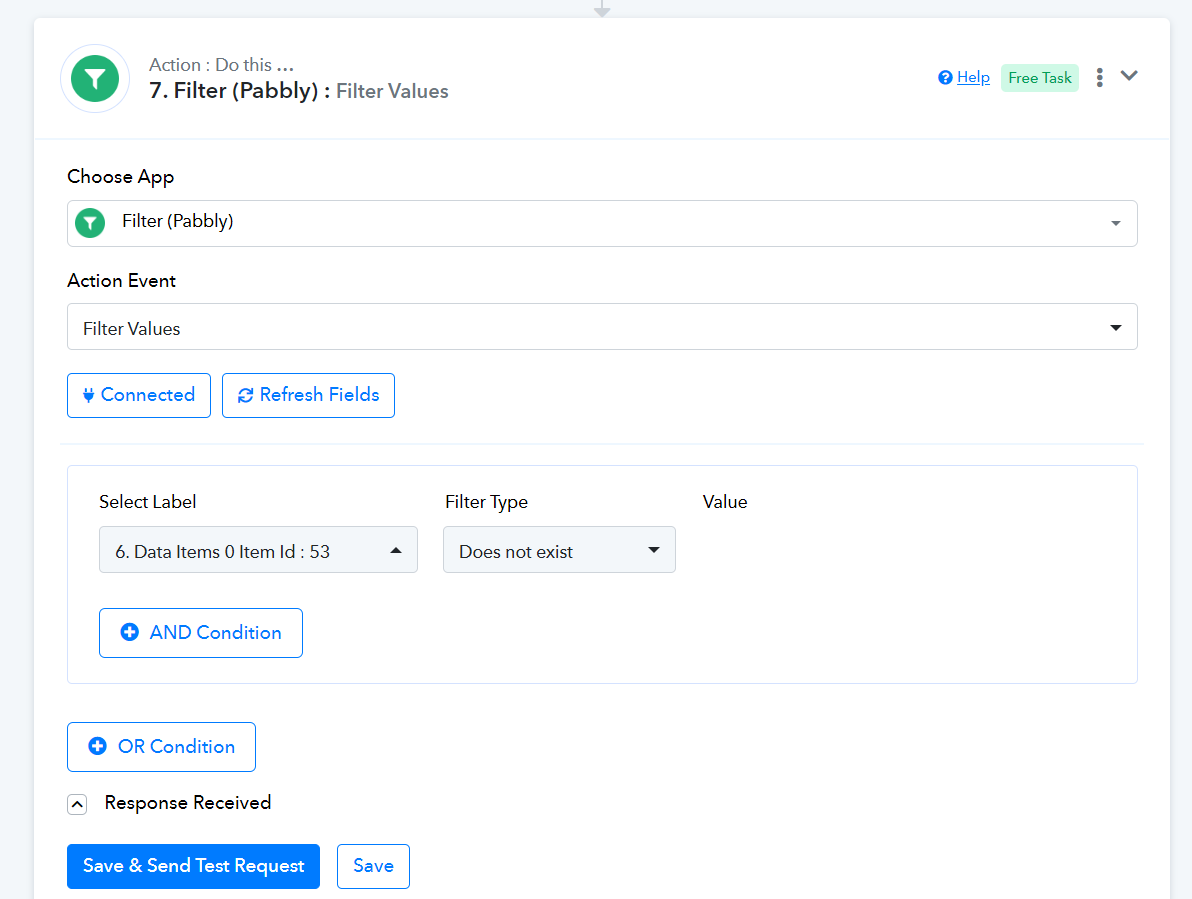
Hi friend I recaptured the webhook to use CLEAN DATA because the data that i used was an old test.
A matached every single STEP with all field but on FILTER VALUES (STEP 7) before to match the field I created a Deal in STEP 9 after the deal was create I went on step 7 and refresh the field and DEAL id: 298 is appeared but I select that field and try to save but I obtain an error
It seems that you have made changes to your Elementor form. Whenever you do this, make sure to click on 'Re-Capture Webhook Response' and capture a new form response in your workflow setup. Once you have captured the new response, map it to the next steps.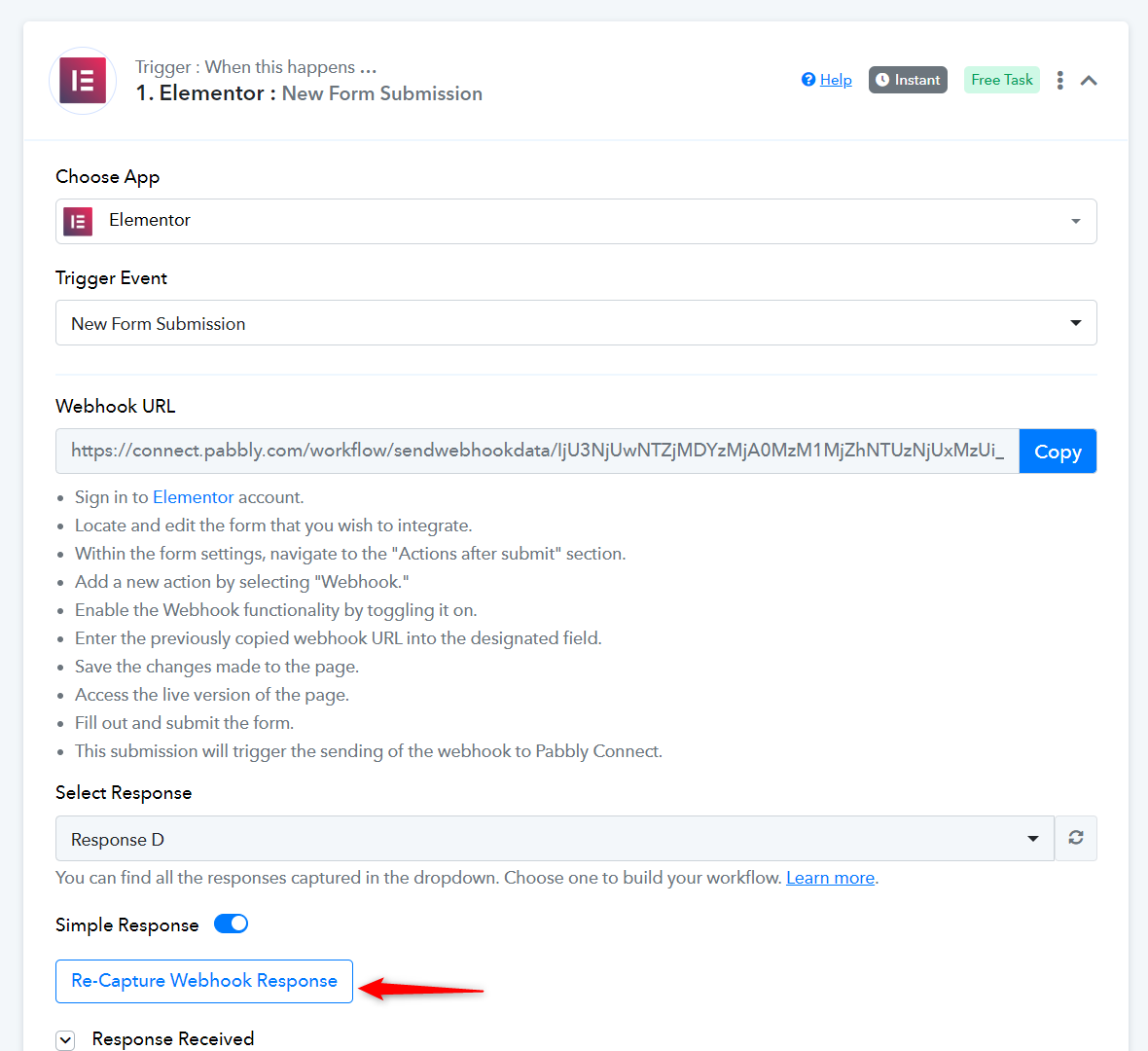
Hi, I recaptured the webook but I have always the same problem on Step FIND DEAL
Hey @SupportHubstrat
We would recommend using "Find Person" as it will return a response as whether the user already exists in Piprdrive or not.
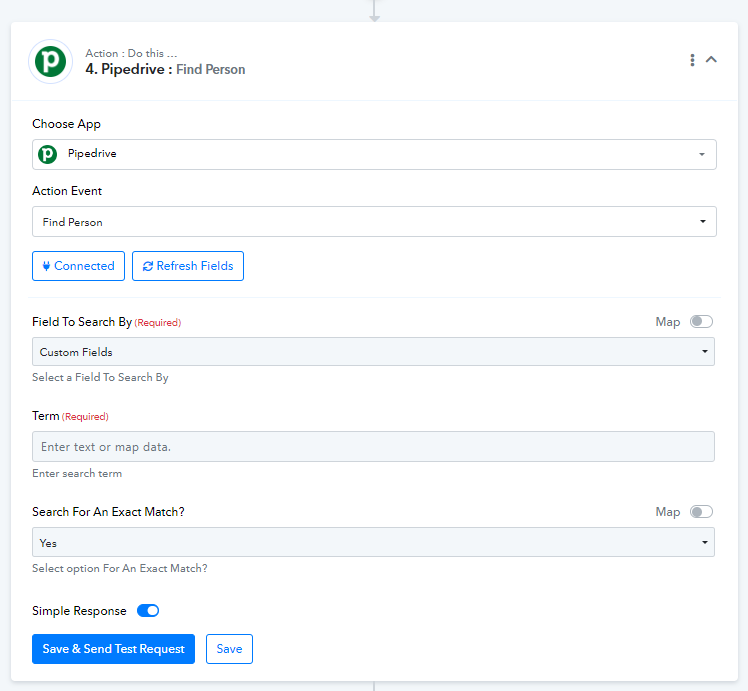
According to this response, you can make two routes using Router by Pabbly. You can then add steps for creating New user for "user not found" and Update user for "existing user". You can refer to the video below for getting to know more about Router -
Hi actually all my steps are:
1) Elementor new Form Submission
2) Google Sheets Add new Ros
3) Find or Create Person on Pipedrive
4) Delay 1 min
5) Find Deal on Pipedrive
6) filter (Pabbly) this step should be prevent the duplication of the deal
7) Get all stages Pipedrive
8) Pipedrive create Deal
9) Filter pabbly (for Brevo)
10) Create or update contact in Brevo
Wich Steps I sould remove and where I need to add PABBLY ROUTE to avoid person and deal duplication?
Thank you
It seems that you haven't captured a new response in your trigger step yet (the last response was captured 7 days ago). Please click the 'Re-Capture Webhook Response' button, capture a new form response in your trigger step, and map the new data to the subsequent steps.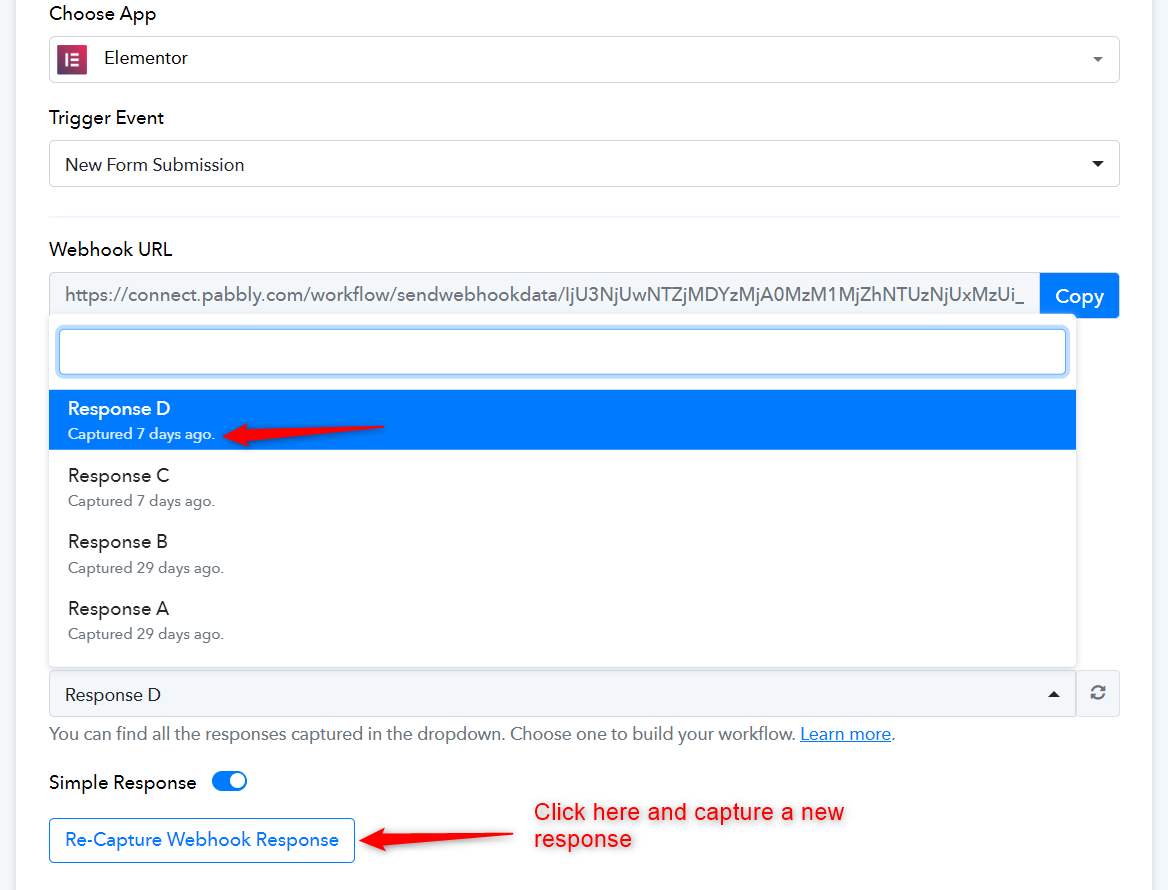
I knew it that there was somenthing wrong....
It was my fault... I know that in the previous message I gave you a webhook. But at this time I'm testing on webhook and you have anotherone...
Since I have to replicate the most webhook thing we can use this as a reference which is the most urgent one (if I solve this I replicate the same thing on all the others)
https://connect.pabbly.com/workflow/sendwebhookdata/IjU3NjUwNTY0MDYzNDA0MzE1MjZmNTUzZDUxMzci_pc
Sorry for misunderstanding
As mentioned before these are my steps:
1) Elementor new Form Submission
2) Google Sheets Add new Ros
3) Find or Create Person on Pipedrive
4) Delay 1 min
5) Find Deal on Pipedrive
6) filter (Pabbly) this step should be prevent the duplication of the deal
7) Get all stages Pipedrive
8) Pipedrive create Deal
9) Filter pabbly (for Brevo)
10) Create or update contact in Brevo
Wich Steps I sould remove and where I need to add PABBLY ROUTE to avoid person and deal duplication?
Thank you
This workflow is set up correctly, and Step 6 will prevent duplication of leads.
Please set up your Elementor Forms trigger step again by following the steps provided in the video below. Only the first part is relevant for you.
youtube.com/watch?v=_n-x2bC9ZQo
Once you have done that, do let us know.
I have problem on STEP 6 every time I add the DEAL ID does not exist as condition I obtain error...
As mentioned previously, you need to set up Elementor as your trigger step again. Please follow the steps provided in the video above and set up Elementor as your trigger step.