link two workflows?
Status: Closed · Asked by 松本昭彦 on · 0 views
What should I do if I want to link two workflows?
I want to go to the next new workflow after the iterator finishes.
Hello @tokyo2025,
Could you please share your specific requirements so we can provide more tailored suggestions for your use case?
Additionally, you might find it helpful to use a Data Forwarder to transfer data between workflows. You can refer to the following tutorial to learn more about setting up a Data Forwarder: Watch the Tutorial.
Thank you for your response. My specific requirement is as follows:
I have a Google Spreadsheet containing blog outlines in a list format. My goal is to fetch rows from this spreadsheet using Pabbly Connect, generate section articles with ChatGPT, and finally post the combined content to WordPress.
Here are the specific challenges I am facing:
- There are over 100 keywords, and the number of outline rows for each keyword varies.
- I want to iterate through the keywords, send the outlines to ChatGPT for article generation, and loop through this process.
- I tried using an iterator in Pabbly, but it caused issues since subsequent tasks (e.g., posting to WordPress) were also executed within the loop, resulting in multiple WordPress posts for each section.
I am considering splitting the workflow into two parts: one for iterating and processing the outlines, and another for combining the generated sections and posting them to WordPress.
However, I’m open to other solutions. My goal is to process the outlines sequentially or in batches (e.g., three keywords at a time), generate articles with ChatGPT, combine the sections, and post the final article to WordPress.
Could you suggest an efficient approach to achieve this?
Thank you!
I’m afraid the use case you’re describing doesn’t seem possible, as we currently don’t have a tool that can store data from all iterations, combine the generated content, and then post it on WordPress.
https://forum.pabbly.com/threads/writing-long-form-content-using-pabbly-and-ai.23375/
I have a question regarding the behavior of the "Schedule (Pabbly)" module when set to "Regular Intervals: Every 1 day."
If I toggle the workflow ON, will the task start immediately after saving and activating the workflow, or will it wait for a certain period before starting?
This timing is important because I need to manage a time gap between Workflow A and Workflow B. Understanding how the initial start time is determined will help me design the workflows accordingly.
I appreciate your clarification on this matter.
Thank you for your assistance!
Best regards,
Hello @tokyo2025,
If you set the workflow to run daily, you will also need to specify a particular time for it to execute, and the workflow will then execute each day at the selected time.
I have a question regarding the behavior of the "Schedule (Pabbly)" module when set to "Regular Intervals: Every 1 day."
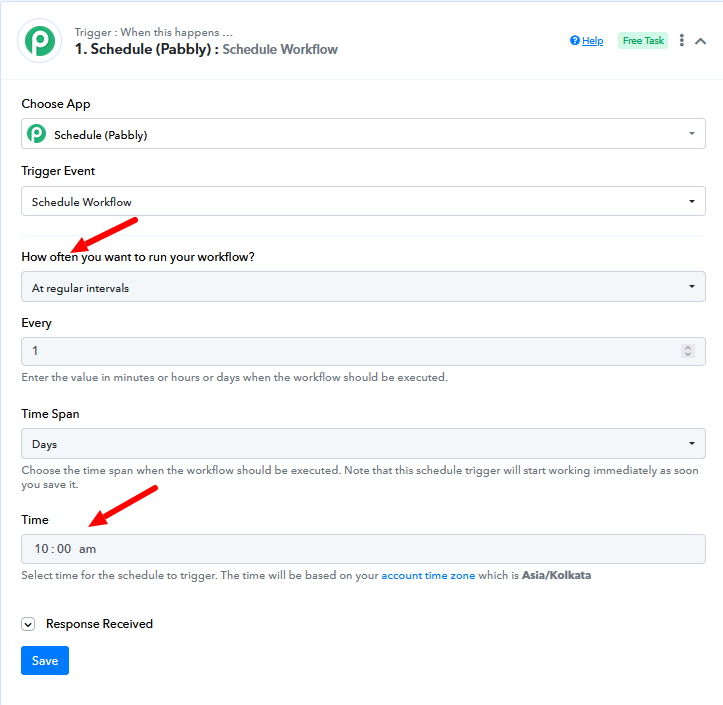
You can refer to this tutorial to better understand how schedule works:
Thank you for your reply.
I'm sorry if I don't have enough words.
I could also use days, but I often use hours.
It says, "Choose the time span when the workflow should be executed. Note that this schedule trigger will start working immediately as soon as you save it," so it looks like I could use two workflows with different time lags if I stagger the timing of saving depending on the workflow.
It would be better if I could stop the loop like Zapier and Make, but there's nothing I can do about it.
I'll try various trial and error.
Thank you.
Hello @tokyo2025,
This means the scheduler will monitor the set time from the moment the workflow is configured. For example, if you set the workflow to run at 10:00 AM but create the workflow at 8:00 AM, the scheduler will wait until 10:00 AM to execute. Similarly, if you configure the workflow at 11:00 AM, it will wait until the next day's 10:00 AM to run. I hope this clarifies how the scheduling works.
"Choose the time span when the workflow should be executed. Note that this schedule trigger will start working immediately as soon as you save it,"
I would also recommend that you first set up the workflow in a way that's more understandable for you. Then, try testing it to see how it works. This will help you get a better grasp of its functionality.
Thank you! I'll try it! Thanks.
Because I added a task above, I remapped the task number to number 9.
However, when I close the task window and reopen it, the task number reverts to number 8.
What do I need to do to correctly set it to number 9?
Hello @tokyo2025,
Kindly click the Save and Send Test Request button for each step in sequence. This should help resolve the issue.
Thank you for your replies.
Whether I click "Save and Send Test Request" or "Save", when I close and reopen the task window, the task number reverts to the original number.
In the case of ChatGPT, even if I reconnect to the API in the task window, the result is the same.
Whenever I make a change, I always click the "Save and Send Test Request" button. Also, even if I change the mapping in the same way for other subsequent tasks, the number reverts to the original number.
I would appreciate any additional hints.
Hello @tokyo2025,
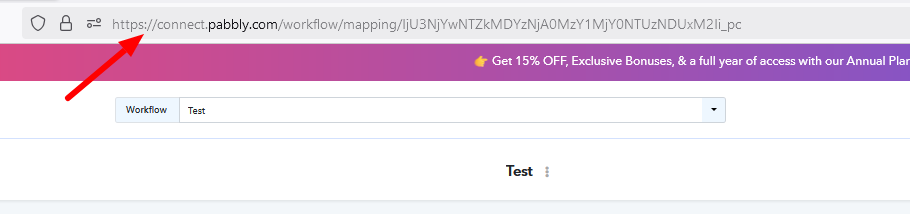
Could you please provide us with a workflow URL of the workflow where you are facing this issue so we can escalate the issue further?
Thank you for your reply.
https://connect.pabbly.com/workflow/mapping/IjU3NjYwNTZmMDYzZjA0MzE1MjZlNTUzMjUxMzEi_pc
When I click the "Refresh Fields" button in the task window, the mapping numbers revert to the ones I had before I changed them.
Even logging in to pabbly again didn't fix it.
thank you.
Hey @tokyo2025
You will have to map the details in every step if you add a step in the middle of a workflow. Kindly capture a new test response, and "Save and Send Test Request" at every step. This will rectify your issue.
Let us know if it works for you.
Thank you for your reply.
As instructed, I ran "Save and send test request" for all 43 tasks, and the mapped task numbers were saved correctly.
The problem has been resolved.
Thank you!