LinkedIn “Create Company Text Post with Image” failing with NONEXISTENT_VERSION error
Status: Open · Asked by Zonsai on · 0 views
Hello,
For the last days, my workflow has been failing on the LinkedIn step:
It was working before, and I have not made any relevant changes to this step.
The error I am receiving is:
{
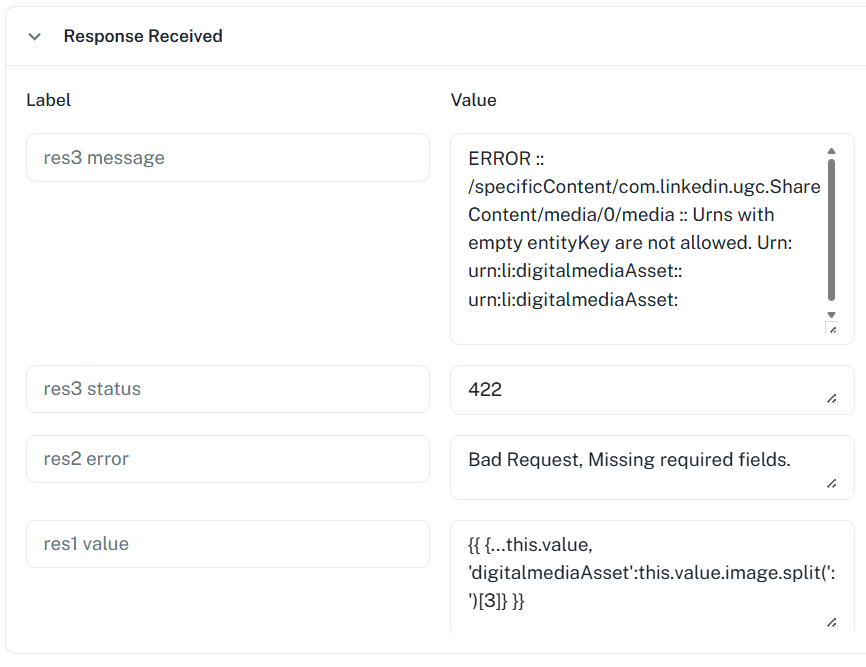
"res1 > value": "{{ {...this.value, 'digitalmediaAsset':this.value.image.split(':')[3]} }}",
"res2 > error": "Bad Request, Missing required fields.",
"res3 > status": 426,
"res3 > code": "NONEXISTENT_VERSION",
"res3 > message": "Requested version 20250401 is not active"
}
From the error message, it looks like the LinkedIn request may be using an API version that is not active anymore.
Could you please confirm:
- If this is a Pabbly-side issue with the LinkedIn module/version
- If there is any fix or workaround available
- Whether I need to reconnect the LinkedIn account or update something manually
This is affecting the step “Create Company Text Post with Image” specifically.
Thanks in advance.
Hey @Zonsai,
Thank you for sharing the details.
We have escalated this issue to our technical team for further review. We will keep you updated as soon as we have more information or a resolution.
Appreciate your patience in the meantime.
Hi!
Looks like I am having the same problem. I look forward to the answer, because it was working before.
Thanks!
Hi!Looks like I am having the same problem. I look forward to the answer, because it was working before.
Thanks!
Could you please share the workflow URL where you are encountering this issue so we can forward it to the technical team?
Thanks & Regards,
Arshil Ahmad
Customer Support Associate
? Pabbly.com
?Rate your support
Could you please share the workflow URL where you are encountering this issue so we can forward it to the technical team?Thanks & Regards,
Arshil Ahmad
Customer Support Associate
? Pabbly.com
?Rate your support
Absolutely. Here it is. Thanks: https://connect.pabbly.com/v2/app/workflow/share/WxMHNQVSB2QHTVU_VDENKg4aAgZVDAFkBx4GFAMMAXlQHghjAkMNZwhEUXNfHAloVx4GbARYVmoMGFBUCV9VJgAZUkAGBVIoBksDeFcWDT5bBQcvBWQ#
Thank you for sharing the workflow URL. We have forwarded it to our technical team and will get back to you as soon as we receive any updates.
Thanks & Regards,
Arshil Ahmad
Customer Support Associate
? Pabbly.com
?Rate your support
API Out of date?
res3 > status: 426
code: NONEXISTENT_VERSION
message: Requested version 20250401 is not active
Yes, that is what the technical team is currently working on. We will get back to you as soon as we receive any updates from their end.
Thanks & Regards,
Arshil Ahmad
Customer Support Associate
? Pabbly.com
?Rate your support
Hi Pabbly team,
Could you please provide an update on this issue?
It has been a few days since it was escalated to the technical team, and the workflow is still failing on the LinkedIn “Create Company Text Post with Image” step with the same error:
NONEXISTENT_VERSION - Requested version 20250401 is not active
This is currently affecting our automated publishing workflow, so I would appreciate knowing if there is already an estimated fix, workaround, or any manual action we should take on our side.
Thanks in advance.
Hey,
Thank you for your patience.
The issue with the LinkedIn “Create Company Text Post with Image” action related to the NONEXISTENT_VERSION error has now been fixed.
Could you please confirm if you are still experiencing this issue in your recent task history? If yes, kindly share the workflow URL or any affected task history ID with us so we can review it and escalate further if required.
Looking forward to your confirmation.
Mine is still failing. Task history Id is IjU3NjYwNTZkMDYzMjA0MzU1MjZiNTUzMTUxM2I1MTZhNTQzNTBmMzEi_pc Task name is
Loyalty Wizard Evergreen Post
We clicked on the “Refresh Fields” button, then clicked on the “Save & Send Test Request” button, and it appears to have fixed your issue. You can refresh fields in all your LinkedIn action steps and save the steps; this should resolve the issue.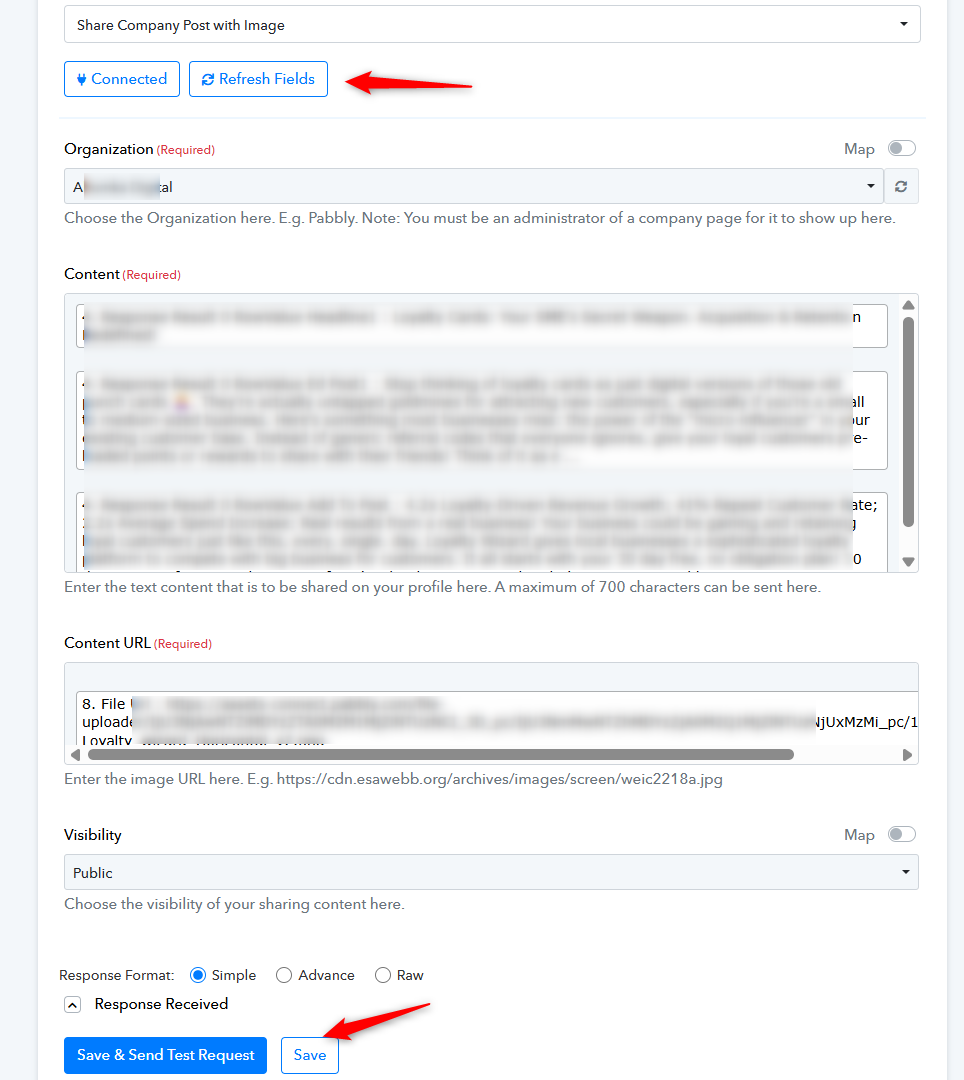
Thanks & Regards,
Arshil Ahmad
Customer Support Associate
? Pabbly.com
We clicked on the “Refresh Fields” button, then clicked on the “Save & Send Test Request” button, and it appears to have fixed your issue. You can refresh fields in all your LinkedIn action steps and save the steps; this should resolve the issue.Thanks & Regards,
Arshil Ahmad
Customer Support Associate
? Pabbly.com
Ok thanks, I will try now
Sure, let us know how it goes.
Please feel free to reach out to us if you face any issues in the future.
Is there anyway to update the connection in bulk? Otherwise I have to refresh every step in every one of my workflows. I have a lot of workflow steps that connect to LinkedIn. When I try to update using connection in settings, it doesn't work.
Hello @expatpat ,
I completely understand your frustration. Currently, there is no global 'Bulk Refresh' button that can update the API versioning across all workflow steps at once.
Updating the connection in the 'Settings' only refreshes your login credentials/token; it doesn't force individual action steps to update their internal API version (which is what the NONEXISTENT_VERSION error requires).
As of now, the only way to resolve this for existing workflows is to manually open the LinkedIn steps and click 'Refresh Fields' followed by 'Save & Send Test Request.' I have noted this as a feature request for our development team, as a 'Global App Refresh' would be incredibly helpful for API version updates like this. We apologize for the manual effort required in the meantime
Ok thanks. This is a major miss in the platform, especially for users with large workflows. This is not a new issue. I've seen users flag it since at least last year. Also, by using save and send test request, instead of just save, there will be an actual post sent to LinkedIn, not just a test in pabbly. I can't use Pabbly for larger production workflows if it can fall down this easily and takes a while to fix
Hi @expatpat,
We completely understand your concern here, especially for larger production workflows with multiple LinkedIn steps.
However, please note that instead of using the “Save & Send Test Request” button, you can also simply use the “Save” button after refreshing the fields. This should also help update the step configuration without triggering an actual post to LinkedIn.
Please try using the “Refresh Fields” + “Save” approach and check whether the workflows get back to normal.
We do understand your feedback regarding bulk refresh/update functionality. Currently, the functionality works this way, but if you would like improvements or additional features such as a global refresh option, we recommend adding the suggestion to our roadmap here:
Our team regularly reviews roadmap requests for future improvements.