Mailchimp update existing subscriber
Status: Open · Asked by nibz on · 0 views
Hello I have a question about my mailchimp setting.
I have set the following steps in pabbly connect:
1) Mail Parser
I am sending an email (with JSON formatted data) to my Pabbly after a form is submitted on my site. The data will be added to custom fields in mailchimp
2) JSON Extrator
I am extracting the reveiced data. To split all the received date in different fields.
3) Mailchimp Add new Member with custom Fields
I am adding the person to my mailchimp list.
But currently if the person already is subscribed i am receiving a error email of pabbly.
How can i solve this, i tried different approaches but don't really know how i can fix this.
What i whan't is to add a check if they are already subscribed.
a) if allready subscribed do nothing
b) if not dubscribed add to mailchimp list
Kind regards,
Robin Bruinsma
Hey @nibz,
Thank you for reaching out.
To avoid this issue, you can first check whether the subscriber already exists in Mailchimp before adding them.
Here’s how you can do it:
- Add the “Find Member” action in Mailchimp and search using the email address
- This action will return a field called “Exact Matches Total Items”, which indicates how many matching records were found
- Add a Filter step right after this action
- Set the condition as:
- Exact Matches Total Items = 0
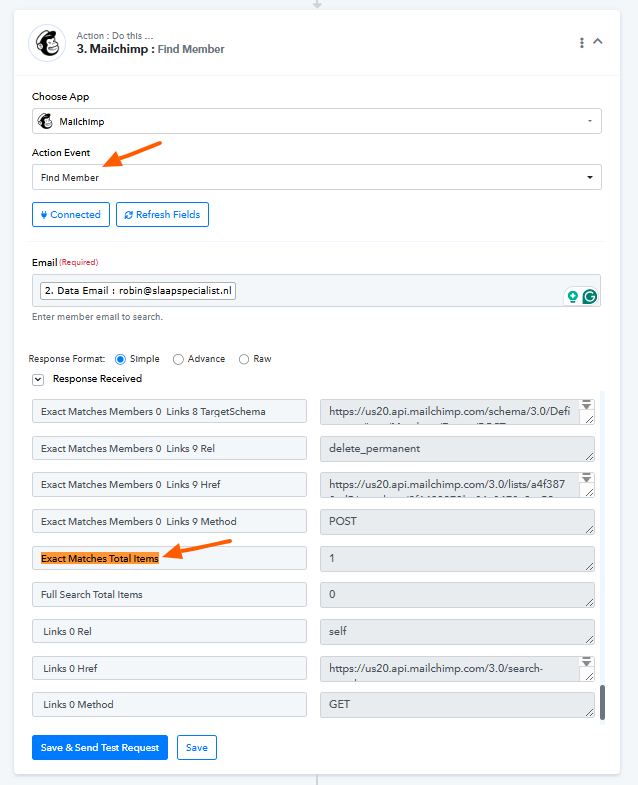
- Exact Matches Total Items = 0
With this setup:
- If the value is 0 → the user does not exist → the Add Member action will run
- If the value is greater than 0 → the user already exists → the workflow will skip adding them
This will help you avoid duplicate subscriber errors.
Let us know if you need help setting this up.