Mapping to previous field step isn't working
Status: Closed · Asked by Jason McCoy on · 0 views
I have a workflow that isn't showing any previous map fields data when I use the / key. It's the last action in the workflow which is "LeadConnect V2 Add Tags to Contact". In the "Contact ID" field, I toggle on mapping, type / to show mapping options, and nothing shows up.
I want to map the "Contact ID" to the 2nd step "LeadConnect V2 Create or Update a Contact" response field for "contact id" or the 3rd step where I use "LeadConnect V2 Search Contact" which provides the "contacts 0 id" field.
Please help. Thank you!

Hello Jason,
Thanks for contacting us.
Could you please share the Workflow URL so that we can look into it and provide information accordingly?
Please be aware that to assist you effectively, we may need to access your Pabbly Connect account. If you're comfortable with this, please grant us permission by stating in your next email: "You have my permission to log into my Pabbly Connect account, and edit workflow {If required}. Here is the registered email address associated with it."
Thanks & Regards,
Adeel Akhtar
🌐 Pabbly.com
Sure it's https://connect.pabbly.com/v2/app/workflow/mapping/IjU3NjcwNTY5MDYzMjA0MzY1MjY5NTUzYzUxMzYi_pc
Hello Jason,
Thanks for contacting us.
Could you please share the Workflow URL so that we can look into it and provide information accordingly?
Please be aware that to assist you effectively, we may need to access your Pabbly Connect account. If you're comfortable with this, please grant us permission by stating in your next email: "You have my permission to log into my Pabbly Connect account, and edit workflow {If required}. Here is the registered email address associated with it."
Thanks & Regards,
Adeel Akhtar
🌐 Pabbly.com
It's https://connect.pabbly.com/v2/app/workflow/mapping/IjU3NjcwNTY5MDYzMjA0MzY1MjY5NTUzYzUxMzYi_pc
You have my permission to log into my Pabbly Connect account, and edit workflow {If required}. Here is the registered email address associated with it. [email hidden]
HI Adeel,
Sure it's https://connect.pabbly.com/v2/app/workflow/mapping/IjU3NjcwNTY5MDYzMjA0MzY1MjY5NTUzYzUxMzYi_pcOn Wed, Jul 1, 2026 at 1:05 PM Pabbly Support <[email hidden]> wrote:Hello Jason,
Thanks for contacting us.
Could you please share the Workflow URL so that we can look into it and provide information accordingly?
Please be aware that to assist you effectively, we may need to access your Pabbly Connect account. If you're comfortable with this, please grant us permission by stating in your next email: "You have my permission to log into my Pabbly Connect account, and edit workflow {If required}. Here is the registered email address associated with it."
Thanks & Regards,
Adeel Akhtar
🌐 Pabbly.com
Hello Jason,
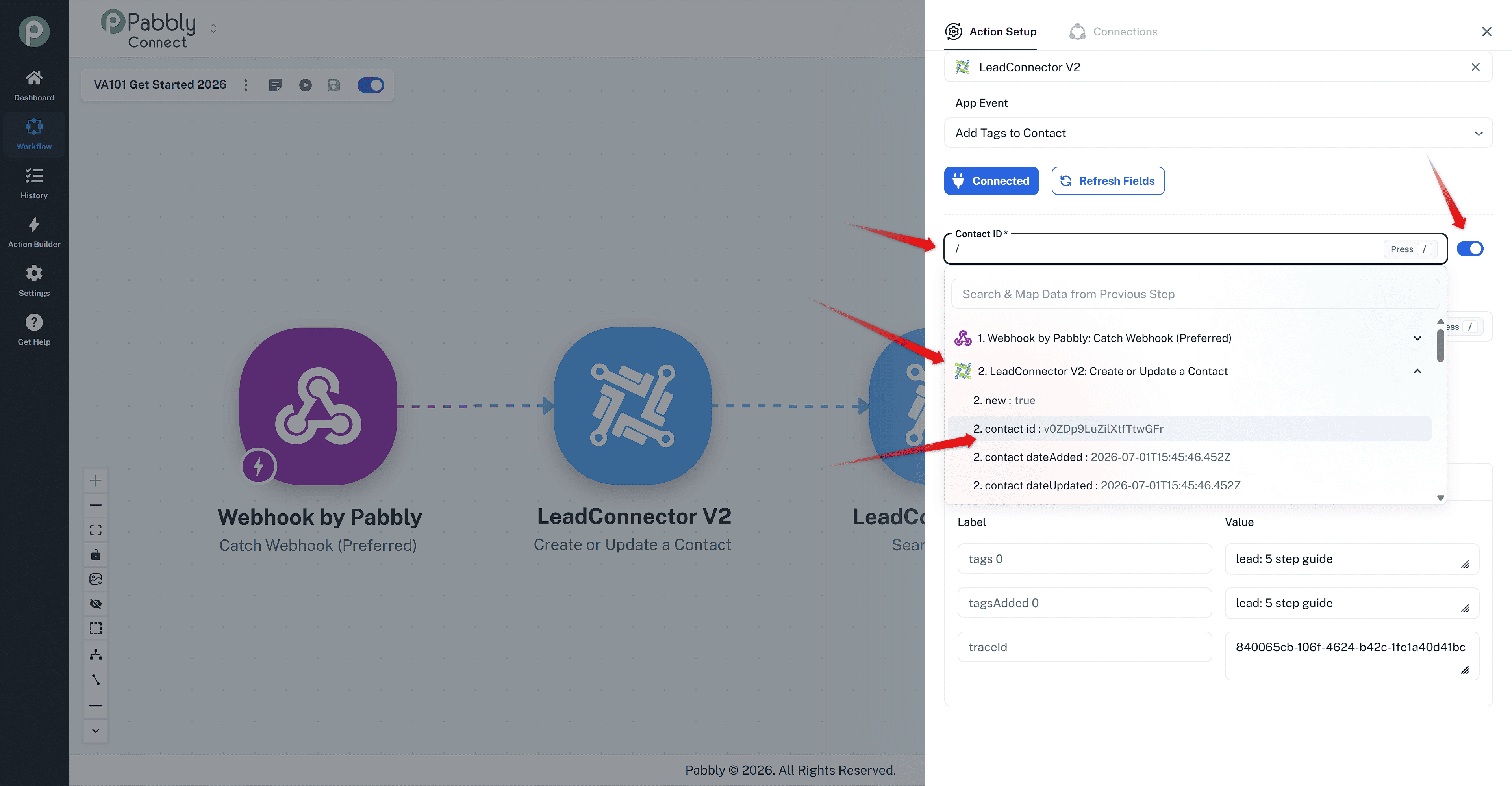
We just mapped and saved the Contact Id in the Add tags to the Contact action without any issue. It seems to be a cache issue at your end.
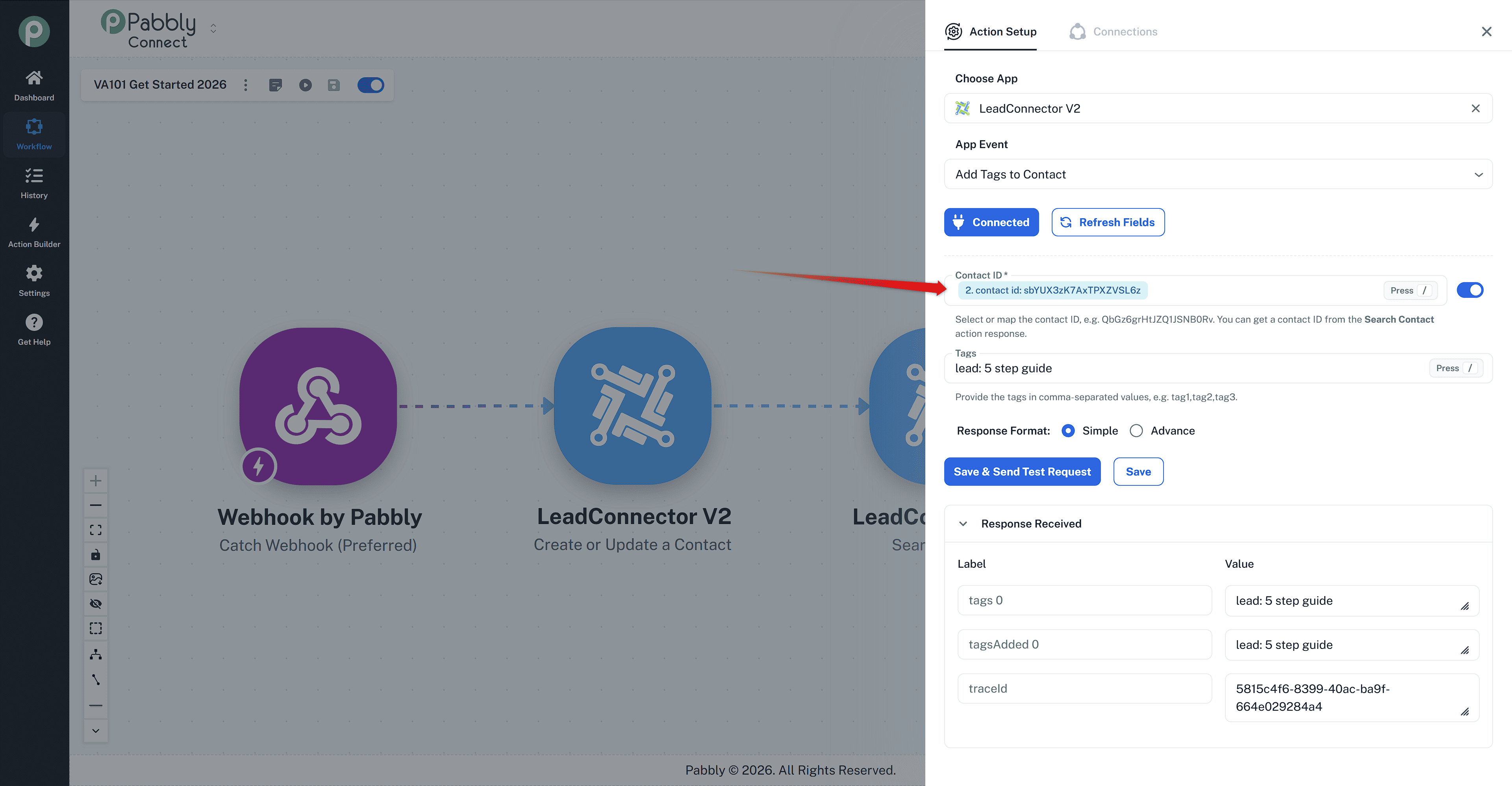
Further, we have already mapped and save the Action step.
Thanks & Regards,
Adeel Akhtar
🌐 Pabbly.com
Hello Jason,
We just mapped and saved the Contact Id in the Add tags to the Contact action without any issue. It seems to be a cache issue at your end.
Further, we have already mapped and save the Action step.
Thanks & Regards,
Adeel Akhtar
🌐 Pabbly.com
Hello Jason,
You're welcome. Always try using Incognito mode of the browser instead of a different browser first.
Thanks & Regards,
Adeel Akhtar
🌐 Pabbly.com