Media link expires within 20 minutes,
Status: Open · Asked by vikash jaiswal on · 0 views
Hi Team,
I am facing an issue in my Pabbly workflow. When I upload a media/document file and send it via WhatsApp, the media link expires within 20 minutes, and after that the message fails with an “Invalid / expired media link” error.
I want to send the direct file (not a link) and also need the workflow to work with delays/follow-ups.
Could you please let me know:
- Why the media URL is expiring so quickly?
- Is there any way to make the uploaded media link long-time valid?
- Is there a recommended or supported method to send direct documents in delayed workflows?
Looking forward to your guidance to fix this issue.
Thank you,
Vikas
Hi @vikas.vibrant,
Thank you for reaching out.
Please find the clarification below:
- When a file is generated using the File Uploader, the generated media URL is temporary and expires within 20 minutes by design.
- Currently, there is no option to extend or make the File Uploader URL valid for a longer duration.
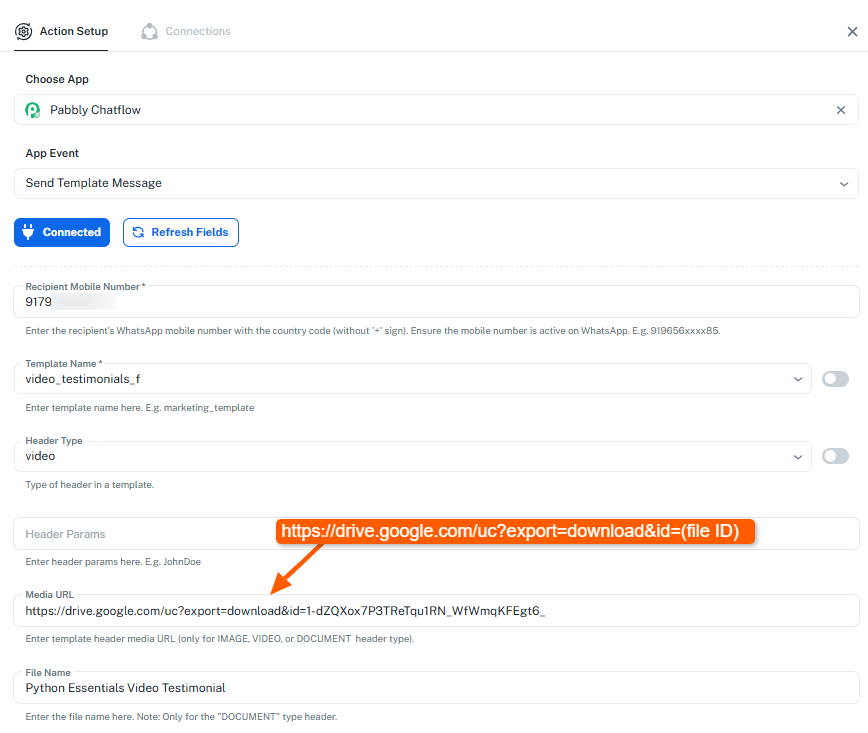
- The recommended approach is to use a downloadable Google Drive file URL instead. You can map the file using the direct download format:
https://drive.google.com/uc?export=download&id=FILE_ID
Replace FILE_ID with the actual file ID of the document you want to send via WhatsApp.
This method ensures the file remains accessible even when delays are involved and helps avoid the “Invalid / expired media link” error.
Please refer to the attached image for better understanding, and let us know if you need any further assistance.
still its show invalid link, can you please change the link in my work flow, because i check this link is work, but when am trying another link is not working
Hi Team,
As per your clarification, I have updated the media URL using the Google Drive direct download format
(https://drive.google.com/uc?export=download&id=FILE_ID) and ensured the file is set to Anyone with the link – Viewer.
The link is working correctly when opened directly in Google Drive / browser, however in Pabbly it is still showing “Invalid / expired media link.”
I have shared the workflow link with you. Please check the workflow from your end, and you may edit or test the workflow if required to verify whether the media URL is mapped correctly or if any additional configuration is needed.
Looking forward to your support and guidance.
Thank you.
Hi @vikas.vibrant,
Thank you for the update.
Upon checking, it appears that the issue is related to the file itself. Even when using the File Uploader, the same “Invalid media link” error is occurring for those file, which indicates that the problem is not with the URL format or workflow mapping.
We recommend trying with a different file (re-upload it to Google Drive or upload a fresh file) and then mapping the new file’s direct download URL in the workflow. Once done, please test again and let us know the outcome.
We’ll be happy to assist further based on the results.