Microsoft Excel as an Action: Populating using the new beta view
Status: Open · Asked by woodennickel on · 0 views
I have used the classic view with excel and been able to map the fields I want to the excel columns no problem, adding a row of data each time.
However, I do not understand what this step is in the new beta view.
How do we map a field to a column?
Listing the data in the order of the columns does not work.
In this example I am trying map these 5 fields to 5 fields in Excel.
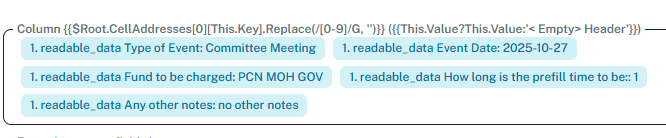
Hello @woodennickel ,
Please try creating a new connection between Excel and Pabbly Connect to ensure the columns load properly in the new beta view.
If the issue still persists after reconnecting, kindly share your workflow URL so we can investigate the issue further and help you resolve it
It is a new connection, just created it.
URL is there.
Hello @woodennickel ,
Thanks for sharing the details. Sometimes, even if the connection is newly created, it may not get properly initialized, which can cause the columns not to appear correctly in the mapping step.
Please make sure that your Excel workbook has proper column headers in the first row — as Pabbly Connect fetches these headers to display the fields for mapping.
Try reloading the step once after verifying the headers.