Microsoft Outlook Calendar Event to Google Calendar
Status: Open · Asked by mr33 on · 0 views
Hi team,
I set up a workflow so that when there is new event added to Outlook Calendar, Pabbly adds new event to Google Calendar.
What I am wondering is how I can update Google Calendar if that event is cancelled or updated in Outlook Calendar.
I couldn't find anything around this.
Any help will be appreciated.
Hello @mr33
Yes, it is possible to update Google Calendar when an event in Outlook is updated or cancelled. You can try achieving this as shown in the attached image:
- Set the trigger as Microsoft 365 – Updated Event.
- Use Google Calendar – Search Events (or Search Events Advanced) to find the corresponding event.
- Then use Google Calendar – Update Event to update the details accordingly.
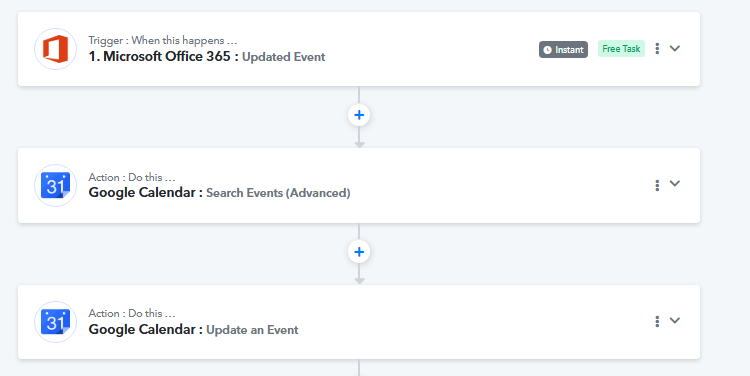
This should help keep both calendars in sync. Please let me know if you face any issues or need further assistance.
Does that mean I need to have two separate workflows? One workflow to add the Outlook Calendar Event to Google Calendar, then another workflow to update events.
Can you provide a screenshot with the arrows expanded for each step? Or is there a training video that explains this?
Thank you.
Hello @mr33,
You would need to create separate workflows to sync newly created events and updated events in Google Calendar. Currently, we do not have a dedicated setup for this specific use case. However, you can try creating the workflow as suggested for updated events. Please give it a try and let us know if you face any issues.
Okay, I rescheduled. Id like to know if in order for us to get the Google calendar event feature working if we have to gain certain privileges now or a special work around we learn about through support to get the Google calendar trigger based on the start time to work?