Missing Lead Stage Options in Pabbly Connect - Follow Up Boss
Status: Closed · Asked by Jason McCoy on · 0 views
I've connected Follow Up Boss to Pabbly Connect. Using the "Create New Person" action - When I select the "Stage" Dropdown it only shows 10 stages, and not the one I'm looking for "Lead". I see "Lead" as a stage in Follow Up Boss, but it's not an option in Pabbly Connect even if I click refresh to fetch new items. "Lead" isn't even a new stage.
Hello Jason,
Could you please share the Workflow URL where you have this concern?
Thanks & Regards,
Arshil Ahmad
🌐 Pabbly.com
Hello Jason,
Could you please share the Workflow URL where you have this concern?
Thanks & Regards,
Arshil Ahmad
🌐 Pabbly.com
Thank you for sharing the workflow. We checked the behavior, and this appears to be related to pagination. The Follow Up Boss API returns only the first 10 stages by default unless additional pages are fetched. As a result, if your Lead stage is beyond the first 10 stages in your account's stage order, it will not appear in the Pabbly Connect dropdown, even after refreshing the field.
Please enable mapping, enter Lead in the Stage field, and check if that resolves the issue.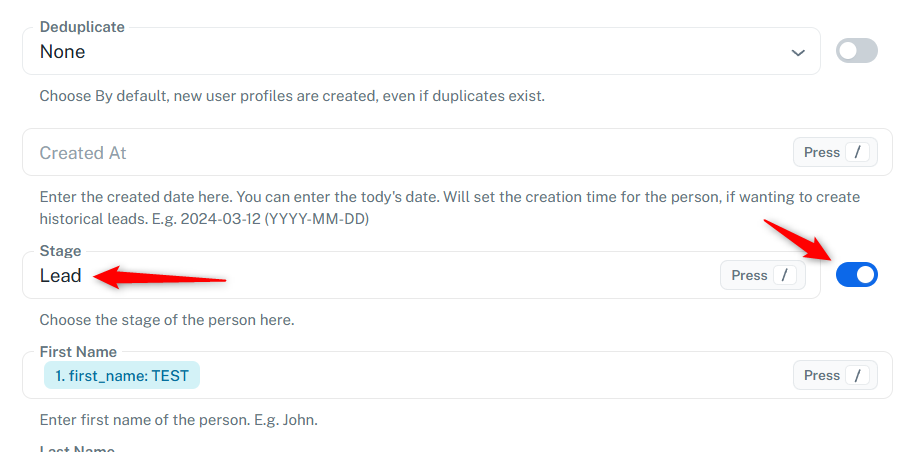
Thanks & Regards,
Arshil Ahmad
🌐 Pabbly.com
Just following up to check if you had a chance to enable mapping, enter Lead in the Stage field, and see if that resolved the issue.
Thanks & Regards,Arshil Ahmad
🌐 Pabbly.com
Just following up to check if you had a chance to enable mapping, enter Lead in the Stage field, and see if that resolved the issue.
Thanks & Regards,
Arshil Ahmad
🌐 Pabbly.com
Thank you for the confirmation. We're glad we were able to help!
Thanks & Regards,Arshil Ahmad
🌐 Pabbly.com