My flow stopped working i do not understand why
Status: Open · Asked by PablyAutoad on · 0 views
Hey, so i a flow which suddenly does not do anything I do not understand where is the problem everything seems fine PLEASE someone can take a look?
Hello @PablyAutoad,
https://connect.pabbly.com/workflow/mapping/IjU3NjYwNTZjMDYzNDA0MzA1MjY0NTUzMzUxM2Ei_pc
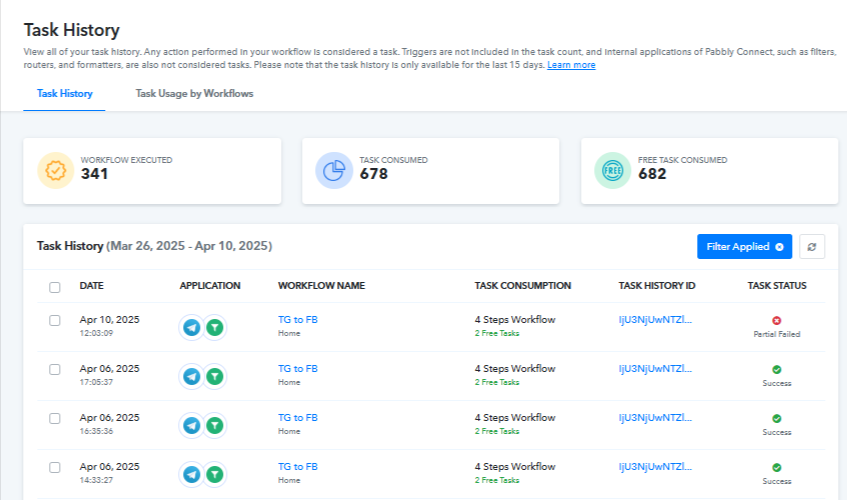
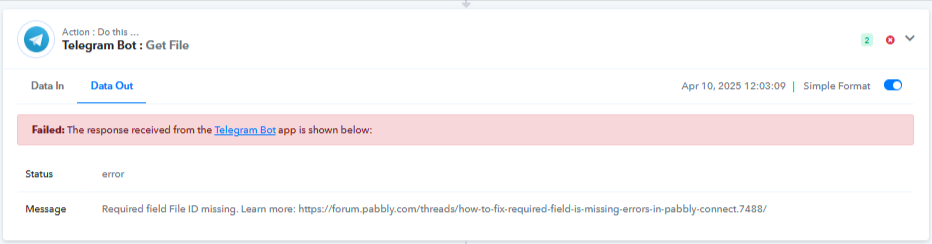
Upon checking the task history associated with the above workflow we found a task history for today which seems to have failed since it didn't received the id mapped in the step 3 of your workflow.
Hello @PablyAutoad,https://connect.pabbly.com/workflow/mapping/IjU3NjYwNTZjMDYzNDA0MzA1MjY0NTUzMzUxM2Ei_pc
Upon checking the task history associated with the above workflow we found a task history for today which seems to have failed since it didn't received the id mapped in the step 3 of your workflow.
Now it says success but I CANT see any new post in my facebook page and when i looked i see missing photo error, any idea how can be fixed
Hello @PablyAutoad,
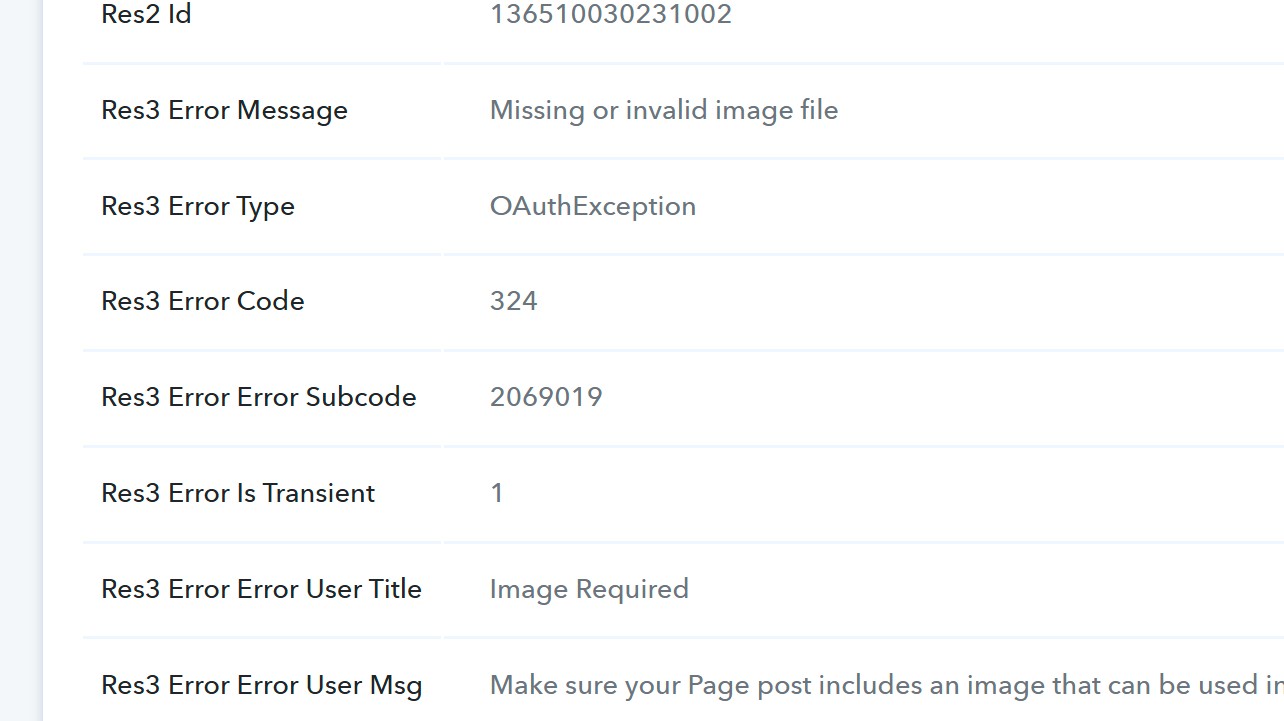
The error occurred because the image URL passed to the Facebook Pages: Create Page Photo Post action appears to be invalid. This is likely causing the issue you're facing.
Please ensure that the URL you’re using is valid and publicly accessible to avoid such errors.
Hello @PablyAutoad,The error occurred because the image URL passed to the Facebook Pages: Create Page Photo Post action appears to be invalid. This is likely causing the issue you're facing.
Please ensure that the URL you’re using is valid and publicly accessible to avoid such errors.
Can you help me understand how can i get the vaild image url? im trying different things but nothing works
Hello @PablyAutoad,,
You can use any public image URL. If it’s not working, just upload the image using Pabbly’s File Uploader — it will give you a valid image URL that works in your workflow.
Hello @PablyAutoad,,You can use any public image URL. If it’s not working, just upload the image using Pabbly’s File Uploader — it will give you a valid image URL that works in your workflow.
I tried everything im getting fetch api error in pabbly file uploder, seems like nothing works PLEASE help me solve it if u can access it and solve it
Hello @PablyAutoad,
Could you please share the file URL, as we’re currently unable to locate it under the automation? It appears that the Telegram Bot: Get File step hasn’t been configured correctly.
Kindly ensure that this step is properly set up. Once done, please let us know so we can proceed with validating the file URL.
Hello @PablyAutoad,Could you please share the file URL, as we’re currently unable to locate it under the automation? It appears that the Telegram Bot: Get File step hasn’t been configured correctly.
Kindly ensure that this step is properly set up. Once done, please let us know so we can proceed with validating the file URL.
How can i find the file url? I can send u the post that i want to forward privately please how can i send it privately?
I always used this
[TABLE]
[TR]
[TD]Channel Post Photo 3 File Id[/TD]
[TD]AgACAgIAAx0CSjQRyAACdcBn-RLMrLnjvdTVXMuHYLzHd60YTAAC0fcxG3RTyUs17dc93_HdvAEAAwIAA3kAAzYE[/TD]
[/TR]
[/TABLE]
but it stopped working
Any idea?
Hello @PabblyAutoad,
To retrieve the file from the Telegram bot, the action requires both the bot token and the file path. I already have the file path, but I’ll need the bot token from your end to proceed further.
Kindly share the bot token so I can assist you more effectively.
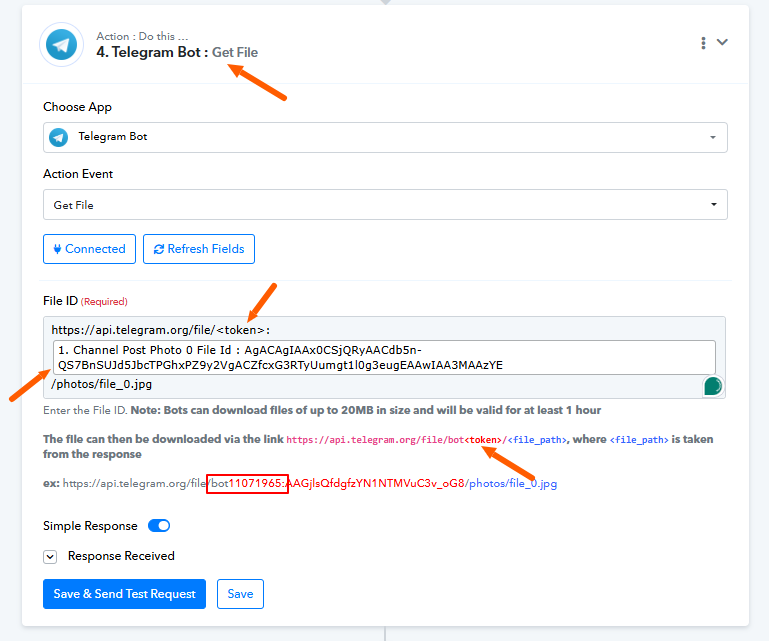
Hello @PabblyAutoad,To retrieve the file from the Telegram bot, the action requires both the bot token and the file path. I already have the file path, but I’ll need the bot token from your end to proceed further.
Kindly share the bot token so I can assist you more effectively.
here it is:
6638525765:AAEaXrmfHzV9D2IdcC6uZzzq2eo7ODC5yIw
Hey @PablyAutoad
We’ve successfully updated your bot token, and your workflow is now functioning properly. Please check from your end to ensure everything is working as expected.
Hey @PablyAutoadWe’ve successfully updated your bot token, and your workflow is now functioning properly. Please check from your end to ensure everything is working as expected.
Thank you, problem is now that sometimes the place that we forward from it has embbeded links, and when it posts it in my Facebook group it does not include the embedded link it includes just a text, anyway to solve it?
Hello @PablyAutoad,
Upon reviewing the task history, we did not find any issues related to the embedded URL. However, we did observe partial errors caused by the file uploader step, which is not required based on your current setup. We have removed this step on your behalf to streamline the workflow.
Additionally, if you have encountered any specific instances where the embedded URL caused issues, kindly share the relevant task history IDs so we can investigate further and assist you more effectively.
Hello @PablyAutoad,Upon reviewing the task history, we did not find any issues related to the embedded URL. However, we did observe partial errors caused by the file uploader step, which is not required based on your current setup. We have removed this step on your behalf to streamline the workflow.
Additionally, if you have encountered any specific instances where the embedded URL caused issues, kindly share the relevant task history IDs so we can investigate further and assist you more effectively.
There's nothing wrong with the flow, I say that the post we forward uses embedded links, but when pabbly forwards it, it forwards without the embedded link, just as plain text
Hello @PablyAutoad,
Could you please elaborate on what you mean by "forward"? As per the current workflow, the Facebook step is set to create a page post, and the link in your page post appears to be embedded and functioning as expected.
To help us better understand the concern, could you kindly share a screen recording demonstrating the issue? This will assist us in expediting the resolution process.
Hello @PablyAutoad,Could you please elaborate on what you mean by "forward"? As per the current workflow, the Facebook step is set to create a page post, and the link in your page post appears to be embedded and functioning as expected.
To help us better understand the concern, could you kindly share a screen recording demonstrating the issue? This will assist us in expediting the resolution process.
We forward posts from Telegram to Facebook using Pabbly. Sometimes these Telegram posts contain clickable embedded links. However, when Pabbly forwards these posts to our Facebook group, it loses the clickable links and shows them only as plain text.
For example, instead of a clickable link:
To purchase: ⬅️ [Clickable Link]
It appears like this on Facebook:
To purchase: ⬅️ Link (without any clickable link)
This means members can't click directly on the link on my Facebook page.
For now, the Facebook Pages API only supports plain text. While links could be made clickable using HTML, this is not supported at the moment.
https://forum.pabbly.com/threads/styling-the-message-when-posting-product-to-facebook.12858/#post-59635
For now, the Facebook Pages API only supports plain text. While links could be made clickable using HTML, this is not supported at the moment.
https://forum.pabbly.com/threads/styling-the-message-when-posting-product-to-facebook.12858/#post-59635
Is there anyway to just fetch the link and not make it embbeded? So it'll be posted on my fb page without embbeded link?
Are you looking to extract this link from your caption? If so, you can try using the Text Formatter for that.
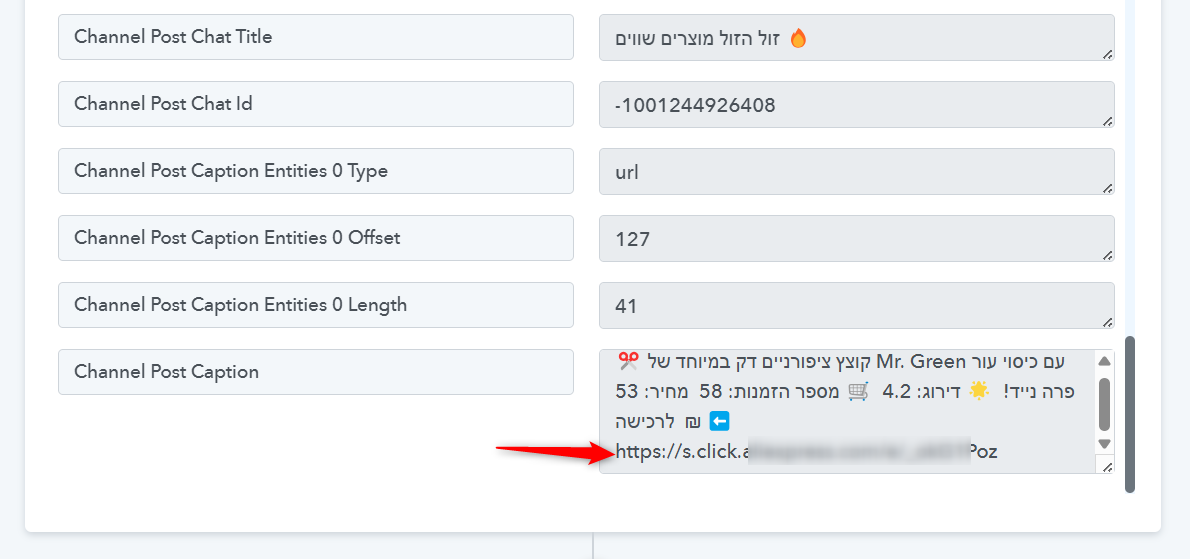
Are you looking to extract this link from your caption? If so, you can try using the Text Formatter for that.
Yes, I want to post that link but as I said sometimes it's embbeded, can still fetch the link even if it's embbeded.?
Yes, absolutely. However, could you please share a screenshot or the task history for each case—one where the link is embedded and one where it is not? This will help us better understand the behavior and assist you more effectively.
Yes, absolutely. However, could you please share a screenshot or the task history for each case—one where the link is embedded and one where it is not? This will help us better understand the behavior and assist you more effectively.
Embedded
IjU3NjUwNTZlMDYzZTA0MzM1MjY1NTUzMjUxMzA1MTYzNTQzNjBmMzUi_pc
Not embedded
IjU3NjUwNTZlMDYzZTA0MzM1MjZmNTUzNTUxMzA1MTY0NTQzNzBmMzYi_pc
Hello @PabblyAutoad,
Achieving your use case for handling both embedded and non-embedded URLs within the current structure is not feasible. However, we’ve suggested a workaround that may help address the requirement.
Please refer to the attached video for a detailed walkthrough, and let us know if it works for you or if you need further assistance.
https://www.awesomescreenshot.com/video/38850473?key=14c66e2e507fe2e953d4476ec048a2d7