Need help mapping LinkedIn Ad ID dynamically to a single form and workflow
Status: Open · Asked by Aliva Patnaik on · 0 views
Hi team,
I’m running multiple LinkedIn ads, and currently, for each ad, I’m creating a separate form and connecting it to a dedicated workflow in Pabbly. However, this process is becoming repetitive and time-consuming.
What I want to achieve is:
- Use a single form and a single workflow for all my LinkedIn ads.
- Dynamically capture or map the LinkedIn Ad ID (or Campaign ID) in the form URL or submission data, so I can identify which ad the lead came from.
In short, I’d like to know if there’s a way to pass the LinkedIn Ad ID as a parameter in the form URL (or any other method) and have it recorded in Pabbly, so I can automate lead tracking for multiple ads using just one form and workflow.
Could you please guide me on how to set this up or if it’s possible within Pabbly’s current integration with LinkedIn Lead Gen Forms?
Thanks in advance
Hello @QuickSell,
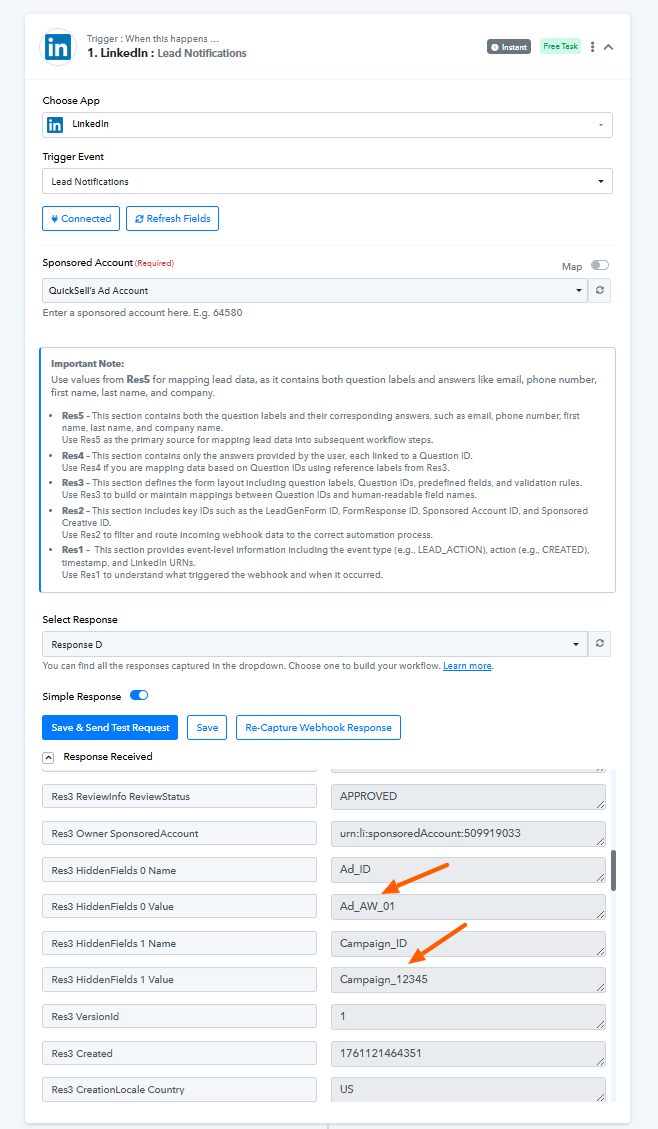
It seems that you are already receiving the Ad ID and Campaign ID values in the trigger response from LinkedIn Lead Gen Forms. You can use these fields to identify which ad the lead originated from, allowing you to handle all ads through a single form and workflow.