Need Help with Pabbly Connect Workflow
Status: Open · Asked by fredkennethuy on · 0 views
Hi,
I need help resolving this one workflow that we use to post on Pinterest.
This used to work for us until June last month, until it stopped.
This is the workflow URL: https://connect.pabbly.com/workflow/mapping/IjU3NjYwNTZiMDYzMzA0M2Q1MjZhNTUzMDUxMzQi_pc
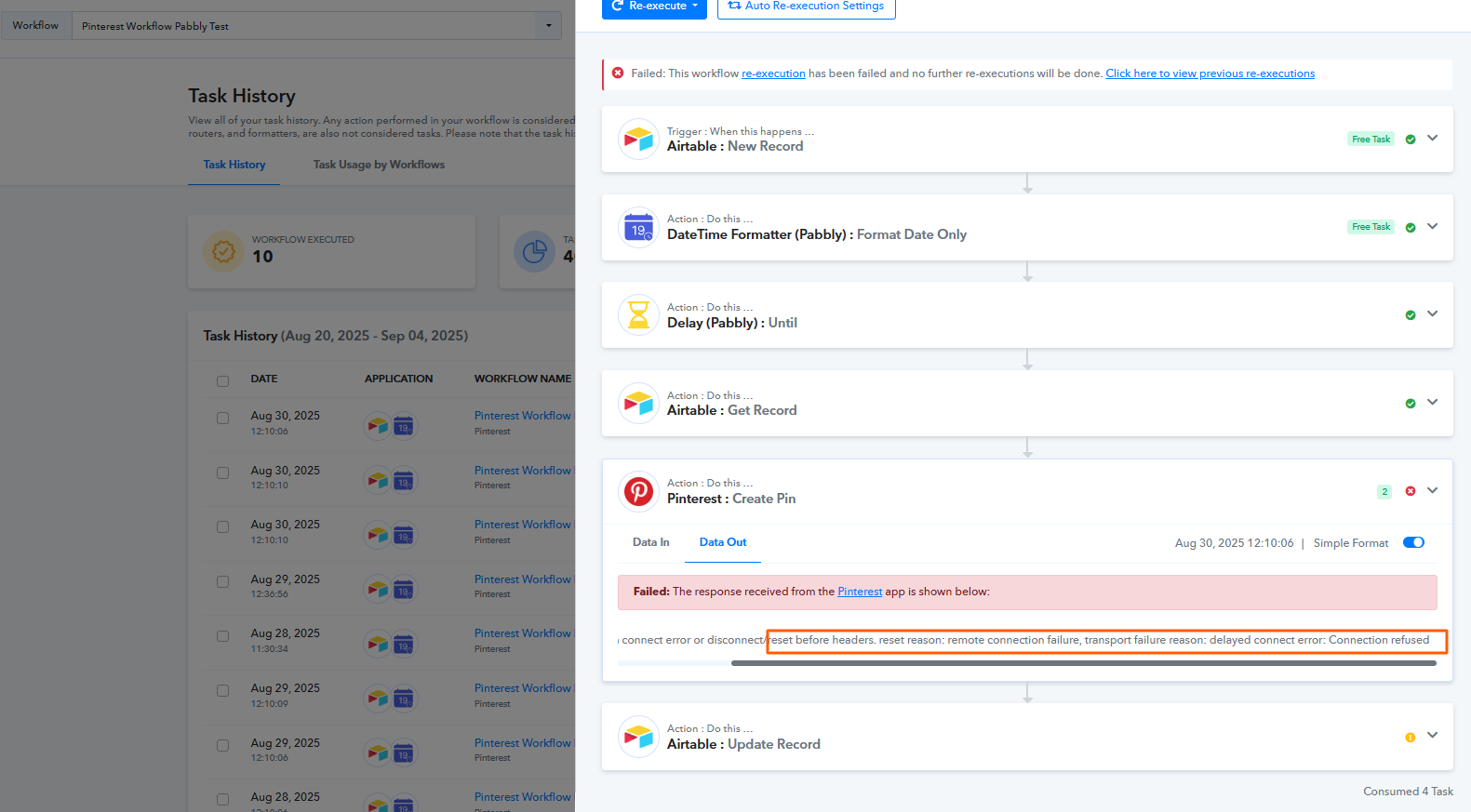
I have attached the error that we are getting.
One thing that I noticed is that when I remove the "Pabbly Delay," which is the 3rd step, all seems to work.
But we need to add that delay, otherwise all Pinterest Pins will be posted at the same time.
I appreciate your help.
Hello @fredkennethuy,
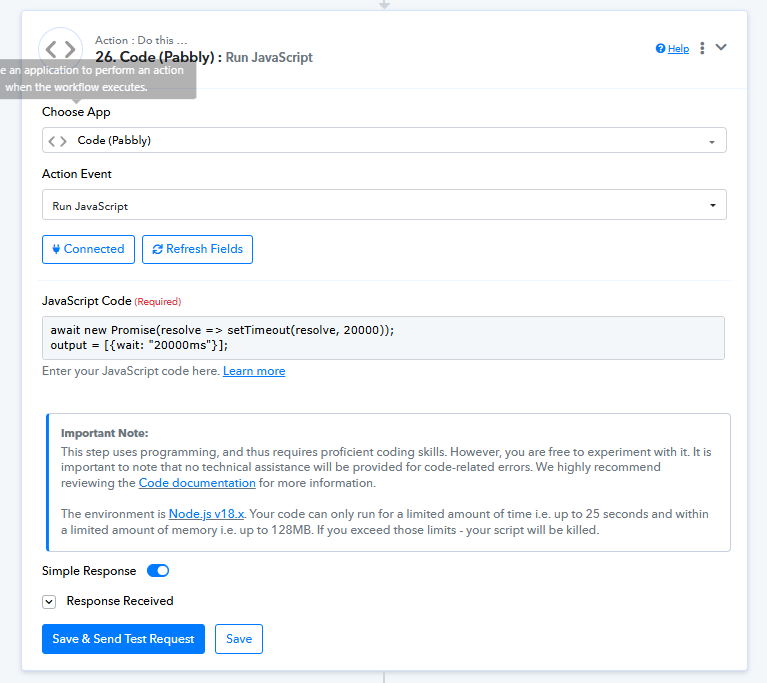
Please try replacing the delay step with the code by pabbly step to add delay in seconds, as per the attached image and let us kow how it goes.
await new Promise(resolve => setTimeout(resolve, 20000));
output = [{wait: "20000ms"}];
Hi @Preeti Paryani ,
Thanks for the reply.
I changed the step like you said. I'll let you know how it goes.
What does this step do exactly? Will this follow the schedule of the post that we entered from Airtable?
Thanks,
Fred
@Preeti Paryani, Ok, so this works, but it doesn't schedule the Pinterest post. It posts it right away. Just to give you an idea, we are scheduling the posts for the whole month, so there should be a delay. I attached the screenshot from airtable.
Hello @fredkennethuy,
Thanks for the update. Noted that the post is going live immediately instead of being scheduled. Could you please let us know the specific time you’re planning to schedule the Pinterest posts for? This will help us assist you more accurately in setting the right delay logic.
Looking forward to your response.
Hi @Preeti Paryani,
Thanks for your reply. We are scheduling at least three posts per day at 10 AM Mountain Time. Please refer to the airtable screenshot that I attached above for the schedule. Thank you.
Hello @fredkennethuy,
Thank you for sharing the update.
From what we understand, the "Delay Until" step is essential for scheduling the post at the desired time. Currently, there doesn't appear an alternative to this function.
We’ve tried replicating the same workflow on our end, and everything seems to be working fine — the automation runs as expected with the "Delay Until" logic in place.
Could you please try the following:
- Re-add the "Delay Until" step to your workflow.
- Go to the Pinterest action step, click into it, and re-save it without making any changes.
- Run a few test submissions and monitor the results.
Please let us know how it goes. As of now, we’re unable to replicate the issue on our side.
Hi @Preeti Paryani,
You're right. Everything works until the delay step. However, when the time comes for it to be posted, the Pinterest action step generates an error, similar to the one shown in the very first screenshot I attached.
I already completed the steps that you mentioned before posting here in the forum. But, I will do these steps again and will let you know how it goes -
- Re-add the "Delay Until" step to your workflow.
- Go to the Pinterest action step, click into it, and re-save it without making any changes.
- Run a few test submissions and monitor the results.
Thanks, please try again and let us know how it goes.
Ok, got it. I re-added the delay step and clicked save on the Pinterest action step without making any changes. (Attached Screenshot)
I scheduled a new entry in Airtable. I will update you in a couple of hours when this is successful, as the delay adds a couple of hours. Thank you.
Hi @Preeti Paryani,
Here's the error (Attached). Thanks.
Hello @fredkennethuy,
Thanks for performing the tests. We have escalated this concern to our technical team for review, and as soon as we receive some updates from them, we will get back to you.
Hi @Preeti Paryani,
Appreciate your response. Please update me as soon as you can because we use this workflow on a daily basis and this bug affects our business. Thank you.
Hello @fredkennethuy,
Sure, we will continue following up with the team regarding this issue. While it may take some time to investigate and resolve, please rest assured that we’ll keep you informed of any updates as soon as we receive them.
Thank you for your patience and understanding.
Hi @Preeti Paryani,
Any updates on this?
Thanks
Hello @fredkennethuy,
Thank you for your patience.
Our team has implemented some fixes, and the issue now appears to be resolved. We recommend running a test to verify if the workflow is functioning as expected.
Additionally, please review the delay logic configured in the workflow to ensure it aligns with your use case. Let us know if everything is working fine on your end, or if you need any further assistance.
Hi @Preeti Paryani,
That sounds great! I will try it today and will update you. Thank you.
@Preeti Paryani,
It's giving me the same error.
Hello @fredkennethuy
We’ve forwarded this to our team and will get back to you with a resolution as soon as possible.
Hello,
Could you please delete this particular step and add it again? This will likely resolve the issue.
If the problem persists, you may need to create a new workflow.

Hi @Resham,
I deleted the Pinterest step and added it back in. I submitted a test and will let you know in a couple of hours if it worked.
Hi @Resham,
I got the same error.
Hello @fredkennethuy
Please try this action step in a new workflow and let us know if it’s working fine. If the issue persists, feel free to let us know — we’ll be happy to assist you.
Hi @Soumya Tripathi @Preeti Paryani,
Good day. I just want to let you know that this issue is Not resolved yet.
I created a new workflow and got the same error.
Can we resolve this please?
Hello @fredkennethuy,
Our team has implemented some fixes, and the issue should now be resolved. Please recapture a response from the trigger step, run the workflow in automation, and let us know the outcome.
Hello @Preeti Paryani,
Thanks for the response. I created a fresh workflow just to be sure. It's configured exactly the same as the old one. I will update you when I have the results. Thank you.
Hello @fredkennethuy,
Could you please share the updates if you had a chance to test it?
Hi @Preeti Paryani,
It still didn't work. I created a new workflow configured exactly the same to try it out, but it still gave the same error.
Hello @fredkennethuy,
We have shared a video in this reply with some suggestions regarding the workflow structure. Kindly update your workflow as per the instructions provided and let us know how the task history behaves afterward.
https://www.awesomescreenshot.com/video/43237539?key=80a8e0f8e96f57b24fadda44f9baffab
Thanks for the update, @Preeti Paryani. I will try your suggestion and provide an update once I receive the results.
Sure, please let us know how it goes.
Hi @Preeti Paryani,
The date formatter step is necessary because Pabbly does not accept dates with "Z" at the end. (Attached the screenshot).
Also, we never had an error with the date formatter step. The errors that we are getting are from the "Get Record" and "Pinterest Create Pins" steps.
Hello @fredkennethuy,
I understand that the issue is not with the Date/Time Formatter. To assist you more effectively and review the setup in real time, we’d like to connect with you over a Google Meet.
Please let us know a convenient time for you to join us between Monday to Friday during one of the following slots:
- 11:00 AM – 1:00 PM IST
- 4:00 PM – 5:00 PM IST
Kindly share your preferred time, and we’ll schedule the meeting accordingly.
Hi @Preeti Paryani,
Can we do tomorrow at 5 PM IST?
Hello @fredkennethuy,
Would you be available to join us at either 4:00 or 4:30 PM IST? Please let us know so we can schedule the meeting accordingly.
Kindly note that if the meeting is scheduled for 5:00 PM IST, it would fall outside our usual meeting hours as our shift concludes at 6:00 PM IST. In that case, we would have to wind up the call within 20–30 minutes.
@Preeti Paryani,
Got it. Let's do 4 PM IST tomorrow. Thank you.
Hello @fredkennethuy,
We have scheduled the meeting for today at 4:00 PM IST. Please note that tomorrow is a local holiday (Ganesh Chaturthi), so we will not be available to connect then. Kindly let me know if you are able to join today’s meeting as scheduled. If not, I can reschedule it for a later date.
Hello @Preeti Paryani,
I am unable to attend today as I have another meeting. Let's schedule it on the 28th(Thursday), 4 PM your time instead. Thank you.
Hello @fredkennethuy,
Okay, I have rescheduled it for 28 August, Thursday accordingly. You can join the meeting then using the following meet link - https://meet.google.com/oey-bnop-zjz.
Hello @Preeti Paryani,
FYI - the workflow that we set up didn't work. It only worked when we were on the call. The rest failed.
Hello @fredkennethuy,
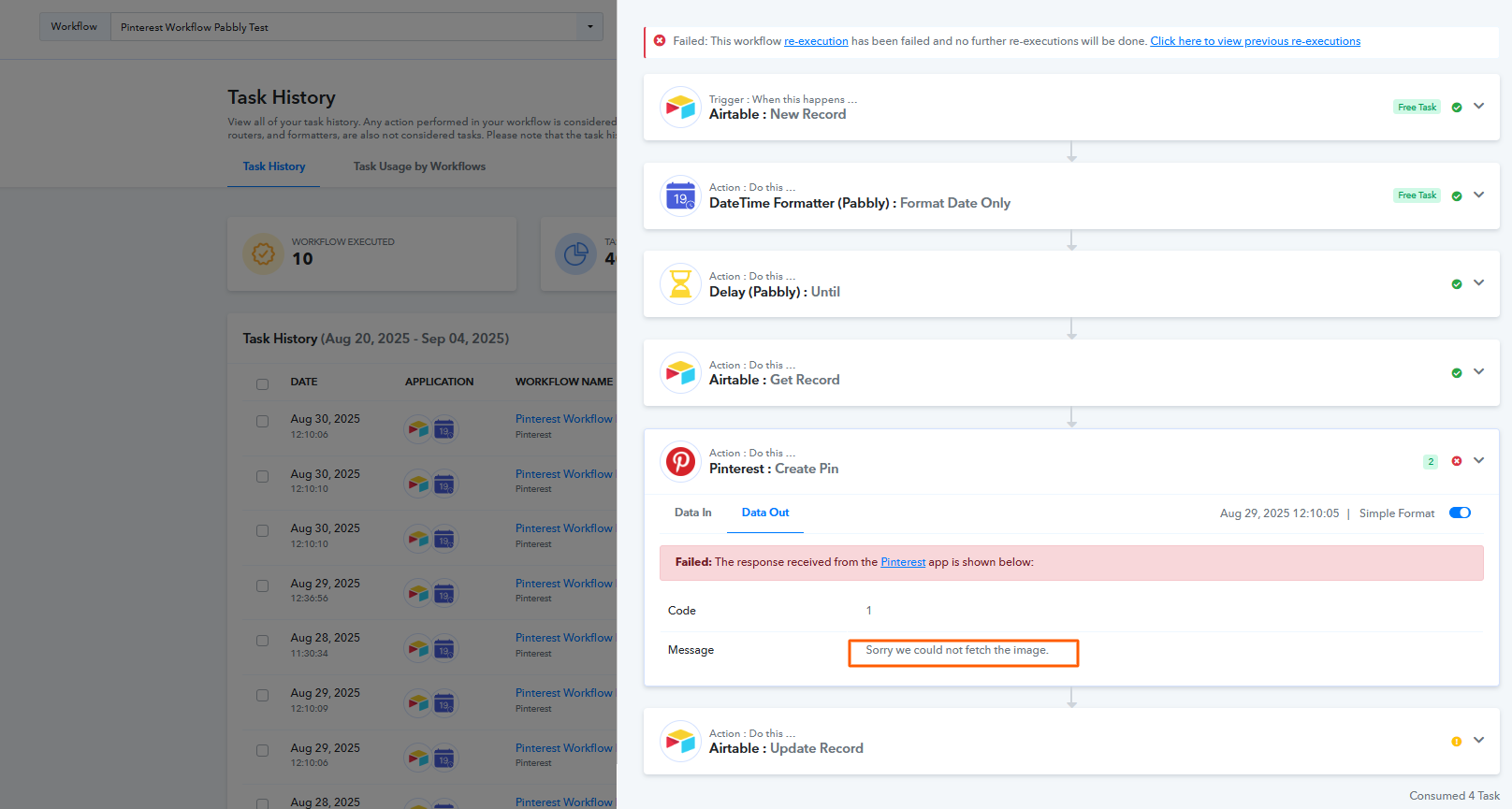
Thanks for the update. We checked your workflow and noticed that the earlier mapping issue has been resolved. However, the current error is occurring because the Pinterest action is unable to fetch the URL you have entered or mapped.
From the error (see attached image), it also seems that the Pinterest connection may have expired. We recommend reconnecting your Pinterest account and testing again. If you still see the error “sorry unable to fetch the image,” it indicates that the issue lies with the mapped image URL itself.