New Order Woocommerce - Pabbly
Status: Open · Asked by Pedro Vieira | The Difference on · 0 views
Why I can't send utm parameters from woocommerce to pabbly conect? Thanks
Hi @Pedro Vieira,
Could you please share a screenshot of the parameters that are not being captured in the WooCommerce trigger step? Also, share the Workflow URL where those parameters are not being fetched.
This are some of the parameters that are not being captured in the WooCommerce:
_wc_order_attribution_utm_source
_wc_order_attribution_utm_campaign
_wc_order_attribution_utm_medium
wc_order_attribution_referrer
wc_order_attribution_source_type
_wc_order_attribution_device_type
Payment Method Title
Line Items 0 Parent Name
Hello @Pedro Vieira
The trigger you're using is a descriptive webhook-based trigger. In such cases, the response is sent by the trigger application whenever the corresponding action is performed, and we do not have control over the fields included in the response.
We recommend using webhook.site to verify if the fields are being captured there. If the fields are not captured there either, we suggest reaching out to the WooCommerce support team for further assistance regarding the missing fields.
To learn more about webhook.site refer to this tutorial -
.This are some of the parameters that are not being captured in the WooCommerce:_wc_order_attribution_utm_source
_wc_order_attribution_utm_campaign
_wc_order_attribution_utm_medium
wc_order_attribution_referrer
wc_order_attribution_source_type
_wc_order_attribution_device_type
Payment Method Title
Line Items 0 Parent Name
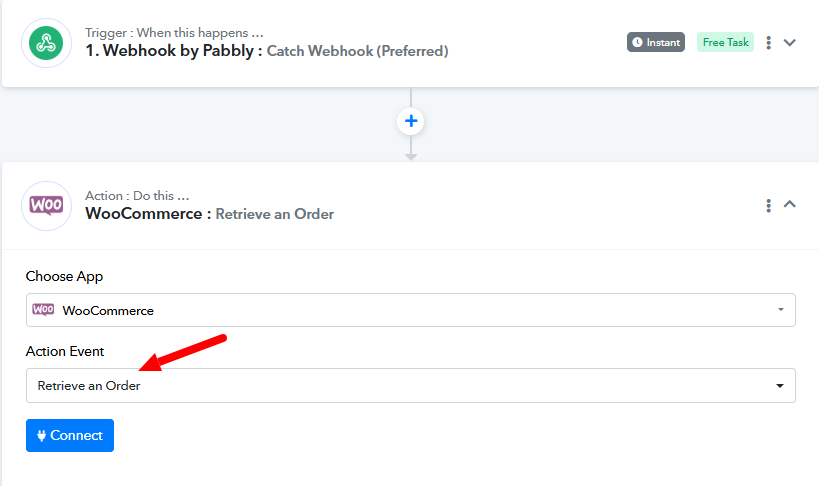
Can you try Retrieve Order action as 2nd step of workflow to see if that fetches the UTM data or not?
@Fagun Shah Could you explain more in depth? How can I do that? What do I put 1st step of workflow?
Hello @Pedro Vieira
You can leave the trigger step as it is and add the "WooCommerce: Retrieve an Order" action to check if it contains the required UTM fields in its response.